
Associate
May 2, 2024
Question

Diagonal tearing on LCD_DSI_VideoMode_DoubleBuffering on STM32F469I-DISCO DK32F469I$AU

  • May 2, 2024
  • 6 replies
  • 7932 views

[If this would be better off in one of the other STM32 MCUs sub-forums, please feel free to move it admins]

I have spent a very long time removing the BSP initialisation calls from the LCD_DSI_VideoMode_DoubleBuffering example on STM32F469I-DISCO, however it behaves exactly the same using the "stock" example and with my modifications. I am not using TouchGFX.

The symptom is a consistent diagonal tear in a fixed location on my landscape configured display regardless of where the region of the screen I am editing is. Naturally, if the region I'm editing doesn't cross the diagonal, the tear isn't visible. Slow mo video of issue is attached.

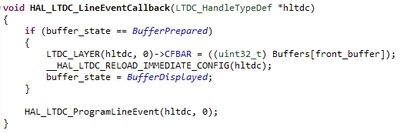
In both the example and my modified code, the screen is waiting on HAL_LTDC_LineEventCallback to switch to a new buffer like so:
RichardCRT_0-1714667465849.png

In my modified code as shown above, Buffers[front_buffer] is written to (using DMA2D) while the state machine is at the state before BufferPrepared, and then the state machine moves on to BufferPrepared 200ms later (same behaviour when this is much higher). 200ms allows the DMA2D plenty of time to complete, so when the interrupt above fires with the buffer state correctly set the data should be stable and unchanging.

So in summary, I have 2 buffers in SDRAM. The DMA2D is only ever writing to the one that the LTDC is not reading. And there's a significant enough delay between the DMA2D operation and the LTDC swapping buffers that the DMA2D must have completed in time. So why does the display end up displaying half (not exactly half, but whatever) of the old buffer and half of the new buffer, split by a diagonal line?

The first of the previous tickets below indicates that this is caused by the screen updating in a 'portrait' manner while the LTDC is updating in a 'landscape' manner, but I don't fully understand this, and neither did the OP of that question (@S.K.Matters), but they never received any further explanation. What's more, even if that is an explanation of the issue, why has the LCD_DSI_VideoMode_DoubleBuffering example got this issue?

The second of the previous tickets below has the same issue, complete with a similar video, but received no reply. I'm hoping someone will be able to reply to this one.

The last ticket I have linked from just a few days ago refers to the same exact issue on a different DISCO board (STM32H747I-DISCO) and the ST employee there said he has reported it internally.


Previous tickets going back 5 years ago with seemingly the same issue but no solution:

https://community.st.com/t5/stm32-mcus-touchgfx-and-gui/some-kind-of-tearing-effect-with-lcd-dsi-videomode/td-p/398477

https://community.st.com/t5/stm32-mcus-touchgfx-and-gui/stm32f469i-disco-screen-tearing-on-double-buffer-example/m-p/668979#M37372

Previous ticket with seemingly the same issue on a different dev board and a ST employee saying the issue was "reported":

https://community.st.com/t5/stm32-mcus-products/stm32h747i-disco-tearing-in-double-buffering/m-p/647508#M237425


This topic has been closed for replies.

6 replies

Tesla DeLorean
Guru
May 2, 2024

ST has an internal support/ticketing system that's opaque to the forum users. This may contain other answers (FAQ) and solutions to problems.

https://www.st.com/content/st_com/en/support/support-home.html

https://ols.st.com/s/

If you're a customer, doing a quantifiable amount of business, you can push in support requests via your FAE, or local reps.

Tips, Buy me a coffee, or three.. PayPal VenmoUp vote any posts that you find helpful, it shows what's working..
Associate
May 2, 2024

Thank you - I'm not a big customer but I've kicked a support request on there anyway.

I've had a break through on the issue also, however I still can't explain the original problem. By initialising the NT35510 in portrait mode and configuring the LTDC to be portrait instead of horizontal the problem is no longer present. Of course, now I have an issue that my frame buffer is portrait instead of landscape, but at least I can work around that except when using DMA2D mem-to-mem.

If anyone can explain the original issue, I still need to understand it, as eventually I will be replacing this display (and controller) with a different off the shelf one.

MM..1
Chief III
May 6, 2024

In video mode your setup must equal to hw display controller. If in pdf is for example 480x1024 you cant config LTDC 1024x480. Orientation can be handled be register config , but data stream is only valid as portrait.

Associate II
May 6, 2024

@Richard-CRT wrote:

So in summary, I have 2 buffers in SDRAM. The DMA2D is only ever writing to the one that the LTDC is not reading. And there's a significant enough delay between the DMA2D operation and the LTDC swapping buffers that the DMA2D must have completed in time. So why does the display end up displaying half (not exactly half, but whatever) of the old buffer and half of the new buffer, split by a diagonal line?


I have to add that even without buffer memory update (using DMA2D or directly) but just swapping buffer address (CFBAR) leads to the same effect. So I can assume that the issue is closely tied to the hardware (defective display or maybe it initially has poor video mode support or poorly designed MCU's DSI/LTDC etc).

Associate
May 7, 2024

OK thank you - unfortunately then I think we're back to square one.

The issues with the diagonal are present on the examples direct from ST, it's not something I/we have introduced. There are several years worth of people talking about this issue on and off and there has never been any conclusive solution. I myself have already played with the timing of the LTDC and DSI quite a bit and it hasn't fixed anything. As @Alekseus has said, that really only leaves a fault/lack of support or incompatibility of the display with the STM peripherals.

Associate II
May 8, 2024

Conducted some experiments and couldn't find satisfying results. It's possible to kick out the diagonal tear line off the screen by significantly increasing Vertical back porch (150 -> 900) but picture becomes flickering.

Also you can change a refresh order using MADCTL register but anyway the tear line is still there just rotated by 90 deg.

Seems like the only option is just draw everything rotated 90 deg or replace the display by the one that can refresh a picture along the shorter side. Changing X-Y axes in LTDC could help but I can't see such option.

Still can't get why the tear line is 45 deg diagonal (is refreshing rate comparable to write rate?) and why it is almost center aligned (disregarding refresh order).

And I noticed that it is possible to bypass GRAM but it looks a bit difficult as requires display board modification (RGBBP pin) and there's no guarantee that it would help.

MM..1
Chief III
May 8, 2024

Try locate trouble by little steps. Start with DSI pattern generator tests Hal have calls for this.

Next test is single buffer LTDC...  16bit vs 24bt vs L8...

Associate II
May 8, 2024

Thanks. Tried the pattern generator and ended up with the same thing. So testing LTDC etc is pointless.

As @Richard-CRT mentioned, the display "is not adapted for landscape mode" (but come on, the same display is used with at least THREE boards and there's a double buffer video mode example project created specially for these boards! How come!).

I'm still curious how it could be "adapted" and why the display IC allows to change orientation whereas there's an obvious tearing effect if we do such a change.

Associate
May 8, 2024

For what it's worth, I got a reply from ST on my engineering support ticket that @Tesla DeLorean recommended I submit. They don't think this is a configuration issue, and that the only landscape option with this LCD is the partial refresh command-mode approach (which I note does improve performance, but as they said, does not completely eliminate tearing effects, only helps). Unfortunately command-mode isn't an option for me with my current project aspirations. See full reply:


LCD screen on STM32F469-DISCO board is not adapted for landscape mode. It will scan vertically (horizontal scanning is not available), This is why you have diagonal tearing effect when configured in landscape mode.

One solution we would recommend is to used command mode partial refresh strategy, this will help to avoid tearing effect.
You can refer to example available in STM32CubeFW_F4 package available also on github.com: https://github.com/STMicroelectronics/STM32CubeF4/tree/master/Projects/STM32469I-Discovery/Examples/LCD_DSI/LCD_DSI_CmdMode_PartialRefresh


Associate
May 8, 2024

Bearing in mind I can't verify how the OTM8009A driver on the older revisions behaves:

It feels to me like the most likely explanation is that the display on the original revision(s) of these board(s) had a better driver chip (certainly the OTM8009A has much lower porch values than the NT35510, not that that necessarily has anything to do with this), and the examples were made for that board. Then, the obsolescence or cost-down process or whatever the driving factor behind the NT35510 revision overlooked the fact that the replacement display driver doesn't work well in landscape video-mode

Associate II
May 9, 2024

@Richard-CRT wrote:

certainly the OTM8009A has much lower porch values than the NT35510


And what is strange, Linux driver for the same display shows ten times smaller values for vertical axis:

static const struct nt35510_config nt35510_frida_frd400b25025 = {
	.width_mm = 52,
	.height_mm = 86,
	.mode = {
		.clock = 23000,
		.hdisplay = 480,
		.hsync_start = 480 + 34, /* HFP = 34 */
		.hsync_end = 480 + 34 + 2, /* HSync = 2 */
		.htotal = 480 + 34 + 2 + 34, /* HBP = 34 */
		.vdisplay = 800,
		.vsync_start = 800 + 15, /* VFP = 15 */
		.vsync_end = 800 + 15 + 12, /* VSync = 12 */
		.vtotal = 800 + 15 + 12 + 15, /* VBP = 15 */
		.flags = 0,
	},

But if you try these values the display won't show anything. At the same time the clock value is slightly lesser.

MM..1
Chief III
May 9, 2024

As you see is portrait config and for DSI horizontal part need calculated values, not copy front porch, sync, backporch in DSI setup... Show how you use this values in LTDC and DSI.