Senior III
May 30, 2024
Solved

Does setScale change the coordinate of an image and width/heigh?

  • May 30, 2024
  • 1 reply
  • 782 views

I can't find an answer to this but, let's say I've an image as texture map of 4x4 pixels located at coordinate (0,0) so getX() and getY() return 0 and 0

If I resize it with setScale(0.5f) so half the size, the getX() and getY() return the same value 0,0 or TouchGFX try to center the image and it returns (1,1)

What about getWidth() and getHeight() value after the setScale(). Do I get 2 and 2 or it always return 4 and the setScale() is just a virtual function for the visualization?


Best answer by GaetanGodart

Hello @nico23 ,


I see texture mappers to be like a view object, basically what camera would see.


Therefore, your texture mapper could be at coordinate 0;0 but the image inside your texture mapper could be at position 20;75.
Then if you scale your image, the image will scale inside the view. If your image becomes too big, you won't be able to see all of it. Here is an example of that happening :
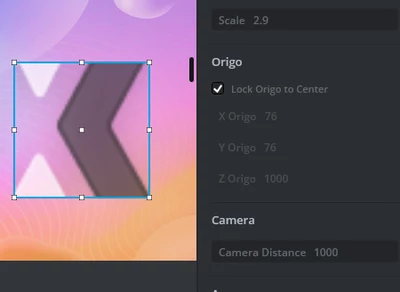
GaetanGodart_0-1717080132719.png

When you do getX and getY, you do something like textureMapper1.getX(), which give the position of the texture mapper itself, not the position of the image inside your texture mapper. Same thing for height and width.
So scaling your image won't affect the coordinate of the texture mapper.


Now, when scaling the image inside the texture mapper, by default, the image is centered :
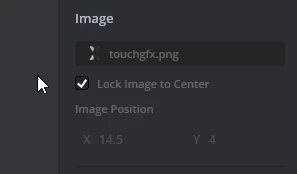
GaetanGodart_1-1717080492156.png


So when scaling an image inside a texture mapper :

  • getX and getY don't change
  • getWidth and getHeight don't change
  • the image is always centered


setSize() is just a virtual function for the visualization?

SetSize doesn't exist, but setScale is indeed just used for visualization. it is setWidth and setHeight that actually change the size of your texture mapper (and not the image inside of it).


If this comment answers your question, I invite you to select it as "best answer".


Regards,

1 reply

GaetanGodart
GaetanGodartBest answer
Technical Moderator
May 30, 2024

Hello @nico23 ,


I see texture mappers to be like a view object, basically what camera would see.


Therefore, your texture mapper could be at coordinate 0;0 but the image inside your texture mapper could be at position 20;75.
Then if you scale your image, the image will scale inside the view. If your image becomes too big, you won't be able to see all of it. Here is an example of that happening :

GaetanGodart_0-1717080132719.png

When you do getX and getY, you do something like textureMapper1.getX(), which give the position of the texture mapper itself, not the position of the image inside your texture mapper. Same thing for height and width.
So scaling your image won't affect the coordinate of the texture mapper.


Now, when scaling the image inside the texture mapper, by default, the image is centered :

GaetanGodart_1-1717080492156.png


So when scaling an image inside a texture mapper :

  • getX and getY don't change
  • getWidth and getHeight don't change
  • the image is always centered


setSize() is just a virtual function for the visualization?

SetSize doesn't exist, but setScale is indeed just used for visualization. it is setWidth and setHeight that actually change the size of your texture mapper (and not the image inside of it).


If this comment answers your question, I invite you to select it as "best answer".


Regards,