

Solved
drawed CircleCheckBox
Hello,
I needed to create some drawed ones elements. My request was the ability to change the color on the fly, the ability to set the day and night mode and possibly change the dimensions.
I am sending here the first working version without setting the dimensions. I set the colors globally, but here I put them directly in the container.
I'm not changing the dimensions here, a newer version will do that. The way I do it is definitely not the best and I will probably edit it before publication.
Now I'm putting it here more for the purpose of getting feedback.
Is this way the right way?
Is there something I'm doing wrong in the code and should I do it differently?
I have created several checkboxes, radiobuttons, buttons, togglebuttons, sleder ...
In case I'm not doing it completely wrong, I'll put them here.
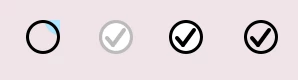
For jnCircleCheckBoxA:
bool checked;
setChecked(false);
determines the state of the checkbox.
bool enabled;
setEnabled(true);
determines whether the checkbox can be clicked
bool selected;
setSelected(false);
determines the active (selected) element when using the keyboard
bool transparent;
setTransparent(true);
sets the visibility for the background and thus sets the transparency
When I create a component directly in my code, I use a constructor with set values. Now the initialization is done in the Base file, I can't write there, so a "setup" function is created to reset the default values and redraw the component.
Callback processing in the screen
Screen1View.hpp
...
private:

 /*
 * Callback Declarations
 */
touchgfx::Callback<Screen1View, const jnCircleCheckBoxA&, ClickEvent::ClickEventType> jnCircleCheckBoxACallback;

 /*
 * Callback Handler Declarations
 */
 void jnCircleCheckBoxACheckedCallbackHandler(const jnCircleCheckBoxA& button, ClickEvent::ClickEventType eventtype_);
Screen1View.cpp
...
Screen1View::Screen1View():
jnCircleCheckBoxACallback(this, &Screen2View::jnCircleCheckBoxACheckedCallbackHandler),
{
jnCircleCheckBoxA1.setClickCallback(jnCircleCheckBoxACallback);

 jnCircleCheckBoxA1.setup(true, true, false, true); // checked, enabled, selected, transparent

...

void Screen1View::jnCircleCheckBoxACheckedCallbackHandler(const jnCircleCheckBoxA& button, ClickEvent::ClickEventType eventtype_)
{
 // Handle button click event (PRESSED or RELEASED)
 if (eventtype_ == ClickEvent::PRESSED) {
 // Handle button pressed event
 touchgfx_printf("PRESSED \n");
 } else if (eventtype_ == ClickEvent::RELEASED) {
 // Handle button released event
 touchgfx_printf("RELEASED \n");
 }
}
When I fine-tune the element according to ST standards, I'll put it in the "Share your Custom Widgets!" section.
The code shows how to write a callback so that the action is written to the screen.
Thank you in advance for your comments and suggestions.
JN
PS. Just a side note. Unable to insert file with extension "tpkg" when uploading. This is a custom container. It would not be wise to whitelist this extension. Now the file must be repackaged, for example, into 7z.