
Associate II
January 15, 2024
Question

Error: failed to download Segment[1] using STMcubeIDE v 1.14.0 & STMCube Programmer v 2.15

  • January 15, 2024
  • 5 replies
  • 3611 views

I am trying to flash the STM32H753I-EVAL-2 board with a .hex file generated from STM cube IDE version 1.14.0. 
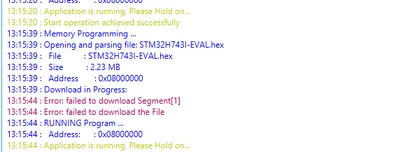
The code is build without error, but while loading it using the STMCube Programmer, I am getting the following errors:

Error: Failed to download Segment [1]
Anupurba_0-1705325908126.png

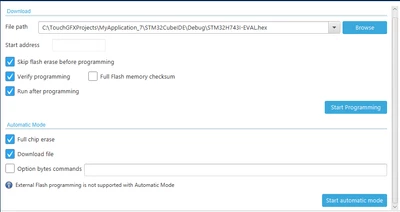
These are the options that I have selected while starting the programming : 

External Loader selected: M29W128GL_STM32H743I_EVAL
Anupurba_1-1705325986490.png

KIndly help.


5 replies

Technical Moderator
January 15, 2024

Hello @Anupurba and welcome to the Community :)

Did you select the proper external loader in the STM32CubeProgrammer?

You can follow this link, it may help you on your setup.

You have also to add properly the M29W128GL to your repository. In CubeIDE, click on the "Run" options and go to the "Debug Configurations" or "Run Configurations" Menu.

Check the external loader used in the" Debugger" tab and select the appropriate version.

ImenD_0-1705339245055.png

Hope this helped you.

"When your question is answered, please close this topic by clicking ""Accept as Solution"".ThanksImen"
AnupurbaAuthor
Associate II
January 17, 2024

Thanks for the suggestion, Actually I downloaded the STM Cube Programmer version from 2.15 to 2.14 and it worked. 

Pavel A.
Super User
January 16, 2024

Size 2.23 MB? Hmm. There are only 2.0 MB available. Is the external flash used in the program too?


Tesla DeLorean
Guru
January 16, 2024

Might be the size of the .HEX, not the content. As ASCII probably about 2.5x larger than the binary data

Tips, Buy me a coffee, or three.. PayPal VenmoUp vote any posts that you find helpful, it shows what's working..
AnupurbaAuthor
Associate II
January 17, 2024

 actually was following a video of touch gfx graphics from the ST microelectronics YouTube channel and followed the steps from there (I am an absolute newbie with using MCU boards, let alone STM 32). I wanted to use the binary file generated for flashing the MCU, but when I built the code from the STM32Cube IDE, the binary file did not get generated. Only .hex and .elf files got generated. 
Is there any option that I need to select to generate the binary file (.bin)?

Pavel A.
Super User
January 17, 2024

Is there any option that I need to select to generate the binary file (.bin)?

@Anupurba If the program has data or code in both internal and external flash, you don't want to generate a .bin file. It will be huge. Instead, either keep using elf or hex (not very optimal formats....) or split the program to two binaries: internal flash part and external (may be several parts if the data in external flash is not contiguous). IAR and Keil have tools for this, or use objcopy to pick the needed data ranges. Then program these binaries one by one.


Visitor II
August 26, 2024

@@Anupurba how size is 2.33MB, it limit is 2MB available. U used external flash too?

Visitor II
October 28, 2025

it depend on the file size