

ferro
Lead
November 27, 2024
Solved

Even though gfx::Box position set outside of a screen, it is still visible

  • November 27, 2024
  • 2 replies
  • 828 views

Hi,

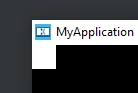
Attached project starts with this screen:
ferro_1-1732723422268.png


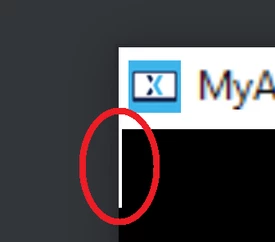
When the white Box is moved to the left - with pressing 'a' key, it should completely go off the screen. However, one pixel thick line is always visible.

box1.setX ( box1.getX () - 1 );
box1.invalidate ();
ferro_0-1732723227217.png

Why ?

Thank you

Best answer by LouisB

Hello @ferro,


Try to put an invalidate before "box1.setX ( box1.getX () - 1 );".

With only one invalidate at the end, it will only invalidate the area in the new position, so the line outside will not be refreshed. Also if you move your box in the screen you may have a (w+1) * h box due to that.

Best regards,

2 replies

LouisBBest answer
ST Employee
November 28, 2024

Hello @ferro,


Try to put an invalidate before "box1.setX ( box1.getX () - 1 );".

With only one invalidate at the end, it will only invalidate the area in the new position, so the line outside will not be refreshed. Also if you move your box in the screen you may have a (w+1) * h box due to that.

Best regards,

ferro
ferroAuthor
Lead
November 28, 2024

Thanks @LouisB 

Interesting, in all Gfx examples - i've seen so far - invalidate is placed after all actions on widgets.

So this works as expected now, with a single 'invalidate ()' before:


box1.invalidate ();
box1.setX ( box1.getX () - 1 );


"With only one invalidate at the end, it will only invalidate the area in the new position, so the line outside will not be refreshed. Also if you move your box in the screen you may have a (w+1) * h box due to that."

Thank you for this, will explore further.

ST Employee
December 2, 2024

Hello @ferro ,

You have to put the 2 invalidates, otherwise you will have unexpected behavior, try with (box1.getX()-100), you will see the unexpected behavior better.

Best regards,