
Fail to load images from the SD card
Hello Community member,
I have a STM32F746G-DISCO, which I used to learn touchGFX application. I'm trying to load images from the mini SDCARD, instead of QUADSPI space. I used touchGFX to create a very simple screen to demonstrate, but I was not able to load images from the sd CARD. Could you review my code below, and advise me what I missed?
I tried the following tutorial to learn how to use images from SD CARD (completed till part 3).
STM32 Graphics: How to Cache Bitmaps Stored on an SD Card, Part 1
I also reviewed the following documents as well:
Using Non-Memory Mapped Flash for Storing Images
Software ver:
- STM32cubeIDE: 1.17.0
- STM32CubeMX: 6.13
- TouchGFX: 4.24.2
The below is the codes and explanation of what I did.
First, I went through all the steps were necessary to setup touchGFX and and STMcubeMX from the part 1. Highlights
- PC13 as input pull up
- enable SDMMC1
- SD 4bits wide bus
- DMA RX and TX
- SDMMC1 global interrupt enable
- FATFS
- enable SD Card
- Detect_SDGIO: GPIO input, PC13
- FREERTOS
- Advanced setting
- USE_NEWLIB_REENTRANT -> enable (otherwise cubeMX complains)
- Advanced setting
I left the rest setup as default.
In the tutorial, he used the 3D moving images, but I used fixed image as shown below. The background is box with orange color.

Second, I setup TouchGFXHAL.cpp file.
I looked up the bufferSection and located the SDRAM addresses.
//STM32F746G_DISCO.map:
BufferSection 0xc0000000 0x13ec00
Based on that, I selected 0xC0200000 for SDRAM cacheStartAddr. And then I reserved 3MB for the cacheSize.
// TouchGFXHAL.cpp file:

// begining of the custom codes:
#include "fatfs.h"

extern uint8_t retSD; /* Return value for SD */
extern char SDPath[4]; /* SD logical drive path */
extern FATFS SDFatFS; /* File system object for SD logical drive */
extern FIL SDFile; /* File object for SD */

__IO uint32_t FatFSInit = 0;
uint32_t bytesread;
// end of the code.

void TouchGFXHAL::initialize()
{
	// begining of the custom codes:
 uint16_t* cacheStartAddr = (uint16_t*)0xC0200000;
 uint32_t cacheSize = 0x300000; //3 MB, as example

 TouchGFXGeneratedHAL::initialize();

 touchgfx::Bitmap::removeCache();
 touchgfx::Bitmap::setCache(cacheStartAddr, cacheSize, 0); // if dynamic memory is not used then set last param to 0
	// end of the code.
}
Then I edited blockCopy as the instruction video suggested.
bool TouchGFXHAL::blockCopy(void* RESTRICT dest, const void* RESTRICT src, uint32_t numBytes)
{
	 // Mount and open the file only once
	if (FatFSInit == 0){
		f_mount(&SDFatFS, (TCHAR const*)SDPath, 0);
		f_open(&SDFile, "images.bin", FA_READ);
		FatFSInit = 1;
	}
	 if ((uint32_t)src >= (uint32_t)0xA0000000 && (uint32_t)src < (uint32_t)0xA0300000)
	 {
		 uint32_t dataOffset = (uint32_t)src - (uint32_t)0xA0000000;
		 f_lseek(&SDFile, dataOffset);
		 f_read(&SDFile, dest, numBytes, (UINT*)&bytesread);
	 return true;
	 }
	 else
	 {
		 return TouchGFXGeneratedHAL::blockCopy(dest, src, numBytes);
	 }
}
Then I edited STM32F746NGHX_FLASH.ld file for the memory definition and linker script.
I added SDCARD with a virtual address, and the length. The rest was the default setup.
//STM32F746NGHX_FLASH.ld

/* Highest address of the user mode stack */
_estack = ORIGIN(RAM) + LENGTH(RAM); /* end of "RAM" Ram type memory */

_Min_Heap_Size = 0xa00 ; /* required amount of heap */
_Min_Stack_Size = 0xa00 ; /* required amount of stack */

/* Memories definition */
MEMORY
{
 RAM (xrw) : ORIGIN = 0x20000000, LENGTH = 320K
 FLASH (rx) : ORIGIN = 0x08000000, LENGTH = 1024K
 QUADSPI (r) : ORIGIN = 0x90000000, LENGTH = 16M
 SDRAM (xrw) : ORIGIN = 0xC0000000, LENGTH = 8M
 SDCARD (r) : ORIGIN = 0xA0000000, LENGTH = 3M
}
Then I changed the ExtFlashSection
 ExtFlashSection (NOLOAD) :
 {
 *(ExtFlashSection ExtFlashSection.*)
 *(.gnu.linkonce.r.*)
 . = ALIGN(0x4);
 } >SDCARD
I noticed that .elf file didn't include images if I put (NOLOAD), so first I built without (NOLOAD), and copied images to the SDCARD, and program it with (NOLOAD). In the instruction tutorial, he used NOLOAD and grab images from the .elf file.
I used the below command to create images.bin from .elf file.
arm-none-eabi-objcopy.exe --dump-section ExtFlashSection=images.bin STM32F746G_DISCO.elf
Finally, I edited the screen1View.cpp file.
void Screen1View::setupScreen()
{
	Bitmap::cacheAll();
 Screen1ViewBase::setupScreen();
}

void Screen1View::tearDownScreen()
{
	Bitmap::clearCache();
 Screen1ViewBase::tearDownScreen();
}
When I built the file, I had no issue, and the below is the console message after download files to the DISCO board.
STMicroelectronics ST-LINK GDB server. Version 7.9.0
Copyright (c) 2024, STMicroelectronics. All rights reserved.

Starting server with the following options:
 Persistent Mode : Disabled
 Logging Level : 1
 Listen Port Number : 61234
 Status Refresh Delay : 15s
 Verbose Mode : Disabled
 SWD Debug : Enabled
 InitWhile : Enabled

Waiting for debugger connection...
Debugger connected
Waiting for debugger connection...
Debugger connected
Waiting for debugger connection...
 -------------------------------------------------------------------
 STM32CubeProgrammer v2.18.0
 -------------------------------------------------------------------


Log output file: C:\Users\justi\AppData\Local\Temp\STM32CubeProgrammer_a09780.log
ST-LINK SN : 066BFF3238504B3043232829
ST-LINK FW : V2J45M31
Board : 32F746GDISCOVERY
Voltage : 3.22V
SWD freq : 4000 KHz
Connect mode: Under Reset
Reset mode : Hardware reset
Device ID : 0x449
Revision ID : Rev Z
Device name : STM32F74x/STM32F75x
Flash size : 1 MBytes
Device type : MCU
Device CPU : Cortex-M7
BL Version : 0x90
Debug in Low Power mode enabled

Opening and parsing file: ST-LINK_GDB_server_a09780.srec


Memory Programming ...
 File : ST-LINK_GDB_server_a09780.srec
 Size : 221.42 KB
 Address : 0x08000000


Erasing memory corresponding to segment 0:
Erasing internal memory sectors [0 4]
Erasing memory corresponding to segment 1:
Erasing external memory sector 0
Download in Progress:


File download complete
Time elapsed during download operation: 00:00:03.660
Shutting down...
Exit.
The youtube instruction was clear, and I tried several times, but unfortunately, I was not able to make it work. The below shows the result after the run.
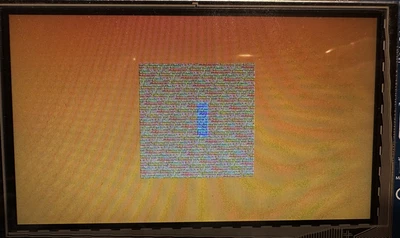
*the background color is solid orange, just my camera couldn't capture the background color uniformly.
Code that I have in this post was everything I had to modify. Not that much. I searched on the web, but I couldn't find any post similar to my case, so it must be something really simple...
Thank you in advance.