
Associate II
June 11, 2024
Solved

"Failed to load native freetype library"

  • June 11, 2024
  • 3 replies
  • 3305 views

Fresh Windows 11 install, fresh TouchGFX install. Started up fine, until I tried to open one of the sample projects. Now the tool won't start at all, and I just get a dialog "Failed to load native freetype library / Could not open file".

I did find: https://community.st.com/t5/stm32-mcus-touchgfx-and-gui/touchgfx-crashes-on-project-creation/td-p/578159

Unclear exactly what was the suggestion. Someone said "install a newer version of VC++", but I don't have that installed and I don't want to have it installed. There is a link to the C++ redistributable in that thread, which I did install, but it made no difference.
Best answer by LouisB

Hello @farble1670,

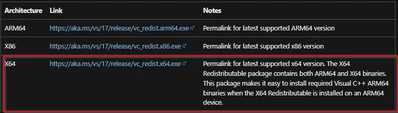
It's fine, can you confirm you download the x64 version ? 

LouisB_0-1718269659611.png

I hope it helps,

3 replies

ST Employee
June 12, 2024

Hello @farble1670 , First welcome to the TouchGFX forum !

You have to install the latest version of VC++, TouchGFX designer is dependant of that. Which version have you downloaded ?

Regards,

Associate II
June 12, 2024

I downloaded the VC++ redistributable from here: https://learn.microsoft.com/en-us/cpp/windows/latest-supported-vc-redist?view=msvc-170#visual-studio-2015-2017-2019-and-2022 and installed, per the other forum link. That did not solve the problem. Am I missing something?

I should add, I'm new to embedded development, and Windows' development environment, so I apologize if I'm missing something obvious.

LouisBBest answer
ST Employee
June 13, 2024

Hello @farble1670,

It's fine, can you confirm you download the x64 version ? 

LouisB_0-1718269659611.png

I hope it helps,

Associate II
June 13, 2024

You're right, I installed the x86 version. I read "ARM support" and thought "well I don't need that". It's starting up now.

Sorry for the confusion.

ST Employee
June 14, 2024

Hello @farble1670,

Glad it worked, please put a my answer as solution so other can directly see the solution to that issue.


Regards,