

ferro
Lead
March 11, 2025
Solved

Flawed vectorized font output (Designer 4.24.1)

  • March 11, 2025
  • 3 replies
  • 1333 views

Hi,

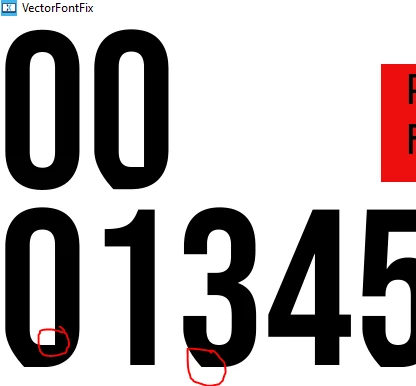
I’d like to use the vectorized version of a font (bebas-neue-regular.ttf), but the glyphs don’t quite match the original shape.
ferro_0-1741712284064.png

ferro_1-1741712327180.png


Why is that, and how can I fix it?

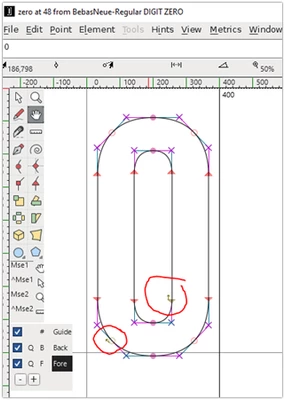
Could it have something to do with the arrow next to some nodes? I don’t know much about glyph design.

The attached example compares the bitmap and vector versions of the font.

Thanks for help.

Best answer by JohanAstrup

Hello @ferro.

The render issue can be resolved by flattening the fontYou can find a guide on this process in the TouchGFX documentation here. I have also attached a flattened version of the font.

Regarding the other issue with the vector font being taller than the bitmap font, I haven't been able to reproduce it. Could you please provide more details about your typography properties?

Thanks in advance!

Best regards,
Johan

3 replies

GaetanGodart
Technical Moderator
March 12, 2025

Hello @ferro ,


The issue happens on 4.24.1 for me too, but upgrading to 4.25.0 fixes the issue.
Looks like we found it and fixed it.

The only thing I can tell you is to upgrade to 4.25.0, I do not know what causes the issue or how to fix it.


Regards,

ferro
ferroAuthor
Lead
March 12, 2025

"upgrade to 4.25.0"

Will do ! Thank you  @GaetanGodart 

ferro
ferroAuthor
Lead
March 17, 2025

Hi @GaetanGodart 

I tried 4.25 and it is an improvement. But there is still a noticeable difference in the vector font (e.g., '0', '6'). Also, the vector font is taller(267px) than bitmap(266px).

ferro_1-1742221423991.png


Attached is the previous project but using 4.25. I moved all functionality to

\gui\src\screen1_screen\Screen1View.cpp 


What are your thougths ?

Thanks


GaetanGodart
Technical Moderator
March 17, 2025

Hello @ferro ,


You are right, it is slightly different.

I will inform the team and hopefully we will fix it soon.

Has the size difference been an issue for you?


regards,

ferro
ferroAuthor
Lead
March 17, 2025

"I will inform the team and hopefully we will fix it soon."

Thank you for prompt reply @GaetanGodart 

"Has the size difference been an issue for you?"

Very good question. For the large font size in my example, not really. It might be with smaller font sizes, I'll experiment further.

I often use numbers (glyphs that do not go below the baseline) with only a few top and bottom padding pixels in a container (e.g., a table of numbers). Knowing about this difference allows me to account for it. However, the blurry top edge on a vector font does not look as good as it does on a bitmap font. Again, I'll check how Gfx copes with smaller font sizes and let you know.

Here is a number cell example using the Arial bitmap font.

ferro_0-1742230115002.png


JohanAstrupBest answer
ST Employee
March 18, 2025

Hello @ferro.

The render issue can be resolved by flattening the fontYou can find a guide on this process in the TouchGFX documentation here. I have also attached a flattened version of the font.

Regarding the other issue with the vector font being taller than the bitmap font, I haven't been able to reproduce it. Could you please provide more details about your typography properties?

Thanks in advance!

Best regards,
Johan

ferro
ferroAuthor
Lead
March 18, 2025

"I have also attached a flattened version of the font"

Lovely, that works like a charm. Thanks @JohanAstrup . I'll try to fix it myself with FontForge to understand the process. I looked at the font in FontForge but didn't see anything suspicious (as shown in the documentation you mentioned).

"Regarding the other issue with the vector font being taller than the bitmap font, I haven't been able to reproduce it."

Hm, Did you run my example from my previous post - VectorFontFix_4.25 ? Attached now, if you press 'f' key you can see font 'jumping'. It jumps with your 'BebasNeue-Regular-flattened.ttf' as well. Let me know if you can see that. Thank you