Associate III
May 24, 2024
Solved

Flipping the screen upside down inclusive the buttons

  • May 24, 2024
  • 1 reply
  • 1608 views

Hello everyone,

Hello @Martin KJELDSEN ,


I have read all the posts in the community, thats with this topic relevant and tried to do the same thing in this post.

I could reversed the screen with 180 degree, except the buttons they staying on the original position. Even when they are clicked then nothing happens.

The post above is few years ago and i don't know if there is some updates to this subject. Otherwise i muss flipping all the screens in the designer.

Regards,

Mahdi

_____________________________________________________________________________

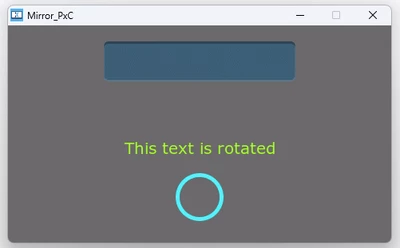
Before flipping:
mids400_0-1716554969095.png

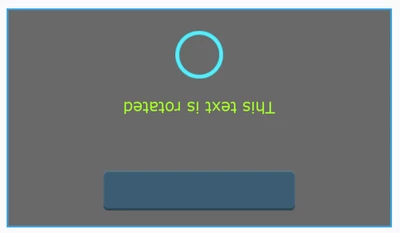
After:

mids400_1-1716555028340.png

but the button is not touchable.

Best answer by JTP1

Hello

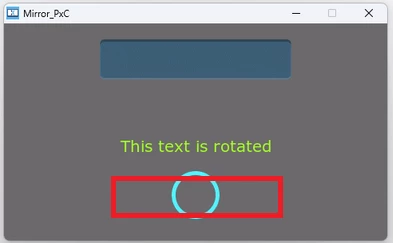
What if you press here (red square) ?

JTP1_1-1716565120659.png

Did you remeber to flip touch panel coordinates in sampleTouch-function like Martin instructed. This function is typically placed STM32TouchController.cpp- file in \TouchGFX\target\- folder.

Br JTP

1 reply

JTP1Best answer
Graduate II
May 24, 2024

Hello

What if you press here (red square) ?

JTP1_1-1716565120659.png

Did you remeber to flip touch panel coordinates in sampleTouch-function like Martin instructed. This function is typically placed STM32TouchController.cpp- file in \TouchGFX\target\- folder.

Br JTP

mids400Author
Associate III
May 27, 2024

Edit 2: It's worked (i was trying with the simulator thats have no touch panel coordinates!)

Hello @JTP1 

When i click on the circle position the button will be clicked and shown on bottom!

That was my question the coordinates of touch even should be also flipped but i don't found where they should?

I will look again..


Edit 1: I found it and edited it like this (due my display's resolution 480x272), but I don't know if I did it right because it still doesn't work!


bool STM32F7TouchController::sampleTouch(int32_t& x, int32_t& y)
{
 TS_StateTypeDef state = { 0 };
 
 if (isInitialized) {
 EDT_TS_GetState(&state);
 if (state.touchDetected)
 {
 x = 479 - state.touchX[0];
 y = 271 - state.touchY[0];

 return true;
 }
 }
 return false; 
}


Br,

Mahdi

Graduate II
May 27, 2024

Hello

Are you testing it in simulator or target ? For simulator you probably need to modify HALSDL2.cpp file.

bool HALSDL2::doSampleTouch(int32_t& x, int32_t& y) const
{
 x = 479-(_x - getCurrentSkinX());
 y = 271-(_y - getCurrentSkinY());

 if (DISPLAY_ROTATION == rotate90)
 {
 int32_t tmp = x;
 x = y;
 y = DISPLAY_WIDTH - tmp;
 }
 return popTouch();
}

 Br JTP