

ferro
Lead
February 1, 2024
Solved

GFX 4.23.1 window closes but TouchGFXDesigner-4.23.1.exe stay running in background

  • February 1, 2024
  • 2 replies
  • 1882 views

Hi,

When I close GFX Designer its window disappears, however, the TouchGFXDesigner-4.23.1.exe stays running in the backround - for every opened/closed *.touchgfx project.
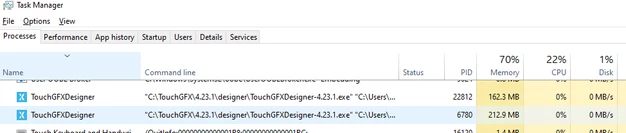
ferro_0-1706801912448.png


Does anyone experiences this GFX misbehaviour ?

Best regards

Ferro

This topic has been closed for replies.
Best answer by Mohammad MORADI ESFAHANIASL

No worries at all,
Yes, we are investigating on this matter. Thank you for helping us :folded_hands:

Best regards,

2 replies

ST Employee
February 6, 2024

Hello @ferro ,

Thank you for reporting the issue,
When does it happen specifically? Is it when you create a new project? Or when you open a previously created project? Do you need to run the simulator or anything similar?

It would be amazing if you could send us the log file that TouchGFX generates. It is available at
C:\Users\[user]\AppData\Roaming\TouchGFX-4.23.1

You can quickly access that folder by searching %appdata% in the Windows search menu.


Thanks a lot for your help

ferro
ferroAuthor
Lead
February 12, 2024

Sorry for my slow reply @Mohammad MORADI ESFAHANIASL 


> "Or when you open a previously created project?"
Yes, it happens every time I open the same project.


Here, someone has got the same behaviour and your colleague @Osman SOYKURT  is on it as well:
https://community.st.com/t5/stm32-mcus-touchgfx-and-gui/touchgfx-4-231-task-doesn-t-close-and-remain-open-on-multiple/td-p/636336

ST Employee
February 13, 2024

No worries at all,
Yes, we are investigating on this matter. Thank you for helping us :folded_hands:

Best regards,

ST Employee
March 15, 2024

Hello @ferro ,

We have fixed this issue in the latest version of TouchGFX (4.23.2). 

Is it possible for you to check whether the problem persists or not? 

Thank you so much for your help.