Associate II
February 8, 2024
Solved

Hour and minutes

  • February 8, 2024
  • 2 replies
  • 3340 views

Good morning , sorry if i'm not posting in the right place but i'm still learning. I have a problem with an example i saw in the tutorial where you bild an iterface to adjust the hour and minutes . In the tutorial where i built the interface it says to copy the code and put it in two files .... i tired but when i press the buttons mothing happens and in the two text areas thereare two question marks. Could someone kindly help me? Thank you so much. 

This topic has been closed for replies.
Best answer by GaetanGodart

Hello @StefanoL ,


It seems like you are stuck at the very beginning of the tutorial where they say :

If you press "Generate Code" or "Run Simulator" the specified virtual functions will be generated by the Designer. Let us start by integrating the four functions for the arrow buttons. To keep track of the values for hour and minute, two counters are also added.
Now add the following code:

The issue there is that you added a wildcard but did not specify the characters this wildcard can take.
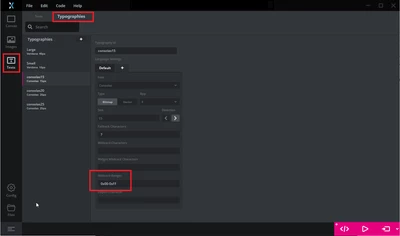
You need to specify which characters can take by going into "Texts", "Typographies" and than filling the fields "Wildcard ranges" for example :
GaetanGodart_0-1707736175207.png
In this case my wildcard could take all the ASCII values.
In your case you just need numbers do you could either type "0,1,2,3,4,5,6,7,8,9" or "0x30-0x39".


As @Andrew Neil mentioned, you seems to be quite new to TouchGFX so you should start simple.
Have you done the previous tutorials ? (tuto 1 and tuto 2)
You can also find resources here : UI development 


Hope this helps.
Don’t hesitate to give us a feedback or give more precisions and tell us if the issue is solved! :smiling_face_with_smiling_eyes:

2 replies

Andrew Neil
Super User
February 8, 2024

Welcome to the forum.

Your question is missing some essential details:


@StefanoL wrote:


I have a problem with an example i saw in the tutorial 

What example is that? Please give a link.

These tips might help:

https://community.st.com/t5/community-guidelines/how-to-write-your-question-to-maximize-your-chances-to-find-a/ta-p/575228

https://community.st.com/t5/community-guidelines/tkb-p/community-guidelines


A complex system that works is invariably found to have evolved from a simple system that worked.A complex system designed from scratch never works and cannot be patched up to make it work.
StefanoLAuthor
Associate II
February 8, 2024
Andrew Neil
Super User
February 8, 2024

That's about setting up two screens.

Have you tried it on just one screen?


A complex system that works is invariably found to have evolved from a simple system that worked.A complex system designed from scratch never works and cannot be patched up to make it work.
GaetanGodart
GaetanGodartBest answer
Technical Moderator
February 12, 2024

Hello @StefanoL ,


It seems like you are stuck at the very beginning of the tutorial where they say :

If you press "Generate Code" or "Run Simulator" the specified virtual functions will be generated by the Designer. Let us start by integrating the four functions for the arrow buttons. To keep track of the values for hour and minute, two counters are also added.
Now add the following code:

The issue there is that you added a wildcard but did not specify the characters this wildcard can take.
You need to specify which characters can take by going into "Texts", "Typographies" and than filling the fields "Wildcard ranges" for example :

GaetanGodart_0-1707736175207.png
In this case my wildcard could take all the ASCII values.
In your case you just need numbers do you could either type "0,1,2,3,4,5,6,7,8,9" or "0x30-0x39".


As @Andrew Neil mentioned, you seems to be quite new to TouchGFX so you should start simple.
Have you done the previous tutorials ? (tuto 1 and tuto 2)
You can also find resources here : UI development 


Hope this helps.
Don’t hesitate to give us a feedback or give more precisions and tell us if the issue is solved! :smiling_face_with_smiling_eyes:

StefanoLAuthor
Associate II
February 12, 2024

Yes i'am quite new........ thank you so much for the information and help you are giving me