
Senior III
January 9, 2026
Solved

How set NEMAGFX_MEM_POOL_SIZE in CubeMX

  • January 9, 2026
  • 2 replies
  • 422 views

Hi,

I've a project with TouchGFX and FreeRTOS on an STM32H7RS. I was updating the library, regenerating the code from CubeMX but, I've noticed that, for some reason, the file \Appli\TouchGFX\target\generated\nema_hal.c has changed

// from
- #define NEMAGFX_MEM_POOL_SIZE 16128 /* NemaGFX byte pool size in byte */
// to
+ #define NEMAGFX_MEM_POOL_SIZE 24320 /* NemaGFX byte pool size in byte */

but I can't find in the .ioc inside the CubeMX where this value is set and why it has been changed

Thanks
Best answer by JohanAstrup

Hello @nico23.

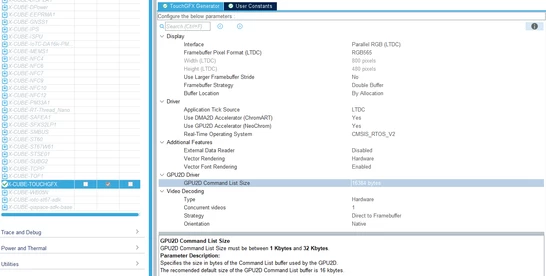
You cannot directly control the entire NEMAGFX_MEM_POOL_SIZE from STM32CubeMX. The size is determined by the command list size, which you can configure in X-CUBE-TOUCHGFX in STM32CubeMX, and 8 KB required for other Nema allocations.

JohanAstrup_1-1767950698659.png

Based on your description, I assume that you have updated an older project to TouchGFX 4.25.0 or newer. In TouchGFX 4.25.0, the default command list size was increased from 8 KB to 16 KB to provide significant performance improvements in certain situations.
If you want to revert this change, you can set the command list size to 8 KB in STM32CubeMX.

Best regards,
Johan

2 replies

JohanAstrupBest answer
ST Employee
January 9, 2026

Hello @nico23.

You cannot directly control the entire NEMAGFX_MEM_POOL_SIZE from STM32CubeMX. The size is determined by the command list size, which you can configure in X-CUBE-TOUCHGFX in STM32CubeMX, and 8 KB required for other Nema allocations.

JohanAstrup_1-1767950698659.png

Based on your description, I assume that you have updated an older project to TouchGFX 4.25.0 or newer. In TouchGFX 4.25.0, the default command list size was increased from 8 KB to 16 KB to provide significant performance improvements in certain situations.
If you want to revert this change, you can set the command list size to 8 KB in STM32CubeMX.

Best regards,
Johan

nico23Author
Senior III
January 9, 2026

Hi @JohanAstrup 

That's why I had issues with the .icf and the RAM used. Having doubled it, it was exciting my previous memory configuration in the .icf file.

Do you have an example of a situation in which the increased memory produced "significant performance improvements"?

Thanks

ST Employee
January 9, 2026

If the command list is not filled within one frame and does not reach an auto submit, you will likely not see any gain. However, if you have a complex screen that triggers many Nema commands per frame, a larger command list is beneficial.
An example of a situation where you will see performance improvements is if you are using vector fonts.
If you only use NeoChrom GPU for blitting, a larger command list does not provide a significant performance gain.

Best regards,
Johan