
Associate II
November 25, 2024
Solved

How to Cache Bitmaps Stored on an SD Card with TouchGFX

  • November 25, 2024
  • 6 replies
  • 4885 views

Hello, everyone,

I am following the following youtube video posted by ST: https://www.youtube.com/watch?v=jE_nL1GObmA.

My intention is to use an SD card to go and insert images due to a lack of space in flash or external ram.

I followed the video, creating a bitmap cache in a portion of external RAM away from frame buffers and other important resources.

In the LD file, I then added a virtual section called SDCARD into which I went to place all the contents of the ExtFlashSection.

Then following the video I am right at the point where from the .elf file I should have created the .bin file through the command arm-none-eabi-objcopy.exe --dump-section ExtFlashSection=images.bin STM32H7S78-DK_24bpp_Appli.elf.

However, I unfortunately get the following error: STM32H7S78-DK_24bpp_Appli.elf[ExtFlashSection]: can't dump section - it has no contents: File in wrong format
C:\TouchGFX\4.24.1\env\MinGW\msys\1.0\gnu-arm-gcc\bin\arm-none-eabi-objcopy.exe: unable to rename 'STM32H7S78-DK_24bpp_Appli.elf'; reason: File exists

Has anyone been through this before and has a possible solution to the problem?
Best answer by mathiasmarkussen

You can keep noload, but then you will have to edit the linker file and build twice to be able to extract your assets .bin.

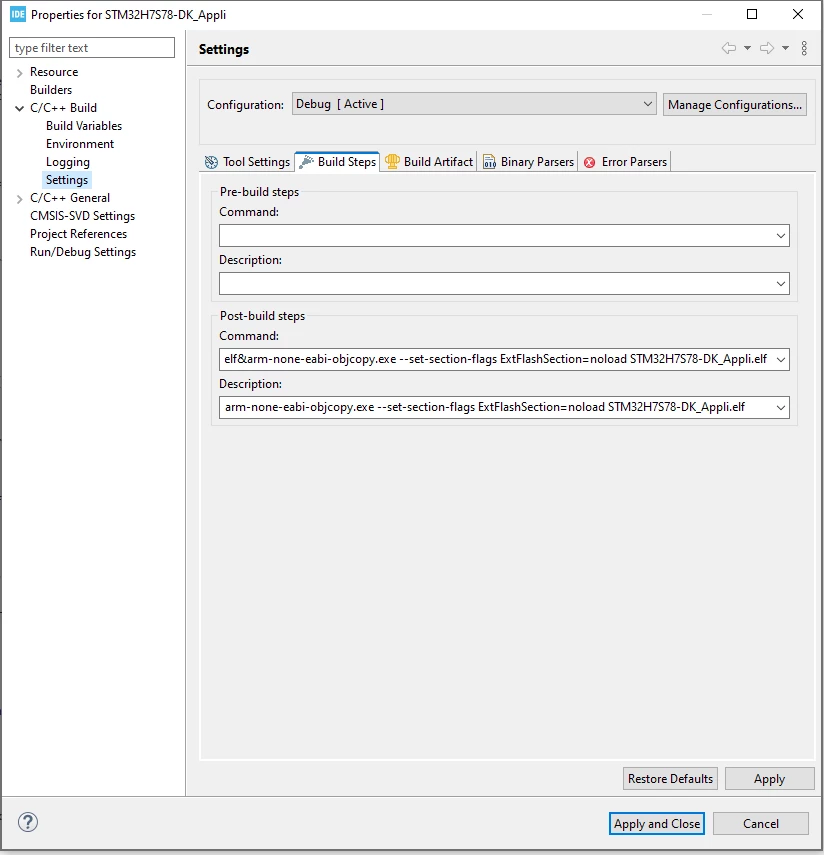
What I meant is removing noload from the linker script, creating the .bin and then setting extflashsection to noload or removing it altogether using objcopy as I described earlier. You can automate this via post-build commands in CubeIDE:

2024-12-18 12_54_06-workspace_1.17.0 - STM32H7S78-DK_Appli_STM32H7S7L8HXH_RAMxspi1_ROMxspi2_app.ld -.png

The command I have set is:

arm-none-eabi-objcopy.exe --dump-section ExtFlashSection=images.bin STM32H7S78-DK_Appli.elf&arm-none-eabi-objcopy.exe --set-section-flags ExtFlashSection=noload STM32H7S78-DK_Appli.elf

 which should mark the section as noload after dumping the images. Again, I have not tried to flash a board, but the .bin is created for me.

You may also be able to use the normal debug and load profiles, since the file is modified as part of the build step.

6 replies

mƎALLEm
Technical Moderator
November 25, 2024

Hello @Leo_Berna99 ,

The video is using TouchGFX. So are you using it for this purpose?

"To give better visibility on the answered topics, please click on ""Accept as Solution"" on the reply which solved your issue or answered your question."
Associate II
November 26, 2024

I forgot to tell that I'm using an STM32H7S78-DK.

Yes, I'm using SD card for TouchGFX images 

mƎALLEm
Technical Moderator
November 26, 2024
"To give better visibility on the answered topics, please click on ""Accept as Solution"" on the reply which solved your issue or answered your question."
Associate II
November 26, 2024

Good morning, yes I also followed that tutorial as well as the video but it still gives problems.

Following the video a virtual memory area is allocated for my SDCARD at address 0xA0000000. Perfect, so far so good. Then still in the ld file I go to insert the contents of the ExtFlashSection zone into SDCARD using (NOLOAD).

Having done this step in the video and in the tutorial it runs arm-none-eabi-objcopy --dump-section ExtFlashSection=images.bin STM32H7S78-DK_Appli.elf but since the address is virtual the ELF rightly cannot create the binary file. I don't understand how the colleague in the video created the binary file with a virtual address and the command (NOLOAD).

To get around this to create the .bin file I momentarily allocated the SDCARD zone in an external flash part, once the .bin was created I put the virtual zone back into the ld file.

At this point the code runs and everything seems to be OK but the images still do not show.

I am using the latest version of touchGFX with a project created using the STM32H7S78-DK 24bpp board template as recommended by @GaetanGodart 


ST Employee
November 27, 2024

Have you tried to run your project with images in flash? You can allocate a few of the images to internal flash for a quick test in the image tab in TouchGFX designer.

Have you implemented a custom blockcopy function for the address space in question as described in Using Non-Memory Mapped Flash for Storing Images | TouchGFX Documentation?

ST Employee
December 2, 2024

Does your .map file suggest the images are in the SD card address range?

And you BitmapDatabase.cpp?

I might suggest creating a linker section for your image buffer, so you are sure you do not overwrite anything useful. It should be uninitialized (like the frame buffers), since the SDRAM is not available at boot time.

I might suggest setting an image or two to be in internal flash in the images tab in TouchGFX designer, and see if they show up.

You could try to put a single image of a solid colour (on the SD card) in your project and draw only that image. Then break at the end of your block copy function and see if the memory contents match your expectation.

Finally, I can see that your image cache is the same size as your SD card region. You could also try the suggested procedure at the bottom here: Using Non-Memory Mapped Flash for Storing Images | TouchGFX Documentation

Associate II
December 2, 2024

Yes, my .map file suggest that the images are in the SDcard Address range.

Leo_Berna99_0-1733148443990.png

This is my BitmapDatabase.cpp file.

Thanks, I'll try your options. 

In the video I can see that your colleague is using the (NOLOAD) option for the ld file, and then he use the command dump section on that section. How is it possible? that region should be empty so no dump could be possible. Am I wrong?

mƎALLEm
Technical Moderator
December 2, 2024

@Leo_Berna99 ,


Leo_Berna99_0-1733148443990.png


Please avoid code screen shots of your code and please use </> button to paste it instead.
Thank you for your understanding.

"To give better visibility on the answered topics, please click on ""Accept as Solution"" on the reply which solved your issue or answered your question."
ST Employee
December 16, 2024

Alternatively, you can flash your application with STM32CubeProgrammer after modifying your elf file.

If you need to debug, you can edit your debug configuration to not download the program before debugging by editing the entry in "Load Image and Symbols" under the startup tab in the debug configuration and disable download. You will then be able to debug, but you will have to flash your elf manually each time you make changes.

Associate II
December 18, 2024

Thank you very much @mathiasmarkussen for your time to answer to my questions. I'll try all your suggestions. 

When you say "after modifying your elf file" you mean keeping the (NOLOAD) right?

mathiasmarkussenBest answer
ST Employee
December 18, 2024

You can keep noload, but then you will have to edit the linker file and build twice to be able to extract your assets .bin.

What I meant is removing noload from the linker script, creating the .bin and then setting extflashsection to noload or removing it altogether using objcopy as I described earlier. You can automate this via post-build commands in CubeIDE:

2024-12-18 12_54_06-workspace_1.17.0 - STM32H7S78-DK_Appli_STM32H7S7L8HXH_RAMxspi1_ROMxspi2_app.ld -.png

The command I have set is:

arm-none-eabi-objcopy.exe --dump-section ExtFlashSection=images.bin STM32H7S78-DK_Appli.elf&arm-none-eabi-objcopy.exe --set-section-flags ExtFlashSection=noload STM32H7S78-DK_Appli.elf

 which should mark the section as noload after dumping the images. Again, I have not tried to flash a board, but the .bin is created for me.

You may also be able to use the normal debug and load profiles, since the file is modified as part of the build step.

Associate II
December 18, 2024

Finally I can say that this is now working. Thank you very much for the help.