JPabl.1
Associate III
November 30, 2024
Question

How to do a page down/up with a list

  • November 30, 2024
  • 2 replies
  • 761 views

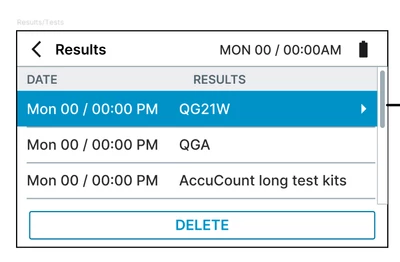
I have this ui requirement 

JPabl1_0-1732983950201.png

The idea is that when the user presses the "down" button, the effect will be to go all the way down, or all the way up. 

I'm using a scrollable container with a list layout to create the view, how can I do it?

2 replies

GaetanGodart
Technical Moderator
December 2, 2024

Hello @JPabl.1 ,


The ScrollableContainer have a method "doScroll" :

GaetanGodart_0-1733135531537.png

https://support.touchgfx.com/docs/api/classes/classtouchgfx_1_1_scrollable_container

This seems to be what you are looking for.
However, I assume it will be a bit painful to use as you will need to know how many pixels you need to scroll.


This issue could be avoided by using another widget such as the ones inheriting for the scrollBase (scrollList and scrollWheel) : https://support.touchgfx.com/docs/api/classes/classtouchgfx_1_1_scroll_list
It has a method animateToItem where you just have to specify the last item if you want to scroll to the end and the first item if you want to scroll to the beginning :

GaetanGodart_1-1733135819519.png


Regards,

GaetanGodart
Technical Moderator
December 10, 2024

Hello @JPabl.1 ,


Have you been able to move forward on your issue?


Regards,