

ARedm.1
Associate II
October 3, 2024
Solved

How to remove gaps in scrollwheel list

  • October 3, 2024
  • 1 reply
  • 1285 views

I have a scrollwheel with cicular function working on my screen. The list is variable depending on how many pages are required on the screen. At the moment I have 3 numbers exposed to show the next and previous pages in the list. This creates 5 drawables in the Base file. If I have less than 5 pages in the list I get gaps in the list (ie Page 1, 2, 3, , ,).

I could load in the spaces with the next number but then that makes it illogical because it will then end up 1,2,3,1,2. 

Can I reduce the number of drawables or is there a way to fill the gaps to keep it logically moving continuously
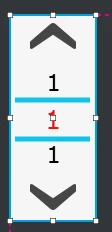
 

ARedm1_0-1727936490260.png


Best answer by GaetanGodart

Hello @ARedm.1 ,


By using a scrollWheel, I was not able to replicate the issue, to me it worked just fine.
Please find a working example attached to this message.


I have created a custom container with a textArea, created a scrollWheel using this cutsom container, set the number of items to 1, made the scrollWheel circular and added the characters "0-9" to the wildcard range.

Here is the code I have added :

CustomContainer 1.hpp:

void setItem(int no)
 {
 Unicode::snprintf(textArea1Buffer, TEXTAREA1_SIZE, "%d", no+1);
 textArea1.invalidate();
 }

Screen1View.hpp:

virtual void scrollWheel1UpdateItem(CustomContainer1& item, int16_t itemIndex)
 {
 item.setItem(itemIndex);
 }

Screen1View.cpp (inside the setupScreen function):

scrollWheel1.setNumberOfItems(3);

You can change the number of items and it works as expected.


I hope this example help you find your issue. :smiling_face_with_smiling_eyes:


Regards,


1 reply

GaetanGodart
Technical Moderator
October 4, 2024

Hello @ARedm.1 ,


Since the number of element is variable, can't you initialize the list at 1 item and then use virtual void setNumberOfItems(int16_t numberOfItems) to update to the correct number of pages (you will also have to update each elements after that)?

I guess this answers :


Can I reduce the number of drawables


If you still need help, I think it would help us if you were able to share your project so we can clearly see the problem (make sure to zip it using 7zip ;)).


Hope this helps! :smiling_face_with_smiling_eyes:
If this comment answered your question, I invite you to select it as "best answer".


Regards,

ARedm.1
ARedm.1Author
Associate II
October 6, 2024

Hi Gaetan,

Thank you for yopur reply, it is appreciated.

I am already using the setNumberOfItems to set the amount of pages when I start up each page. The way TouchGFX compiles is that the number of drawables which is set in the Base class of the scrollwheel depends on the number of elements visible in the scroll wheel +2, so in my case I have 3 elements visible it will set the DrawableListItems to 5 in the hpp of the Base class.

                touchgfx::DrawableListItems<ScrollWheelText, 5> scrollWheelListItems;

I have played around with this and if I have 7 elements visible in the scrollwheel window, the above is set to 9. Unless I only make 1 element visible will it work properly. The idea we have is by exposing 3 elements, on the first page the number above the "1" will be the amount of pages the user can go through.

Im sorry but I cannot upload the project to here as it is too large and is also being used in a commercial capacity so it would violate our IP rules for the company I work for. I can provide snippets or maybe I would have to create a dummy project for you guys to view if I can't solve the issue.

GaetanGodart
GaetanGodartBest answer
Technical Moderator
October 8, 2024

Hello @ARedm.1 ,


By using a scrollWheel, I was not able to replicate the issue, to me it worked just fine.
Please find a working example attached to this message.


I have created a custom container with a textArea, created a scrollWheel using this cutsom container, set the number of items to 1, made the scrollWheel circular and added the characters "0-9" to the wildcard range.

Here is the code I have added :

CustomContainer 1.hpp:

void setItem(int no)
 {
 Unicode::snprintf(textArea1Buffer, TEXTAREA1_SIZE, "%d", no+1);
 textArea1.invalidate();
 }

Screen1View.hpp:

virtual void scrollWheel1UpdateItem(CustomContainer1& item, int16_t itemIndex)
 {
 item.setItem(itemIndex);
 }

Screen1View.cpp (inside the setupScreen function):

scrollWheel1.setNumberOfItems(3);

You can change the number of items and it works as expected.


I hope this example help you find your issue. :smiling_face_with_smiling_eyes:


Regards,