

luisfynn1
Associate II
June 28, 2024
Solved

how to run STM32Cube.ioc at TouchGFX project?

  • June 28, 2024
  • 1 reply
  • 946 views

Hi I am luis.

I'm testing TouchGFX, and I have a question.
After creating an example board project with TouchGFX V4.22.1 Designer and then moving the STM32F769I_DISCO.ioc file into the STM32CubeIDE folder to set the IO, an error occurs when compiling after setting the IO. There are too many errors to easily resolve. I would like to know what is the optimal way to set up IO after creating a project with TouchGFX V4.22.1 Designer.
 

Best answer by GaetanGodart

Hello Luis,


I am not sure what you mean by "example board project".

If "example board project" means "a random board that I picked because it looked cool", then, what you want to do is basically to change you board setup.
In that case, all you have to do is to create a new project from Designer if we provide TBS (TouchGFX Board Setup) for the new board + screen you want to use (that is the case for the STM32F769-DK).
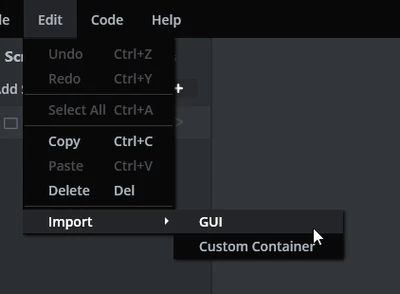
You will end up with an empty project, but you can easily import what you previously designed by clicking on "Edit" => "Import" => "GUI" and then simply selecting the .touchgfx file of your previous design :

GaetanGodart_0-1719565856312.png


If the answers your question, I invite you to select this comment as "best answer".


Regards,

1 reply

GaetanGodart
GaetanGodartBest answer
Technical Moderator
June 28, 2024

Hello Luis,


I am not sure what you mean by "example board project".

If "example board project" means "a random board that I picked because it looked cool", then, what you want to do is basically to change you board setup.
In that case, all you have to do is to create a new project from Designer if we provide TBS (TouchGFX Board Setup) for the new board + screen you want to use (that is the case for the STM32F769-DK).
You will end up with an empty project, but you can easily import what you previously designed by clicking on "Edit" => "Import" => "GUI" and then simply selecting the .touchgfx file of your previous design :

GaetanGodart_0-1719565856312.png


If the answers your question, I invite you to select this comment as "best answer".


Regards,