

Solved
how to update background customcontainer
Hi Touchgfx team!
I've this screen requirement
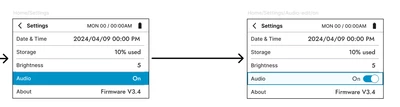
I'm doing it with a custom container list as in the listLayout example. Currently, once I press the audio element, I'm able to move the "on" text to the left, and add the image. Now, I want to update the background color. I'm trying this but it doesn't do anything:
void CustomListElement::set_audio_element(int new_x, int new_y){
 settings_text.setXY(new_x, new_y);
 background.setColor(touchgfx::Color::getColorFromRGB(255, 255, 255));
 invalidate();
}
this is a method in the custom container. The 255 is just for reference
This is my view where I call the function
void settingsView::listElementClicked(CustomListElement &element)
{
 // The button of the list element has been pressed

 switch (element.item_index)
 {
 case DATE_TIME_INDEX:
 go_to_date_and_time_screen();
 break;
 case STORAGE_INDEX:
 go_to_storage_screen();
 break;
 case ABOUT_INDEX:
 go_to_about_screen();
 break;
 case AUDIO_INDEX:
 audio_toggle_button.setVisible(true);
 settings_list_elements[AUDIO_INDEX].set_audio_element(190, 12);
 settings_list.invalidate();
 audio_toggle_button.invalidate();
 break;
 default:
 break;
 }
}
Thanks a lot in advance