

Junde
Senior III
December 17, 2024
Solved

How to use SVG in touchGFX

  • December 17, 2024
  • 2 replies
  • 1196 views

Hi there,

In my touchGFX project, I import an SVG file.

I can compile and simulate the UI page using TouchGFX Designer, which works as expected.

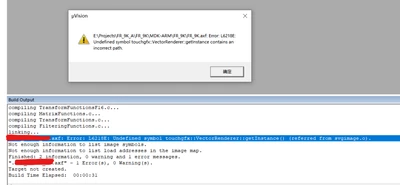
However, after I finished the design in TouchGFX Designer and tried to compiler the project by MDK-ARM, the following error was present:
Junde_0-1734415027630.png

(When I delete the SVG object in TouchGFX Designer, everything works well again.)

I don't know what this means, how do I resolve it?

Thanks for your help!


2 replies

ferro
ferroBest answer
Lead
December 17, 2024
Junde
JundeAuthor
Senior III
December 18, 2024

@ferro  Thank you

this resolved my error!

GaetanGodart
Technical Moderator
December 17, 2024

Hello @Junde ,


Could you check if it works when compiling and flashing from TouchGFX Designer?

Maybe there is a missing include file or library path in your IAR project?


Regards,

Junde
JundeAuthor
Senior III
December 18, 2024

@GaetanGodart thanks for your reply

It can work well with the touchGFX Designer in simulation mode.

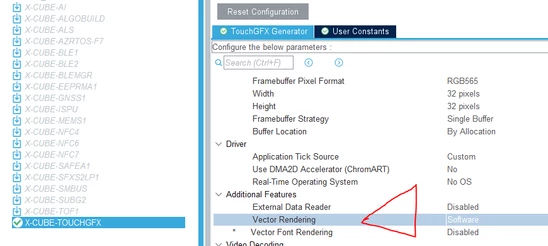
My question can be resolved by enabling "Vector Rendering" in cubeMx.