
Solved
I delete an item from ScrollList but doesn't redraw on invalidate()
Hi gm
I have the following scroll list
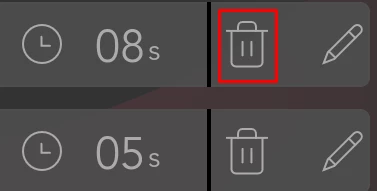
When I click on delete i execute the following code
void Display_Stages::Delete_Stage(uint8_t id)
{
 // Find element with m_id == id
 auto it = std::find_if(m_elements.begin(), m_elements.end(), [id](Stages_Element *elem)
 { return elem->Get_Id() == id; });

 if (it != m_elements.end())
 {
 delete *it;
 m_elements.erase(it);
 m_total_stages--;

 // Adjust m_stage_id if necessary
 if (m_stage_id == id && m_stage_id > 0)
 m_stage_id--;

 m_scroll_stages.invalidate();
 // Sort elements and update UI
 Sort_Elements();
 Resize_Slider();
 }
}
This code does find the item clicked and it does erase it from the elements list which i use to fill item data on m_scroll_stagesUpdateItem(Stages_Element &item, int16_t itemIndex)
But its like the scroll list updates the data so now the item that was on the 5th place is on the 4th place (i clicked the delete 4th item) but it doesnt erase the last element and i don't know how to tell it to redraw.

void Display_Stages::m_scroll_stagesUpdateItem(Stages_Element &item, int16_t itemIndex)
{
 item.Set_Id(m_elements[itemIndex]->Get_Id());
 item.Set_List_Number(m_elements[itemIndex]->Get_List_Number());
 item.Set_Pressure(m_elements[itemIndex]->Get_Pressure(), 0);
 item.Set_Time(m_elements[itemIndex]->Get_Time());
 item.Set_Callback(m_stage_callback);

 if (m_can_scroll)
 {
 m_slider.setValue(m_scroll_stages.getNumberOfItems() - itemIndex);
 }
 item.invalidate();
}
This is how I update the scroll List. It works fine on scrollable container but we need scroll list for memory reasons.