Roger.ch
Associate III
September 7, 2023
Solved

Is it possible to change the font of a text field during runtime.

  • September 7, 2023
  • 3 replies
  • 2526 views


We want to change the font and color of text fields at runtime. The text always remains the same. We only want to change to one of the predefined fonts.

Is this possible with TouchGFX?

Thank you for any advice.

Regards, Roger 

Best answer by Osman SOYKURT

Hello @Roger.ch ,

Changing the color is possible, you will find in the tutorial 6 on our support website, a guide to change it step by step.
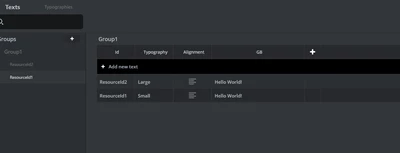
Concerning the font, it's not as easy as the color. In TouchGFX, all texts are associated with a certain typography. That means that if you need to change the font for a certain text in your application, you'll need to duplicate your text in the text database and change the font. So you'll have 2 resources with the same text but with different typographies.
OsmanSOYKURT_0-1694434944986.png

Changing the font runtime would also imply that in your code you'll need to change the text resource to show on your screen.


3 replies

Osman SOYKURT
Osman SOYKURTBest answer
Technical Moderator
September 11, 2023

Hello @Roger.ch ,

Changing the color is possible, you will find in the tutorial 6 on our support website, a guide to change it step by step.
Concerning the font, it's not as easy as the color. In TouchGFX, all texts are associated with a certain typography. That means that if you need to change the font for a certain text in your application, you'll need to duplicate your text in the text database and change the font. So you'll have 2 resources with the same text but with different typographies.

OsmanSOYKURT_0-1694434944986.png

Changing the font runtime would also imply that in your code you'll need to change the text resource to show on your screen.

Osman SOYKURTST Software Developer | TouchGFX
Roger.ch
Roger.chAuthor
Associate III
September 11, 2023

Hi Osman. 

Thank you for your answer. I know this from earlier applications with graphics processors. There I also had to write a character set generator for the characters used. Would have hoped that TouchGFX could specify two or more fonts per text. Many designers would like to highlight the same text with a different font.

Please put it on the "Nice to have" feature list.

Thanks. 

Regards, Roger 

Osman SOYKURT
Technical Moderator
September 12, 2023

Thank you for your feedback!

Osman SOYKURTST Software Developer | TouchGFX
CButz.1
Associate III
December 11, 2024

You can layer multiple textfields over each other and show the one with the approriate font.

For texts which are used multiple times, I use wildcards in the textfield and fill them like this:

Unicode::strncpy(wildcardBuffer, (const TypedText&)T_YOURTEXTID).getText(), WILDCARDBUFFER_SIZE);

However it is a performance degradation as you have to use wildcards and strncpy calls, but for projects with alot of reusable texts it can be a suitable solution.