

Question
Keyboard to programmatically change icon for key
Good evening!
I'm implementing a keyboard that looks like the three mockups below (you can ignore the fourth, "Numbers Compact"). I'm manipulating the basic "Keyboard Example" provided by TouchGFX.
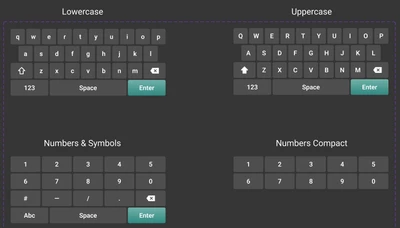
I have implemented two keyboard layouts - `alphaLayout` and `numLayout` and I programmatically switch between the two when the ABC/123 button is pressed. I am finding myself reaching for a third layout simply so I can have different icons for the SHIFT key between the lowercase and uppercase versions:
 uppercase version
 lowercase version
That seems silly, but I can't find any other way to change the icon on that one particular button for the unpressed state. Am I missing something?
Thanks,
Julia