
Associate
November 25, 2025
Solved

Partition a QSPI NOR Flash in memory mapped mode

  • November 25, 2025
  • 4 replies
  • 177 views

Post edited by ST moderator to be inline with the community rules for the code sharing. In next time please use </> button to paste your code or a script. Please read this post: How to insert source code.

Hi

This is something very easy that I am missing or impossible. I am using a nucleo-l476 to drive an RA8875 with a flash memory attached. This is using touch gfx to drive the RA8875 LCD. I am switching in/out of memory mapped mode to rewrite part of the flash memory so I can load different images into the flash memory and touch gfx will load the new images from the nor flash (This all works beautifully).

what I am trying to do is have touch gfx load an image to a different part of the nor flash using partitioning.  see linker below.


MEMORY

{

RAM (xrw) : ORIGIN = 0x20000000, LENGTH = 96K

RAM2 (xrw) : ORIGIN = 0x10000000, LENGTH = 32K

FLASH (rx) : ORIGIN = 0x8000000, LENGTH = 1024K

QSPI_NOR (xrw) : ORIGIN = 0x90000000, LENGTH = 8M

QSPI_NOR_P (xrw) : ORIGIN = 0x90800000, LENGTH = 8M

}


/* Sections */

SECTIONS

{

ExtFlashSectionP :

{

*(ExtFlashSection ExtFlashSection.*)

*(.gnu.linkonce.r.*)

. = ALIGN(0x100);

} >QSPI_NOR_P


ExtFlashSection :

{

*(ExtFlashSection ExtFlashSection.*)

*(.gnu.linkonce.r.*)

. = ALIGN(0x100);

} >QSPI_NOR


FontFlashSection :

{

*(FontFlashSection FontFlashSection.*)

*(.gnu.linkonce.r.*)

. = ALIGN(0x100);

} >QSPI_NOR

the issue is touch gfx wont show or allow me to write to the separate partition

on the nor flash. is what i am trying to do possible and if so what am i missing.
Best answer by Osman SOYKURT

Hello @drJonesy ,

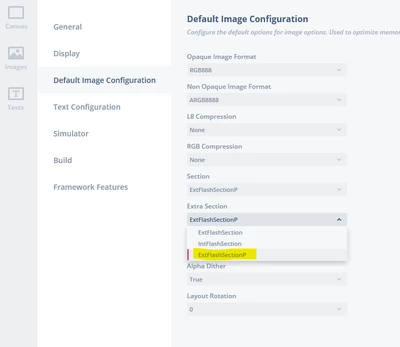
Yes quite easy (but hidden feature). Open your touchgfx file with a text editor and add your new ExtFlashSectionP  section like such:

 "AvailableSections": [
 "ExtFlashSection",
 "IntFlashSection",
	 "ExtFlashSectionP"
 ],

After that, you should be able to select it from the drop down list in your images settings for instance:

OsmanSOYKURT_0-1764945026886.png

Your linker looks good to me. So with only the changes i mentioned above, it should be working.

4 replies

Osman SOYKURT
Osman SOYKURTBest answer
Technical Moderator
December 5, 2025

Hello @drJonesy ,

Yes quite easy (but hidden feature). Open your touchgfx file with a text editor and add your new ExtFlashSectionP  section like such:

 "AvailableSections": [
 "ExtFlashSection",
 "IntFlashSection",
	 "ExtFlashSectionP"
 ],

After that, you should be able to select it from the drop down list in your images settings for instance:

OsmanSOYKURT_0-1764945026886.png

Your linker looks good to me. So with only the changes i mentioned above, it should be working.

Osman SOYKURTST Software Developer | TouchGFX
drJonesyAuthor
Associate
December 12, 2025

Thank you very much Osman, Will try this and let you know.

December 12, 2025

Yes — it’s possible, but keep it simple: map the NOR as a single memory-mapped region and use logical offsets (partitions) inside it, update your linker sections/TouchGFX resource pointers to those offsets, always exit QSPI memory-mapped mode before erase/programming (use indirect mode), perform erase/write to the partition, then re-enable memory-mapped mode and invalidate CPU caches so the MCU reads the new data; also ensure your QSPI driver supports both modes and your partitions align to NOR sector boundaries.

drJonesyAuthor
Associate
December 12, 2025

Hi Ghazali

As mentioned in the question, all that works well. The issue is, not being able to get Touch GFX to load images to the separate partition.  Which seems to be very easy to implement.

drJonesyAuthor
Associate
December 12, 2025

That was very easy. Thanks again Osman SOYKURT for your help.

Brief edit and update.  

System is working well with Touch GFX  loading the replaceable image to the new flash partition (so as to not effect the rest of the images stored) and  loading new images from SD-Card to the flash partition. With this method I could add more partitions and load other images to separate sections.