MPast.1
Senior
February 23, 2024
Solved

Qrcode is not interpretable

  • February 23, 2024
  • 5 replies
  • 11477 views

Hi everybody,

I'm trying to implement into a custom board, the dynamic Qrcode generation algorithm.

I'm using touchgfx 4.23.0, an SPI display with partial buffer strategy.

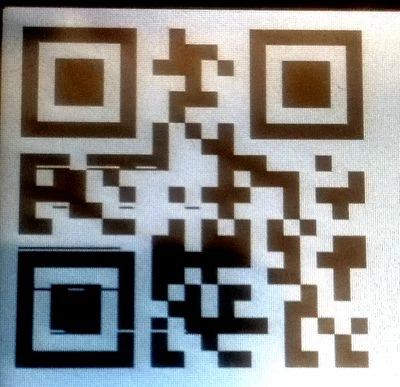
I would like to draw the string "https://support.touchgfx.com" . Display seem to draw it correctly but when I'm try to read it using my phone, this one is not readle. it seems not valid..

I'm using the following initialization sequence:


void Screen_QrCodeView::setupScreen()
{
Screen_QrCodeViewBase::setupScreen();

QR *code;

sprintf( string, "https://support.touchgfx.com");
code = new QR( string );

qrCode.setXY(10,10);
qrCode.setQRCode(code);
qrCode.setScale(8);
add(qrCode);
}
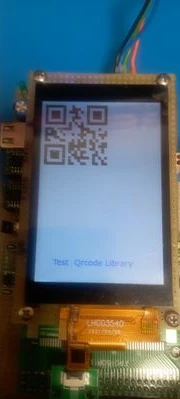


display screendisplay screenQrcode detailQrcode detail

I don't understand the reason. If I change the size of QrCode using qrCode.setScale the result is the same.

Is it possibile to change the resoltuion of the QrCode? Is the QrCode resolution too poor respect the modern APP algorithm?

Does someone ahs the same issue? Please, Can someone try to draw the string https://support.touchgfx.com and share the picture for a comparison, ?

What can I check in the project?


Thanks to all
 

This topic has been closed for replies.
Best answer by GaetanGodart

Hello @MPast.1 


Please find attached a custom container of a QrCode generator that I have made.
Note that the QrCode uses the Nayuki library in C++ (quite big) github.com/nayuki/QR-Code-generator with MIT license.


We are working on making a QrCode using the C version of the library in the near future.


From your last post, it seem like your board works fine with no tearing. Somehow the tearing only happens with the QrCode which is unfortunate but indicates that it could be an issue with the QrCode generation rather than tearing.
Does the tearing happens with scaling of 1?


To make the QrCode works even with the tearing you could try to increase the correction level (from what I know there is 4 levels of correction [this is different from the version number, the version number defines the number of dots]).


Finally, 2 QrCode displaying the same data could look different just because their version is not the same.
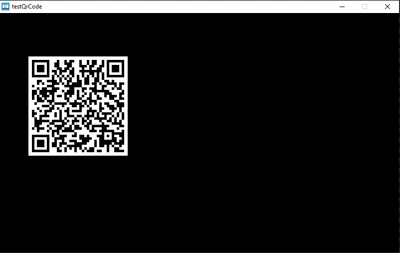
Here is mine running on TouchGFX simulator with quartile (3rd highest) level of correction (also works on board):

GaetanGodart_0-1708946260418.png


Regards,

5 replies

Pavel A.
Super User
February 23, 2024

PavelA_0-1708728671973.png


MPast.1
MPast.1Author
Senior
February 24, 2024

Why your Qrcode is so different?

Can you share your sources files, you use in the project?


Thanks

Andrew Neil
Super User
February 24, 2024

@MPast.1 wrote:

Why your Qrcode is so different?


Indeed it's very different:

AndrewNeil_1-1708767581771.png

Apart from the "tearing", yours seems to be missing a lot of points

A complex system that works is invariably found to have evolved from a simple system that worked.A complex system designed from scratch never works and cannot be patched up to make it work.
Andrew Neil
Super User
February 24, 2024

@MPast.1 wrote:

Display seem to draw it correctly


What makes you say that?

It's drawn something - but, clearly, what it's drawn is not correct!

There's a lot of "tearing" in your image:

AndrewNeil_0-1708767178596.png

Can you correctly draw any other text as a QR code?


sprintf( string, "https://support.touchgfx.com");
code = new QR( string );

You haven't shown the definition of string

What if you just do

code = new QR( "https://support.touchgfx.com" );


A complex system that works is invariably found to have evolved from a simple system that worked.A complex system designed from scratch never works and cannot be patched up to make it work.
Andrew Neil
Super User
February 24, 2024

This site gives what looks like the same result as @Pavel A. 

AndrewNeil_0-1708770681015.png

https://www.qr-code-generator.com/ 


A complex system that works is invariably found to have evolved from a simple system that worked.A complex system designed from scratch never works and cannot be patched up to make it work.
MPast.1
MPast.1Author
Senior
February 24, 2024

main screenmain screen

As you can see an example of correct scren with buttons, text and images.

String as decalred like "char"

QRCodeWidget qrCode;
char string[50];


Can be depend by display orientation?


Andrew Neil
Super User
February 24, 2024

Sorry, you missed my point: can you successfully display other things as QR codes ?

  • Other URLs as QR codes ?
  • Text other than URLs as QR codes ?

Also:

  • Have you checked your definition of string in your original code ?
  • Have you tried specifying the string as a literal directly in the constructor ?
A complex system that works is invariably found to have evolved from a simple system that worked.A complex system designed from scratch never works and cannot be patched up to make it work.
MPast.1
MPast.1Author
Senior
February 24, 2024

1708789060040.jpg1708790629533.jpg


After updating Code with others sources files, finally Now it works correctly: I can rappresent anykind of text.

Remain to understand why is so dirty. Should the parial frame buffer system be the cause?


Graduate II
February 24, 2024

@MPast.1 wrote:

Should the parial frame buffer system be the cause?


Hello

I think it is possible, are you rendering it directly to the framebuffer like in this example:

https://support.touchgfx.com/docs/development/ui-development/touchgfx-engine-features/custom-widgets#example-source-code

What if you set scale to 1, can you still see 'dirty' pixels ?

Br JTP


MPast.1
MPast.1Author
Senior
February 24, 2024

1708799552836.jpg

The problem is always present when setScale is set more than 2.

It seems that algorithm forgot to draw and compiles wrong pixels.. very strange..

Another observation = I use 3 "large" buffer for draw screens..

Touchgfx config.png

If I don't wrong in 115200 bytes Touchgfx could draw 120 full rows . (my calcualtions= 115200 / (320 columns * 3 bytes (RGB)) = 120 rows). I know that partial buffer mode doesn't draw screens like single buffer, but I think that my buffer size can be enought fro draw a small square (100 x 100 pixel) on the screen.


At this point I need to check what happens inside the QrCode algorithms


GaetanGodart
GaetanGodartBest answer
Technical Moderator
February 26, 2024

Hello @MPast.1 


Please find attached a custom container of a QrCode generator that I have made.
Note that the QrCode uses the Nayuki library in C++ (quite big) github.com/nayuki/QR-Code-generator with MIT license.


We are working on making a QrCode using the C version of the library in the near future.


From your last post, it seem like your board works fine with no tearing. Somehow the tearing only happens with the QrCode which is unfortunate but indicates that it could be an issue with the QrCode generation rather than tearing.
Does the tearing happens with scaling of 1?


To make the QrCode works even with the tearing you could try to increase the correction level (from what I know there is 4 levels of correction [this is different from the version number, the version number defines the number of dots]).


Finally, 2 QrCode displaying the same data could look different just because their version is not the same.
Here is mine running on TouchGFX simulator with quartile (3rd highest) level of correction (also works on board):

GaetanGodart_0-1708946260418.png


Regards,

MPast.1
MPast.1Author
Senior
February 29, 2024

hi @GaetanGodart ,

sorry for my late response but I want to confirm you taht your solution works perfectly.

I try different sizes and everything is drawn correctly without any wrong pixel.

1709235018399.jpg

Thank you very much