
Associate III
August 11, 2025
Question

Regarding addition of text and font section in linker file using TouchGFX

  • August 11, 2025
  • 2 replies
  • 403 views

Goal: I need to store my newly added assets (images, fonts and texts generated from STM's touchGFX designer) in the existing project (which already has set of assets in it).

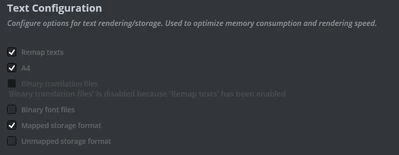
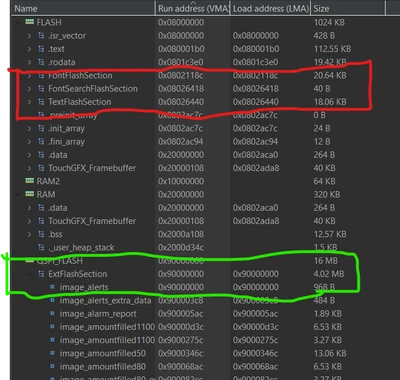
BUG: The newly added assets (maybe text area, image, fonts) to the existing project, are not displaying properly. (My assumption is, the added assets might be stored inside the internal flash, because of it's large space, the data is overflowing, because of this the image is not properly displaying, instead it should store inside the external flash, I am facing issues with storing the external flash despite enabling the mapped storage format in the touchGFX designer).

Help me to implement how I can move the contents of internal flash to external flash, so that the assets will be stored inside the external flash.
Abhiram_12_0-1754913195491.png

Abhiram_12_2-1754913336921.png

Thanks,


2 replies

ST Employee
August 14, 2025

Hello @Abhiram_12.

You can control the placement of different sections in your linker script. It appears that you are using STM32CubeIDE, so, to place all sections in external flash, ensure you have something similar to the following in the linker script.

 FontFlashSection :
 {
 *(FontFlashSection FontFlashSection.*)
 *(.gnu.linkonce.r.*)
 . = ALIGN(0x4);
 } >QSPI_FLASH

 FontSearchFlashSection :
 {
 *(FontFlashSection FontFlashSection.*)
 *(.gnu.linkonce.r.*)
 . = ALIGN(0x4);
 } >QSPI_FLASH

 TextFlashSection :
 {
 *(TextFlashSection TextFlashSection.*)
 *(.gnu.linkonce.r.*)
 . = ALIGN(0x4);
 } >QSPI_FLASH

 ExtFlashSection :
 {
 *(ExtFlashSection ExtFlashSection.*)
 *(.gnu.linkonce.r.*)
 . = ALIGN(0x4);
 } >QSPI_FLASH

Best regards,
Johan

Associate III
September 17, 2025

@JohanAstrup thanks, will try it out!