

Martin294
Associate III
August 17, 2024
Question

Rename project for opening in STM32CubeIDE

  • August 17, 2024
  • 3 replies
  • 1492 views

Hello all,

I am trying out different projects based on the F469I discovery board. Unfortunately they show up in STM32CubeIDE as having the same name, so it refused to open them.
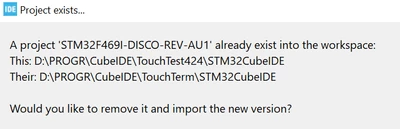
Martin294_0-1723908818806.png

This problem has been around for a long time, with a rather ugly workaround:

https://community.st.com/t5/stm32-mcus-touchgfx-and-gui/touchgfx-designer-generated-projects-have-the-same-name-in/td-p/598919

Any updates? Is someone working on that? I find that rather annoying.

Thanks! Martin


3 replies

MM..1
Chief III
August 17, 2024

When your project names equal your workspaces must differ ...

Martin294
Martin294Author
Associate III
August 18, 2024

... which I would consider an even uglier workaround.


What I did (and seems to work for now) is:

1. Create project from template in TouchGFXDesigner

2. Close designer before changing anything

2. In Notepad++, do a file search and replace in the project directory for STM32F469I-DISCO-REV-AU1 to a different project name (23 occurences changed)

3. In addition, rename two files (touchgfx and debug configuration) from STM32F469I-DISCO-REV-AU1

4. Open ToughGFXDesigner, generate code

5. Double click on .project to open STM32CubeIDE

6. Build and debug.


ST Employee
August 20, 2024

Hello @Martin294,

I know this issue is annoying, however, fixing it is not as simple as it sounds, and might introduce a whole new set of problems. Therefore, we have decided not to change it for now.

A possible solution would be to rename the .ioc file, and delete the STM32CubeIDE directory. Then open the STM32CubeMX project, regenerate code. Open TouchGFX project and regenerate code. This will result in a STM32CubeIDE project with the name you set for the .ioc file. But, keep in mind that this results in default configuration for the STM32CubeIDE project, and you have to change some of the configurations to match the project which is always created by TouchGFX.

Renaming STM32CubeMX projectRenaming STM32CubeMX project 

So, I guess your current workaround might be better since it retains the project settings.

I apologize for the inconvenience. 
Best regards,

Martin294
Martin294Author
Associate III
August 21, 2024

Hello @Mohammad MORADI ESFAHANIASL ,

sorry to hear no fix is in sight.

Maybe a suggestion: I could imagine that renaming an existing project is difficult. But what about when you create a project from a template? You could add a project name field (in addition to the location and file name entry fields) that lets the user change the project name.

One still would have the situation that only when trying to import at STM32CubeIDE one would realize that one should have changed the project name, but next time you could change it. Particularly when experimenting with different projects on the same board that would be a great help!


Regards, Martin

ST Employee
August 28, 2024

Yes, I see your point, but, the main problem is that STM32CubeIDE project's name is derived from the STM32CubeMX (.ioc) project and not TouchGFX. Therefore, a proper and accessible solution is not available now. 

Kind regards,