ToniT
Associate
February 27, 2024
Solved

scrollable container

  • February 27, 2024
  • 2 replies
  • 1386 views

Hi,

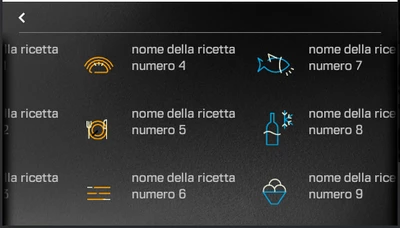
i have a scrollable container with some objects inside:

ToniT_0-1709043288012.png

on the left and right i have these images:

ToniT_1-1709043818917.png       ToniT_2-1709043862841.png

i need to hide the images images on left and right border according to scroll position and number of objects:

  • if objects are <= 6 hide left and right images
  • if objects > 6 and scroll is full right hide left and show right
  • if objects > 6 and scroll is full left show left and hide right
  • if objects > 6 and scroll is on middle show left and right

Any suggestion?

This topic has been closed for replies.
Best answer by GaetanGodart

Hello @ToniT ,


I took some freedom and assumed you wanted to display you side images only when you are able to scroll in the direction of the image (assuming that 6 objects make is so that the container cannot fully hold all the elements but this is only true with a specific size of elements).


I implemented a handleTickEvent function that is called 60 times per second and check the current "amount of scroll" to see if we are scrolled completely to the right, in the middle or to the left and set visible or not the side images :

void Screen1View::handleTickEvent()
{
 boxLeft.setVisible(scrollableContainer1.getChildrenContainedArea().x<0);
 boxRight.setVisible(scrollableContainer1.getChildrenContainedArea().right()-scrollableContainer1.getWidth()>0);
 boxLeft.invalidate();
 boxRight.invalidate();

 //to see the values
 if(0 == tickCount%60) //every sec
 {
 Rect containedArea = scrollableContainer1.getChildrenContainedArea();
 touchgfx_printf("\nleft : %03d\t|\tright : %03d", containedArea.x, containedArea.right());
 touchgfx_printf("\nleft : %03d\t|\tright : %03d (minus width [%03d])", containedArea.x, containedArea.right()-scrollableContainer1.getWidth(), scrollableContainer1.getWidth());
 }

 tickCount++;
}

 Please find attached my project.


Hope this answers your question.

If you really want to check the amount of children, you can iterate through the children and count them :

Drawable* child = firstChild;
		
		// child found (!=0)
		while (child)
		{
			// set the touchable property of that child
			childCount++;;
			
			// find next sibling
			child = child->nextSibling;
		}


Regards,

2 replies

GaetanGodart
GaetanGodartBest answer
Technical Moderator
February 27, 2024

Hello @ToniT ,


I took some freedom and assumed you wanted to display you side images only when you are able to scroll in the direction of the image (assuming that 6 objects make is so that the container cannot fully hold all the elements but this is only true with a specific size of elements).


I implemented a handleTickEvent function that is called 60 times per second and check the current "amount of scroll" to see if we are scrolled completely to the right, in the middle or to the left and set visible or not the side images :

void Screen1View::handleTickEvent()
{
 boxLeft.setVisible(scrollableContainer1.getChildrenContainedArea().x<0);
 boxRight.setVisible(scrollableContainer1.getChildrenContainedArea().right()-scrollableContainer1.getWidth()>0);
 boxLeft.invalidate();
 boxRight.invalidate();

 //to see the values
 if(0 == tickCount%60) //every sec
 {
 Rect containedArea = scrollableContainer1.getChildrenContainedArea();
 touchgfx_printf("\nleft : %03d\t|\tright : %03d", containedArea.x, containedArea.right());
 touchgfx_printf("\nleft : %03d\t|\tright : %03d (minus width [%03d])", containedArea.x, containedArea.right()-scrollableContainer1.getWidth(), scrollableContainer1.getWidth());
 }

 tickCount++;
}

 Please find attached my project.


Hope this answers your question.

If you really want to check the amount of children, you can iterate through the children and count them :

Drawable* child = firstChild;
		
		// child found (!=0)
		while (child)
		{
			// set the touchable property of that child
			childCount++;;
			
			// find next sibling
			child = child->nextSibling;
		}


Regards,

ToniT
ToniTAuthor
Associate
February 28, 2024

HI,

it's exactly what I needed, works great.
Thank you