

jchernus-fikst
Senior
April 16, 2025
Solved

Scrollable container doesn't show scrollbar

  • April 16, 2025
  • 2 replies
  • 591 views

Hi there,

I have the following setup duplicated thrice in my project - to select three distinct parameters to define an object.

jchernusfikst_0-1744839882486.png

Each listLayout is programmatically populated with a number of items (buttons). 

One screen has 5 items, the other two have 6. Five items fit perfectly on a screen and don't require a scrollbar, while six items require scrolling to see the final item. 

However, none of the scrollableContainer display their scrollbar until I touch the screen, despite me configuring it to do so (at least, that's what I think "Show scrollbars" means):
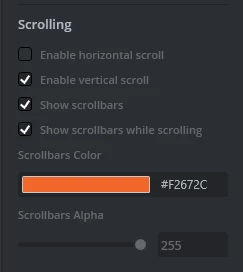
jchernusfikst_1-1744840034855.png

What am I doing wrong? How can I ensure that the vertical scroll bar is shown, by default, when I open a screen with more items than fit on a screen?

Thanks,

Julia


Best answer by jchernus-fikst

I couldn't figure out how to set this in TouchGFX Designer, but I was successfull at setting it programmatically, like so:

scrollableContainer.setScrollbarsPermanentlyVisible(true);

as I'd learned in the TouchGFX docs.

I only have the vertical scrollbar set as visible, and it now appears as soon as I open the screen with this item.

2 replies

jchernus-fikst
jchernus-fikstAuthorBest answer
Senior
April 18, 2025

I couldn't figure out how to set this in TouchGFX Designer, but I was successfull at setting it programmatically, like so:

scrollableContainer.setScrollbarsPermanentlyVisible(true);

as I'd learned in the TouchGFX docs.

I only have the vertical scrollbar set as visible, and it now appears as soon as I open the screen with this item.

ferro
Lead
April 18, 2025

This combo works for me in 4.25

ferro_0-1744997395456.png