FJB2069
Senior
January 20, 2025
Solved

scrollWheel index incorrect, not responsive

  • January 20, 2025
  • 2 replies
  • 1515 views

I want to create a scrollWheel that has 3 preset options.  Option A, Option B,  and Option A&B

The issue I have is that I can never get itemIndex  = 1 in scrollWheelUpdateItem callback , only index 0 and 2.  Also, after I first change wheel, it takes a while to be able to change it again.

I tried to provide all the relevant code and touchgfx setup.  

Appreciate if you can tell me what is incorrect.


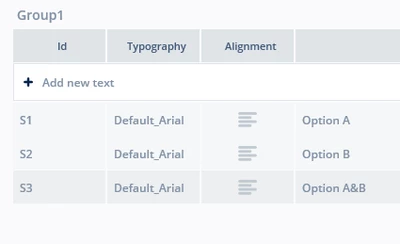
Here is my Container  (MenuItem):
FJB2069_1-1737391403340.png

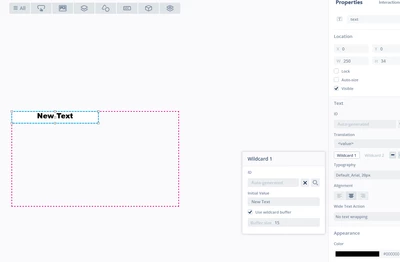
Here is how I set up my text:

FJB2069_0-1737391266784.png

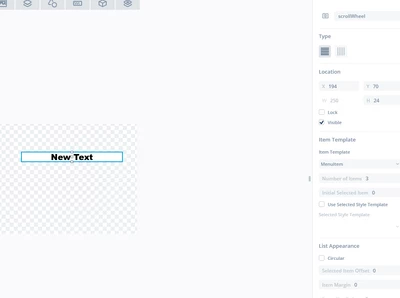
scrollWheel:

FJB2069_2-1737391503713.png


Here is Container MenuItem.cpp:

#include <gui/containers/MenuItem.hpp>
#include <texts/TextKeysAndLanguages.hpp>
#include <BitmapDatabase.hpp>


MenuItem::MenuItem()
{

}

void MenuItem::initialize()
{
 MenuItemBase::initialize();
}

void MenuItem::setWheelElements(int item)
{
	switch (item)
	{
	case 0:
		text.invalidate();
		text.setTypedText(TypedText(T_S1));
		break;
	case 1:
		text.invalidate();
			text.setTypedText(TypedText(T_S2));
			break;
	case 2:
		text.invalidate();
			text.setTypedText(TypedText(T_S3));
			break;

	}

}

MenuItem.hpp:

#ifndef MENUITEM_HPP
#define MENUITEM_HPP

#include <gui_generated/containers/MenuItemBase.hpp>

class MenuItem : public MenuItemBase
{
public:
 MenuItem();
 virtual ~MenuItem() {}

 virtual void initialize();
 void setWheelElements(int item);
protected:
};

#endif // MENUITEM_HPP

Buttons1MenuView.cpp

#include <gui/buttons1menu_screen/Buttons1MenuView.hpp>
#include <gui_generated/common/FrontendApplicationBase.hpp>
#include "config_file.h"
#include "math.h"


Buttons1MenuView::Buttons1MenuView()
{

}

void Buttons1MenuView::setupScreen()
{
 Buttons1MenuViewBase::setupScreen();

 
}

void Buttons1MenuView::tearDownScreen()
{
 Buttons1MenuViewBase::tearDownScreen();
}


void Buttons1MenuView::scrollWheelUpdateItem(MenuItem& item, int16_t itemIndex)
 {
	scrollWheel.invalidate(); //NOT SURE IF NEEDED
 	item.setWheelElements(itemIndex);

 }

Buttons1MenuView.hpp

#ifndef BUTTONS1MENUVIEW_HPP
#define BUTTONS1MENUVIEW_HPP

#include <gui_generated/buttons1menu_screen/Buttons1MenuViewBase.hpp>
#include <gui/buttons1menu_screen/Buttons1MenuPresenter.hpp>

class Buttons1MenuView : public Buttons1MenuViewBase
{
public:
 Buttons1MenuView();
 virtual ~Buttons1MenuView() {}
 virtual void setupScreen();
 virtual void tearDownScreen();
 
 virtual void scrollWheelUpdateItem(MenuItem& item, int16_t itemIndex);


protected:
};

#endif // BUTTONS1MENUVIEW_HPP


Best answer by FJB2069

I missed that, thank you!

2 replies

FJB2069
FJB2069Author
Senior
January 20, 2025

I increased the size of the scrollWheel window (still making it only show one item) it responds much better and I do now get valid itemIndex, accept the index number does agree to what I thought it should be.

FJB2069_1-1737395078839.png

In other words,  I assume Option A should have index 0,  Option B index 1 and Option AB index 2,

but I get Option A index 1, Option B index 2 and Option AB index 0

Anyone know why the indexes as not as expected?


GaetanGodart
Technical Moderator
January 21, 2025

Hello @FJB2069 ,


Getting the "right" index when using a scrollWheel is tricky.
This is because it is not meant to be accessed. Instead, the scrollWheel should be used as a menu selector to navigate through your application or to select various options.
Therefore, you should only use the 2 callbacks provided setitempressedcallback and setitemselectedcallback .

So in a way I am avoiding your question because this is not how you should use the scrollWheel and I invite you to not use the index but only the 2 callbacks if you can.
If you really want to use the index of the elements, you should use the scrollList.


I hope this helps.


Regards,

FJB2069
FJB2069Author
Senior
January 21, 2025

I changed from a scrollWheel to a scrollList.  I get exact same results.


1) How might I implement setitemselectedcallback in my existing code?  

I tried below, but will not trigger?

2) Also,  I need to initialize the scrollList.  How can I do this in Buttons1MenuView::setupScreen()?


Buttons1MenuView.hpp


#ifndef BUTTONS1MENUVIEW_HPP
#define BUTTONS1MENUVIEW_HPP

#include <gui_generated/buttons1menu_screen/Buttons1MenuViewBase.hpp>
#include <gui/buttons1menu_screen/Buttons1MenuPresenter.hpp>

class Buttons1MenuView : public Buttons1MenuViewBase
{
public:
 Buttons1MenuView();
 virtual ~Buttons1MenuView() {}
 virtual void setupScreen();
 virtual void tearDownScreen();
 virtual void buttonRGOPressed();
// virtual void button2H1BPressed();
// virtual void button2H2BPressed();
 virtual void scrollListUpdateItem(MenuItem& item, int16_t itemIndex);
 virtual void scrollListItemSelectedCallbackHandler(const touchgfx::ScrollList&, int itemIndex);


 void saveCurrentScreenIndex(int screenIndex)
 {
 	 presenter->saveCurrentScreenIndex(screenIndex);
 }

 int getCurrentScreenIndex()
 {
 	 return presenter->getCurrentScreenIndex();

 }

protected:
 touchgfx::Callback<Buttons1MenuView, const touchgfx::ScrollList&, int> itemSelectedCallback;
};

#endif // BUTTONS1MENUVIEW_HPP


Buttons1MenuView.cpp


#include <gui/buttons1menu_screen/Buttons1MenuView.hpp>
#include <gui_generated/common/FrontendApplicationBase.hpp>
#include "config_file.h"
#include "math.h"

static int8_t index_trig;
static int position;


Buttons1MenuView::Buttons1MenuView() : itemSelectedCallback(this, &Buttons1MenuView::scrollListItemSelectedCallbackHandler)
{
 // Initialization code for ScrollList, if needed
	
}


void Buttons1MenuView::setupScreen()
{
 Buttons1MenuViewBase::setupScreen();

 saveCurrentScreenIndex(8);


}

void Buttons1MenuView::tearDownScreen()
{
 Buttons1MenuViewBase::tearDownScreen();
}


void Buttons1MenuView::buttonRGOPressed()
 {
 // Override and implement this function in Buttons1Menu

		 if(textButtonRGO.isVisible())
		 {
			 //turn off
			 CONFIG.RGOMode[CONFIG.mode]=0;
			 textButtonRGO.setVisible(0);
		 }
		 else
		 {
			 CONFIG.RGOMode[CONFIG.mode]=1;
						 textButtonRGO.setVisible(1);
		 }
		 textButtonRGO.invalidate();
 }


void Buttons1MenuView::scrollListUpdateItem(MenuItem& item, int16_t itemIndex)
 {


	if(itemIndex==0)
		index_trig = itemIndex;
	else if(itemIndex==1)
		index_trig = itemIndex;
	else if(itemIndex==2)
		index_trig = itemIndex;

		item.setWheelElements(itemIndex);

		scrollList.invalidate();
		index_trig = itemIndex;


 }


void Buttons1MenuView::scrollListItemSelectedCallbackHandler(const touchgfx::ScrollList&, int itemIndex)
{
	// Handle item selection here
	position = itemIndex;
	// Example: Update a text area with the selected item
	// Unicode::snprintf(selectedItemTextBuffer, TEXT_BUFFER_SIZE, "Selected: %d", itemIndex);
	// selectedItemText.invalidate();
}


Osman SOYKURT
Technical Moderator
January 29, 2025

Hello @FJB2069 ,

I'm not sure about the issue you're having. I've tried on my side to make an application similar to what you want to achieve (from what I understood). It works fine on my side. I'm sharing it here. Please let me know if this was what you wanted to achieve.

Osman SOYKURTST Software Developer | TouchGFX