
Visitor II
June 30, 2025
Solved

setVisible() and invalidate() don't work when they are in if/switch~case statement.
  • June 30, 2025
  • 2 replies
  • 753 views

emi1123_0-1751247172566.png

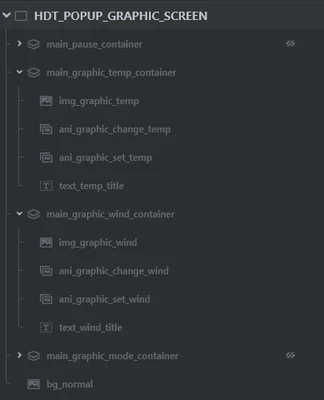
I made some containers in 1 screen. (please refer to attached image)

I wanted to handle these containers depends on h/w key.

e.g. temp key is pressed, all of the containers in HDT_POPUP_GRAPHIC_SCREEN must be disabled. only

main_graphic_temp_container will be showed up.


However, 

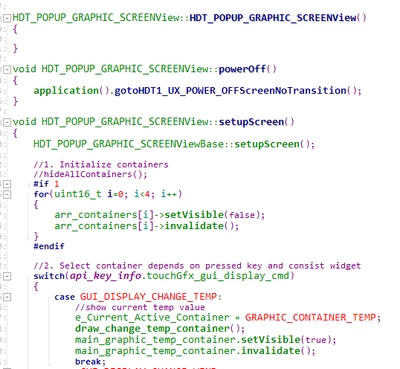
main_graphic_temp_container.setVisible(true);
main_graphic_temp_container.invalidate();

doesn't work normally, when these codes are in the switch~case statement.
emi1123_1-1751247431430.png


I tried to move these codes to the end of the setupScreen(), not in the switch~case statement.

In that case, 

main_graphic_temp_container.setVisible(true);
main_graphic_temp_container.invalidate();

works normally.

Am I wrong to use these two (setVisible, invalidate) methods?


This topic has been closed for replies.
Best answer by Maxime_MARCHETTO

Hello @emi1123,

This post has been escalated to the ST Online Support Team for additional assistance.  We'll contact you directly.

Best regards,
Maxime

2 replies

GaetanGodart
Technical Moderator
June 30, 2025

Hello @emi1123 and welcome to the community!


Am I wrong to use these two (setVisible, invalidate) methods?


It should be fine.

Can you make sure you do reach that case by adding a print or setting a breakpoint?


Regards,

Maxime_MARCHETTOBest answer
ST Employee
July 9, 2025

Hello @emi1123,

This post has been escalated to the ST Online Support Team for additional assistance.  We'll contact you directly.

Best regards,
Maxime

​In order to give better visibility on the answered topics, please click on 'Accept as Solution' on the reply which solved your issue or answered your question.