
Associate III
February 22, 2024
Solved

simply change pages screen

  • February 22, 2024
  • 2 replies
  • 924 views

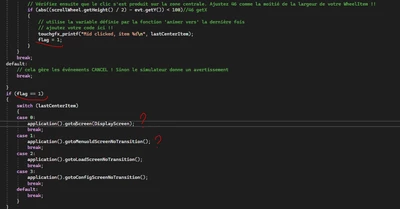
When a condition is validated, for example clicking in the middle of the scroll whell (flag == 1), how to change page, I can't do it? I've tried several things but I can't find anything explicit and clear in the posts or tutorials.
NicoEFI_2-1708627916614.png


This topic has been closed for replies.
Best answer by JTP1

Hello

Just add to some of your screen interactions for changing screen - Screen x for all necessary screens. Its not needed to put any trigger to those interaction.

Then generate code and check generated function names from FrontendApplicationBase.cpp file. Then just call those functions from your switch-case structure.

Check my earlier answer here, maybe its enough clear:

https://community.st.com/t5/stm32-mcus-touchgfx-and-gui/frontendapplication-cpp-is-overwritten-when-he-code-is-generated/td-p/572550

Br JTP


2 replies

JTP1Best answer
Graduate II
February 22, 2024

Hello

Just add to some of your screen interactions for changing screen - Screen x for all necessary screens. Its not needed to put any trigger to those interaction.

Then generate code and check generated function names from FrontendApplicationBase.cpp file. Then just call those functions from your switch-case structure.

Check my earlier answer here, maybe its enough clear:

https://community.st.com/t5/stm32-mcus-touchgfx-and-gui/frontendapplication-cpp-is-overwritten-when-he-code-is-generated/td-p/572550

Br JTP


NicoEFIAuthor
Associate III
February 22, 2024

Many thanks :grinning_face: