Associate
July 12, 2024
Question

SPI, LTDC and TouchGFX init of Adafruit 4" Round LCD HD40015C40-Y

  • July 12, 2024
  • 4 replies
  • 7036 views

Hi Everyone I have a some difficulties with bringing up the HD40015C40-Y display with TouchGFX or even at all:

1. I used the init code provided by adafruit, I set up my SPI with 9bit words and sent it to the display as per the datasheet for the NV3052CRGB datasheet.

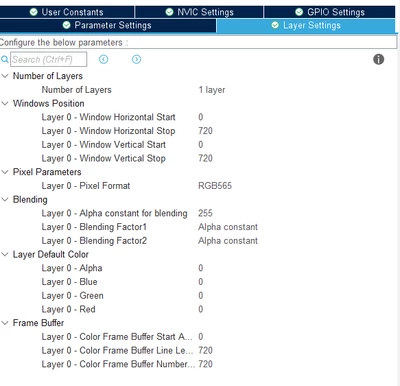
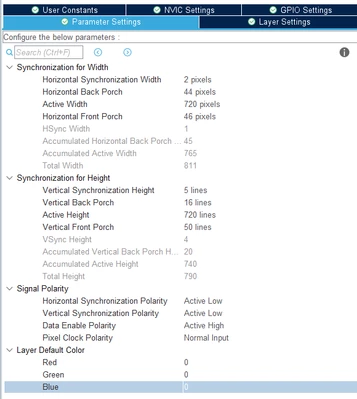
2. TouchGFX is already setup and LTDC is setup to the timings described in the  https://www.adafruit.com/product/5793 init code. 


3. I have very strange rainbow lines behaviour
Currently I am running a 35Mhz clock. The 35Mhz clock was derived from the linux device tree overlay for the HD40015C40-Y display. 
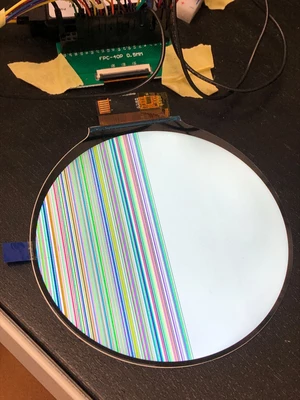
SkeleSt_0-1720762206550.png


4. Things I do know: SPI transmission definitely works. There are physical signals for the LTDC pins coming from the STM chip as I checked with an oscilloscope.


Interestingly if you read the Circuit Python code from Adafruit, they only have 16Mhz frequency.

I have no idea if this is a software problem, hardware problem or a combination of both. 


void Wrt_Reg_3052(uint8_t Par1,uint8_t Par2)
{
	// 9 bit mode
	command = 0;
	command|= Par1;

	parameter = 256;
	parameter |= Par1;

	HAL_GPIO_WritePin(CS_PIN_GPIO_Port, CS_PIN_Pin ,GPIO_PIN_RESET);
	HAL_SPI_Transmit(&hspi1, (uint8_t*)&command,1, 1000);
	HAL_SPI_Transmit(&hspi1, (uint8_t*)&parameter,1, 1000);
	HAL_GPIO_WritePin(CS_PIN_GPIO_Port, CS_PIN_Pin, GPIO_PIN_SET);
}
uint8_t NV3051D_Init()
{
	Wrt_Reg_3052(0xFF,0x30);
	Wrt_Reg_3052(0xFF,0x52);
	Wrt_Reg_3052(0xFF,0x01);
	Wrt_Reg_3052(0xE3,0x00);
	Wrt_Reg_3052(0x0A,0x11);
	Wrt_Reg_3052(0x23,0xA0);//A2
	Wrt_Reg_3052(0x24,0x32);
	Wrt_Reg_3052(0x25,0x12);
	Wrt_Reg_3052(0x26,0x2E);
	Wrt_Reg_3052(0x27,0x2E);

	Wrt_Reg_3052(0x29,0x02);
	Wrt_Reg_3052(0x2A,0xCF);
	Wrt_Reg_3052(0x32,0x34);
	Wrt_Reg_3052(0x38,0x9C);
	Wrt_Reg_3052(0x39,0xA7);
	Wrt_Reg_3052(0x3A,0x27);
	Wrt_Reg_3052(0x3B,0x94);
	Wrt_Reg_3052(0x42,0x6D);
	Wrt_Reg_3052(0x43,0x83);
	Wrt_Reg_3052(0x81,0x00);
	Wrt_Reg_3052(0x91,0x67);
	Wrt_Reg_3052(0x92,0x67);
	Wrt_Reg_3052(0xA0,0x52);
	Wrt_Reg_3052(0xA1,0x50);
	Wrt_Reg_3052(0xA4,0x9C);
	Wrt_Reg_3052(0xA7,0x02);
	Wrt_Reg_3052(0xA8,0x02);
	Wrt_Reg_3052(0xA9,0x02);
	Wrt_Reg_3052(0xAA,0xA8);
	Wrt_Reg_3052(0xAB,0x28);
	Wrt_Reg_3052(0xAE,0xD2);
	Wrt_Reg_3052(0xAF,0x02);
	Wrt_Reg_3052(0xB0,0xD2);
	Wrt_Reg_3052(0xB2,0x26);
	Wrt_Reg_3052(0xB3,0x26);
	Wrt_Reg_3052(0xFF,0x30);
	Wrt_Reg_3052(0xFF,0x52);
	Wrt_Reg_3052(0xFF,0x02);
	Wrt_Reg_3052(0xB1,0x0A);
	Wrt_Reg_3052(0xD1,0x0E);
	Wrt_Reg_3052(0xB4,0x2F);
	Wrt_Reg_3052(0xD4,0x2D);
	Wrt_Reg_3052(0xB2,0x0C);
	Wrt_Reg_3052(0xD2,0x0C);
	Wrt_Reg_3052(0xB3,0x30);
	Wrt_Reg_3052(0xD3,0x2A);
	Wrt_Reg_3052(0xB6,0x1E);
	Wrt_Reg_3052(0xD6,0x16);
	Wrt_Reg_3052(0xB7,0x3B);
	Wrt_Reg_3052(0xD7,0x35);
	Wrt_Reg_3052(0xC1,0x08);
	Wrt_Reg_3052(0xE1,0x08);
	Wrt_Reg_3052(0xB8,0x0D);
	Wrt_Reg_3052(0xD8,0x0D);
	Wrt_Reg_3052(0xB9,0x05);
	Wrt_Reg_3052(0xD9,0x05);
	Wrt_Reg_3052(0xBD,0x15);
	Wrt_Reg_3052(0xDD,0x15);
	Wrt_Reg_3052(0xBC,0x13);
	Wrt_Reg_3052(0xDC,0x13);
	Wrt_Reg_3052(0xBB,0x12);
	Wrt_Reg_3052(0xDB,0x10);
	Wrt_Reg_3052(0xBA,0x11);
	Wrt_Reg_3052(0xDA,0x11);
	Wrt_Reg_3052(0xBE,0x17);
	Wrt_Reg_3052(0xDE,0x17);
	Wrt_Reg_3052(0xBF,0x0F);
	Wrt_Reg_3052(0xDF,0x0F);
	Wrt_Reg_3052(0xC0,0x16);
	Wrt_Reg_3052(0xE0,0x16);
	Wrt_Reg_3052(0xB5,0x2E);
	Wrt_Reg_3052(0xD5,0x3F);
	Wrt_Reg_3052(0xB0,0x03);
	Wrt_Reg_3052(0xD0,0x02);
	Wrt_Reg_3052(0xFF,0x30);
	Wrt_Reg_3052(0xFF,0x52);
	Wrt_Reg_3052(0xFF,0x03);
	Wrt_Reg_3052(0x08,0x09);
	Wrt_Reg_3052(0x09,0x0A);
	Wrt_Reg_3052(0x0A,0x0B);
	Wrt_Reg_3052(0x0B,0x0C);
	Wrt_Reg_3052(0x28,0x22);
	Wrt_Reg_3052(0x2A,0xE9);
	Wrt_Reg_3052(0x2B,0xE9);
	Wrt_Reg_3052(0x34,0x51);
	Wrt_Reg_3052(0x35,0x01);
	Wrt_Reg_3052(0x36,0x26);
	Wrt_Reg_3052(0x37,0x13);
	Wrt_Reg_3052(0x40,0x07);
	Wrt_Reg_3052(0x41,0x08);
	Wrt_Reg_3052(0x42,0x09);
	Wrt_Reg_3052(0x43,0x0A);
	Wrt_Reg_3052(0x44,0x22);
	Wrt_Reg_3052(0x45,0xDB);
	Wrt_Reg_3052(0x46,0xdC);
	Wrt_Reg_3052(0x47,0x22);
	Wrt_Reg_3052(0x48,0xDD);
	Wrt_Reg_3052(0x49,0xDE);
	Wrt_Reg_3052(0x50,0x0B);
	Wrt_Reg_3052(0x51,0x0C);
	Wrt_Reg_3052(0x52,0x0D);
	Wrt_Reg_3052(0x53,0x0E);
	Wrt_Reg_3052(0x54,0x22);
	Wrt_Reg_3052(0x55,0xDF);
	Wrt_Reg_3052(0x56,0xE0);
	Wrt_Reg_3052(0x57,0x22);
	Wrt_Reg_3052(0x58,0xE1);
	Wrt_Reg_3052(0x59,0xE2);
	Wrt_Reg_3052(0x80,0x1E);
	Wrt_Reg_3052(0x81,0x1E);
	Wrt_Reg_3052(0x82,0x1F);
	Wrt_Reg_3052(0x83,0x1F);
	Wrt_Reg_3052(0x84,0x05);
	Wrt_Reg_3052(0x85,0x0A);
	Wrt_Reg_3052(0x86,0x0A);
	Wrt_Reg_3052(0x87,0x0C);
	Wrt_Reg_3052(0x88,0x0C);
	Wrt_Reg_3052(0x89,0x0E);
	Wrt_Reg_3052(0x8A,0x0E);
	Wrt_Reg_3052(0x8B,0x10);
	Wrt_Reg_3052(0x8C,0x10);
	Wrt_Reg_3052(0x8D,0x00);
	Wrt_Reg_3052(0x8E,0x00);
	Wrt_Reg_3052(0x8F,0x1F);
	Wrt_Reg_3052(0x90,0x1F);
	Wrt_Reg_3052(0x91,0x1E);
	Wrt_Reg_3052(0x92,0x1E);
	Wrt_Reg_3052(0x93,0x02);
	Wrt_Reg_3052(0x94,0x04);
	Wrt_Reg_3052(0x96,0x1E);
	Wrt_Reg_3052(0x97,0x1E);
	Wrt_Reg_3052(0x98,0x1F);
	Wrt_Reg_3052(0x99,0x1F);
	Wrt_Reg_3052(0x9A,0x05);
	Wrt_Reg_3052(0x9B,0x09);
	Wrt_Reg_3052(0x9C,0x09);
	Wrt_Reg_3052(0x9D,0x0B);
	Wrt_Reg_3052(0x9E,0x0B);
	Wrt_Reg_3052(0x9F,0x0D);
	Wrt_Reg_3052(0xA0,0x0D);
	Wrt_Reg_3052(0xA1,0x0F);
	Wrt_Reg_3052(0xA2,0x0F);
	Wrt_Reg_3052(0xA3,0x00);
	Wrt_Reg_3052(0xA4,0x00);
	Wrt_Reg_3052(0xA5,0x1F);
	Wrt_Reg_3052(0xA6,0x1F);
	Wrt_Reg_3052(0xA7,0x1E);
	Wrt_Reg_3052(0xA8,0x1E);
	Wrt_Reg_3052(0xA9,0x01);
	Wrt_Reg_3052(0xAA,0x03);

	Wrt_Reg_3052(0xFF,0x30);
	Wrt_Reg_3052(0xFF,0x52);
	Wrt_Reg_3052(0xFF,0x00);
	Wrt_Reg_3052(0x36,0x0A);
	Wrt_Reg_3052(0x11,0x00);
	HAL_Delay(200);
	Wrt_Reg_3052(0x29,0x00);
	HAL_Delay(100);

	for (int i = 0; i < 50; i++){
		HAL_GPIO_TogglePin(GPIOD, USER_LD2_RED_Pin|USER_LD3_GREEN_Pin);
		HAL_Delay(30);
	}
	return 1;
}
 

SkeleSt_1-1720762471699.pngSkeleSt_2-1720762480100.png


4 replies

SkeleStAuthor
Associate
July 17, 2024

 have realized an error in my function. I have changed the Par1 to Par2 for the parameter. I have progressed to a different screen. 


void Wrt_Reg_3052(uint8_t Par1,uint8_t Par2)
{
	// 9 bit mode
	command = 0;
	command|= Par1;

	parameter = 256;
	parameter |= Par1;

	HAL_GPIO_WritePin(CS_PIN_GPIO_Port, CS_PIN_Pin ,GPIO_PIN_RESET);
	HAL_SPI_Transmit(&hspi1, (uint8_t*)&command,1, 1000);
	HAL_SPI_Transmit(&hspi1, (uint8_t*)&parameter,1, 1000);
	HAL_GPIO_WritePin(CS_PIN_GPIO_Port, CS_PIN_Pin, GPIO_PIN_SET);
}

SkeleSt_1-1721201505278.png

I've had different permutations and combinations of Vsync and it has yielded different artefacts such as the number of lines appearing. However none of this reflects what my GUI design is supposed to look like.

SkeleSt_4-1721201548711.png


I have the image even TouchGFX GUI animating in the simulator but there is no change on the display.

So it seems to be stuck somewhere between SPI initialization and LTDC? If I turn off the power, it will lose this state. So SPI init seems to be working to an extent, however I cannot see the desired image. Anyone have any ideas?


INaee.1
Associate II
July 18, 2024

Hi SkeleSt ,,

I played with 5inch TFT having NV3052 chip with 720x1280 resolution.

The interface was SPI+RGB

Instead of Hardware SPI , I used software SPI function for Initialized .

Here is TouchGFX , running on 5.0" ,, 720X1280 ,, RGB + SPI TFT with STM32F429i-DISCOVERY
LCD PART No. TL050HDV31CT5-H1206A
The lcd driver chip/COG is NV3052

_legacyfs_online_stmicro_images_0693W00000dDSwFQAW.png

Let me know if you need help , fixing errors.

regards

I.N


Visitor II
July 20, 2024

Hi Skele,

I'm doing a very similar activity and I am currently in the middle of the debug.

I have an MPU board that is not able to light up the display properly (even if the signals are correct), and for this reason, I've bought a complete adafruit kit, and I'm currently doing some tests on it.

I won't mention here the microcontroller that came with the display in this kit, but after having flashed the associated binary image, the display is running properly.


Here is what I've discovered until now:

This microcontroller is running the pixelclock at 16MHz, but if I raise it to 35MHz the display is still lighted up; there is a lot of flickering and the image is not stable but it is always present. See below pictures (on the left pixelclock = 16MHz, on the right 35MHz)


WhatsApp Image 2024-07-20 at 22.25.05.jpeg

 16 MHz

WhatsApp Image 2024-07-20 at 22.23.27.jpeg


Moreover, I verified that the following register initialization works properly after having mounted the kit:

https://cdn-shop.adafruit.com/product-files/5793/5793_initcode.txt

To do better debugging I reduced that list of registers initialization, and I verified that the minimal registers initialization to have the display working properly is the following one (register, datalen, value):

tmp_init_sequence = [

0xff, 0x01, 0x30,
0xff, 0x01, 0x52,
0xff, 0x01, 0x01, // Page 1
0x0a, 0x01, 0x11,
0x23, 0x01, 0xa0,
0x29, 0x01, 0x02,
0x2a, 0x01, 0xcf,

0xff, 0x01, 0x30,
0xff, 0x01, 0x52,
0xff, 0x01, 0x03, // Page 3
0x82, 0x01, 0x1f,
0x83, 0x01, 0x1f,
0x85, 0x01, 0x0a,
0x86, 0x01, 0x0a,
0x87, 0x01, 0x0c,
0x88, 0x01, 0x0c,
0x89, 0x01, 0x0e,
0x8a, 0x01, 0x0e,
0x8b, 0x01, 0x10,
0x8c, 0x01, 0x10,
0x8f, 0x01, 0x1f,
0x90, 0x01, 0x1f,
0x93, 0x01, 0x02,
0x94, 0x01, 0x04,
0x9a, 0x01, 0x05,

0xff, 0x01, 0x30,
0xff, 0x01, 0x52,
0xff, 0x01, 0x00,  // Page 0
0x36, 0x01, 0x0a,
0x11, 0x01, 0x00,
0x29, 0x01, 0x00]

I cannot shrink the list more than this, in particular, if I comment out the PANELU2D1~44:80H~ABH on Page 3, there is an effect similar to the one you showed in your photo.

I'll let you be aware of any progress.

Cheers

Giuseppe

SkeleStAuthor
Associate
July 22, 2024

Hi Guiseppe and I.N,

thanks for replying. Regarding, 35Mhz is it possible that is due to signal integrity? The data should not be any different correct? Theorhetically if you try 18Mhz, 20Mhz etc. The data should be stable?
I read App note AN4861 and to get 60fps for 720x720 at 18bit we need at least 35Mhz clock.


Also see Lady Ada from Adafruit achieve high fps with ICN6211 here: https://www.tiktok.com/@adafruit/video/7301032769637993770

https://www.youtube.com/watch?v=CZ8xDk7Tw4g 


From my understanding the Adafruit Microcontroller only updates at around 30fps which is a primary reason I wanted to move to a STM32U5 based system with Neochrom.


Regarding, the minimal init sequence you are sending the bytes with 9 bit words in STM32?

9bit cmd + 9bit parameter? + 9bit parameter? How is this achieved?

SkeleSt_0-1721612110673.png

 compared to the Write_Reg_3052(cmd,param);


Regards,

Skele.


INaee.1
Associate II
July 22, 2024

Hi SkeleSt ,,

at first look , i suspect the init codes are not properly transmitting to NV3052.

As i mentioned before , I used software spi solution of 9-bit frame .


below is my nv3052c.h

#include "stm32f4xx_hal.h"
#include "stm32f4xx_hal_gpio.h"
//#include "stdint.h"

/* Define for connection, redefine if needed */

/* Define for module SPI */

/* Define the pins tp connect */

/* Define for Chip Select Pin */
#define CS_PORT						GPIOC
#define CS_PIN						GPIO_PIN_8

/* Define for Data/Command Pin */
#define SCL_PORT					GPIOE
#define SCL_PIN						GPIO_PIN_2

/* Define for Data/Command Pin */
#define SDA_PORT					GPIOE
#define SDA_PIN						GPIO_PIN_6

/* Define for Backlite Pin */
#define BL_PORT						GPIOG
#define BL_PIN						GPIO_PIN_3

/* End Define For Connection */

/* Define private useful macro */
#define SPI_ENABLE	HAL_GPIO_WritePin(CS_PORT,CS_PIN,GPIO_PIN_RESET);
#define SPI_DISABLE HAL_GPIO_WritePin(CS_PORT,CS_PIN,GPIO_PIN_SET);

/* Define private useful macro */
#define BL_ENABLE		HAL_GPIO_WritePin(BL_PORT,BL_PIN,GPIO_PIN_SET)
#define BL_DISABLE 	HAL_GPIO_WritePin(BL_PORT,BL_PIN,GPIO_PIN_RESET)

#define LCD_SDA0 		HAL_GPIO_WritePin(SDA_PORT,SDA_PIN,GPIO_PIN_RESET);
#define LCD_SDA1 		HAL_GPIO_WritePin(SDA_PORT,SDA_PIN,GPIO_PIN_SET);

#define LCD_SCL0 		HAL_GPIO_WritePin(SCL_PORT,SCL_PIN,GPIO_PIN_RESET);
#define LCD_SCL1 		HAL_GPIO_WritePin(SCL_PORT,SCL_PIN,GPIO_PIN_SET);

/* Define For TFT */
#define LCD_W 1280
#define LCD_H 720

/* Define string mode for tft_puts */
#define TFT_STRING_MODE_NO_BACKGROUND		0x01
#define TFT_STRING_MODE_BACKGROUND			0x00

extern uint16_t BACK_COLOR, POINT_COLOR;

/* Control Registers and constant codes */
#define NOP 0x00
#define SWRESET 0x01
#define RDDID 0x04
#define RDDST 0x09

#define SLPIN 0x10
#define SLPOUT 0x11
#define PTLON 0x12
#define NORON 0x13

#define INVOFF 0x20
#define INVON 0x21
#define DISPOFF 0x28
#define DISPON 0x29
#define CASET 0x2A
#define PASET 0x2B
#define RAMWR 0x2C
#define RAMRD 0x2E

#define PTLAR 0x30
#define COLMOD 0x3A
#define MADCTL 0x36


/** 
 * Memory Data Access Control Register (0x36H)
 * MAP: D7 D6 D5 D4 D3 D2 D1 D0 
 * param: MY MX MV ML RGB MH - -
 * 
 */ 

/* Page Address Order ('0': Top to Bottom, '1': the opposite) */
#define NV3052C_MADCTL_MY 0x02
/* Column Address Order ('0': Left to Right, '1': the opposite) */
#define NV3052C_MADCTL_MX 0x01
/* Page/Column Order ('0' = Normal Mode, '1' = Reverse Mode) */
/* RGB/BGR Order ('0' = RGB, '1' = BGR) */
#define NV3052C_MADCTL_RGB 0x08

#define NV3052C_RDID1 0xDA
#define NV3052C_RDID2 0xDB
#define NV3052C_RDID3 0xDC
#define NV3052C_RDID4 0xDD

/* Choose a display rotation you want to use: (0-3) */
//#define NV3052C_ROTATION 0
//#define NV3052C_ROTATION 1 
//#define NV3052C_ROTATION 2				// use Normally on 240x240
#define NV3052C_ROTATION 3


#define NV3052C_COLOR_MODE_16bit 0x55 // RGB565 (16bit)
#define NV3052C_COLOR_MODE_18bit 0x66 // RGB666 (18bit)

/* Declaring Function Prototype */

/***************************************************** User Function ************************************************************/
/********************************************************************************************************************************/
/********************************************************************************************************************************/
/********************************************************************************************************************************/

void NV3052C_Init(void); 
void NV3052C_SetRotation(uint8_t m);

/******************************************************** Private Function ******************************************************/
/********************************************************************************************************************************/
/********************************************************************************************************************************/
/********************************************************************************************************************************/
/* Private Function Do Not Use In User Program */
void tft_add_set(uint16_t x1,uint16_t y1,uint16_t x2,uint16_t y2);
void NV3052C_WriteSmallData(uint8_t data);
void tft_write_data(uint16_t data);
void NV3052C_WriteCommand(int8_t data);
void LCDSetXY(int x, int y);
void LCDSetCircle(int x0, int y0, int radius, int color);
void LCDSetPixel(int x, int y, int color);
void LCDSetLine(int x1, int y1, int x2, int y2, int color);
void LCDSetRect(int x0, int y0, int x1, int y1, unsigned char fill, int color);
void DefaultAxis(void);

void LCDPutChar(char c, int x, int y, int size, int fcolor, int bcolor);
void LCDPutString(char *pString, int x, int y, int Size, int fColor, int bColor);
void LCD_Clear (unsigned short color);

void LCDWriteWiFiLogo(unsigned int x, unsigned int y,unsigned int size_x, unsigned int size_y, unsigned int state);
void FIVE_inch_init(void);
void WriteSpiCommand(volatile unsigned int command);
void WriteSpiData(volatile unsigned int data);
void shiftBits(char b);
void write_Reg_3052(unsigned int command,unsigned int data);

below is my nv3052c.c

#include "nv3052c.h"


void write_Reg_3052(unsigned int command,unsigned int data);

/*---------------------- Graphic LCD size definitions ------------------------*/
#define WIDTH 1280 /* Screen Width (in pixels) */
#define HEIGHT 720 /* Screen Hight (in pixels) */
/******************************************************************************/

// *****************************************************************************
// 	function.c
// *****************************************************************************
/***************************************************** User Function ************************************************************/
void FIVE_inch_init(void)
{	
	BL_ENABLE;

 write_Reg_3052(0xFF,0x30);
 write_Reg_3052(0xFF,0x52);
 write_Reg_3052(0xFF,0x01); //page1 
 write_Reg_3052(0xE3,0x00);
 write_Reg_3052(0xf6,0xc0);
 write_Reg_3052(0xf0,0x00);
 write_Reg_3052(0xf3,0x00);
 write_Reg_3052(0xf5,0x00);
 write_Reg_3052(0x40,0x0a); 
 write_Reg_3052(0x32,0x34);
 write_Reg_3052(0x23,0xa2); 
 write_Reg_3052(0x43,0x83);
 write_Reg_3052(0x42,0x6d);
 write_Reg_3052(0x24,0x10);
 write_Reg_3052(0x25,0x10);
 write_Reg_3052(0x26,0x2e);
 write_Reg_3052(0x27,0x2e);
 write_Reg_3052(0x81,0x00);
 write_Reg_3052(0x91,0x55);
 write_Reg_3052(0x92,0x66);
 write_Reg_3052(0xaa,0xa8);
 write_Reg_3052(0xab,0x28);
 write_Reg_3052(0xae,0xd2);
 write_Reg_3052(0xaf,0x02);
 write_Reg_3052(0xb0,0xd2);
 write_Reg_3052(0xb2,0x26);
 write_Reg_3052(0xb3,0x26);
 write_Reg_3052(0xA0,0x52); 
 write_Reg_3052(0xA1,0x50); 
 write_Reg_3052(0x3b,0x94); 
 write_Reg_3052(0xA4,0x9C); 
 write_Reg_3052(0x3a,0x30);
 write_Reg_3052(0x38,0x9c);
 write_Reg_3052(0x39,0xa7);
 //Gamma
 write_Reg_3052(0xFF,0x30);
 write_Reg_3052(0xFF,0x52);
 write_Reg_3052(0xFF,0x02);
 //VRP0~VRP5
 write_Reg_3052(0xB0,0x07);
 write_Reg_3052(0xB1,0x04);
 write_Reg_3052(0xB2,0x03);
 write_Reg_3052(0xB3,0x23);
 write_Reg_3052(0xB4,0x21);
 write_Reg_3052(0xB5,0x2b);
 //PRP0,0xPRP1
 write_Reg_3052(0xB6,0x08);
 write_Reg_3052(0xB7,0x2b);
 //PKP0~PKP9
 write_Reg_3052(0xB8,0x0a);
 write_Reg_3052(0xB9,0x01);
 write_Reg_3052(0xBA,0x11);
 write_Reg_3052(0xBB,0x0f);
 write_Reg_3052(0xBC,0x12);
 write_Reg_3052(0xBD,0x13);
 write_Reg_3052(0xBE,0x17);
 write_Reg_3052(0xBF,0x0f);
 write_Reg_3052(0xC0,0x16);
 write_Reg_3052(0xC1,0x06);
 //VRN0~VRN5
 write_Reg_3052(0xD0,0x02);
 write_Reg_3052(0xD1,0x0a);
 write_Reg_3052(0xD2,0x05);
 write_Reg_3052(0xD3,0x2f);
 write_Reg_3052(0xD4,0x35);
 write_Reg_3052(0xD5,0x3e);
 //PRN0,0xPRN1
 write_Reg_3052(0xD6,0x0d);
 write_Reg_3052(0xD7,0x33);
 //PKN0~PKN9
 write_Reg_3052(0xD8,0x0c);
 write_Reg_3052(0xD9,0x02);
 write_Reg_3052(0xDA,0x11);
 write_Reg_3052(0xDB,0x0f);
 write_Reg_3052(0xDC,0x12);
 write_Reg_3052(0xDD,0x14);
 write_Reg_3052(0xDE,0x18);
 write_Reg_3052(0xDF,0x0e);
 write_Reg_3052(0xE0,0x16);
 write_Reg_3052(0xE1,0x07);
 write_Reg_3052(0xFF,0x30);
 write_Reg_3052(0xFF,0x52);
 write_Reg_3052(0xFF,0x03); //page3
 write_Reg_3052(0x05,0x00); //gip_vst_tchop low
 write_Reg_3052(0x06,0x00); //gip_vst_tglue low
 write_Reg_3052(0x07,0x02); //gip_vst_width
 write_Reg_3052(0x08,0x07); //gip_vst_shift1 07
 write_Reg_3052(0x09,0x08); //gip_vst_shift2 08
 write_Reg_3052(0x0a,0x09); //gip_vst_shift3 09
 write_Reg_3052(0x0b,0x0a); //gip_vst_shift4 0a
 //ECLK
 write_Reg_3052(0x70,0x0f); //eclk_width
 write_Reg_3052(0x71,0xc0); //eclk_tchop
 write_Reg_3052(0x34,0xb1); //gip_clk_tchop high
 write_Reg_3052(0x35,0x77); 
 write_Reg_3052(0x36,0x20); ///gip_clk_tchop low80
 write_Reg_3052(0x37,0x13); ///gip_clk_width
 //GCLKA1/2/3/4
 write_Reg_3052(0x40,0x09); //clk_start 0a
 write_Reg_3052(0x41,0x0a); //clk_start 0b
 write_Reg_3052(0x42,0x0b); //clk_start 0c
 write_Reg_3052(0x43,0x0c); //clk_start 0d
 write_Reg_3052(0x45,0x11); //clk_stop 0e
 write_Reg_3052(0x46,0x12); //clk_stop 0f
 write_Reg_3052(0x48,0x13); //clk_stop 10
 write_Reg_3052(0x49,0x14); //clk_stop 11
 //GCLKB1/2/3/4
 write_Reg_3052(0x50,0x0d); //clk_start 0e
 write_Reg_3052(0x51,0x0e); //clk_start 0f
 write_Reg_3052(0x52,0x0f); //clk_start 10
 write_Reg_3052(0x53,0x10); //clk_start 11
 write_Reg_3052(0x55,0x15); //clk_stop 12
 write_Reg_3052(0x56,0x16); //clk_stop 13
 write_Reg_3052(0x58,0x17); //clk_stop 14
 write_Reg_3052(0x59,0x18); //clk_stop 15
 write_Reg_3052(0x80,0x1f); //FW
 write_Reg_3052(0x81,0x00); //BW
 write_Reg_3052(0x82,0x15); //GPWR1
 write_Reg_3052(0x83,0x16); //GPWR2
 write_Reg_3052(0x84,0x0e); //clkb2,0xclk1_l
 write_Reg_3052(0x85,0x10); //clkb4,0xclk2_l
 write_Reg_3052(0x86,0x0a); //clka2,0xclk3_l
 write_Reg_3052(0x87,0x0c); //clka4,0xclk4_l
 write_Reg_3052(0x88,0x02); //vst2,0xstv1_l
 write_Reg_3052(0x8A,0x04); //vst4,0xstv2_l
 write_Reg_3052(0x96,0x1f); //FW
 write_Reg_3052(0x97,0x00); //BW
 write_Reg_3052(0x98,0x17); //GPWR1
 write_Reg_3052(0x99,0x18); //GPWR2
 write_Reg_3052(0x9a,0x0d); //clkb1,0xclk1_r
 write_Reg_3052(0x9b,0x0f); //clkb3,0xclk2_r
 write_Reg_3052(0x9c,0x09); //clka1,0xclk3_r
 write_Reg_3052(0x9d,0x0b); //clka3,0xclk4_r
 write_Reg_3052(0x9e,0x01); //vst1,0xstv1_r
 write_Reg_3052(0xA0,0x03); //vst3,0xstv2_r
 write_Reg_3052(0xb0,0x00);
 write_Reg_3052(0xb1,0x1f);
 write_Reg_3052(0xb2,0x15);
 write_Reg_3052(0xb3,0x16);
 write_Reg_3052(0xb4,0x0b);
 write_Reg_3052(0xb5,0x09);
 write_Reg_3052(0xb6,0x0f);
 write_Reg_3052(0xb7,0x0d);
 write_Reg_3052(0xb8,0x03);
 write_Reg_3052(0xba,0x01);
 write_Reg_3052(0xc6,0x00);
 write_Reg_3052(0xc7,0x1f);
 write_Reg_3052(0xc8,0x17);
 write_Reg_3052(0xc9,0x18);
 write_Reg_3052(0xca,0x0c);
 write_Reg_3052(0xcb,0x0a);
 write_Reg_3052(0xcc,0x10);
 write_Reg_3052(0xcd,0x0e);
 write_Reg_3052(0xce,0x04);
 write_Reg_3052(0xd0,0x02);
	
 write_Reg_3052(0xFF,0x30);
 write_Reg_3052(0xFF,0x52);
 write_Reg_3052(0xFF,0x00);
// write_Reg_3052(0x36,0x03);

 NV3052C_SetRotation(1);

 write_Reg_3052(0x35,0x01);
 write_Reg_3052(0x11,0x00);
 HAL_Delay(120);	

 write_Reg_3052(0x29,0x00);
 HAL_Delay(120);


} 
// *****************************************************************************
// 	function.c
// *****************************************************************************
void NV3052C_SetRotation(uint8_t m)
{
	
	switch (m) {
	case 0:
		write_Reg_3052(MADCTL,NV3052C_MADCTL_MX );
		break;
	case 1:
		write_Reg_3052(MADCTL,NV3052C_MADCTL_MY );
		break;
	case 2:
		write_Reg_3052(MADCTL,NV3052C_MADCTL_MX | NV3052C_MADCTL_MY );
		break;
	case 3:
		write_Reg_3052(MADCTL,NV3052C_MADCTL_MX | NV3052C_MADCTL_MY | NV3052C_MADCTL_RGB);
		break;
	default:
		break;
	}
}
// *****************************************************************************
// WriteSpiCommand.c
// *****************************************************************************
void WriteSpiCommand(volatile unsigned int command)
{
 LCD_SCL0;
 LCD_SDA0; //0 for cmd
 LCD_SCL1;
 shiftBits(command);
 
}
// *****************************************************************************
// WriteSpiData.c
// *****************************************************************************
void WriteSpiData(volatile unsigned int data)
{
 LCD_SCL0;
 LCD_SDA1; //1 for param
 LCD_SCL1;
 shiftBits(data);
}
// *****************************************************************************
// shiftBits
// *****************************************************************************
void shiftBits(char b)
{
 LCD_SCL0;
 if ((b&128)!=0) {LCD_SDA1;} else LCD_SDA0;
 LCD_SCL1;
 LCD_SCL0;

 if ((b&64)!=0) {LCD_SDA1;} else LCD_SDA0;
 LCD_SCL1;
 LCD_SCL0;

 if ((b&32)!=0) {LCD_SDA1;} else LCD_SDA0;
 LCD_SCL1;
 LCD_SCL0;

 if ((b&16)!=0) {LCD_SDA1;} else LCD_SDA0;
 LCD_SCL1;
 LCD_SCL0;

 if ((b&8)!=0) {LCD_SDA1;} else LCD_SDA0;
 LCD_SCL1;
 LCD_SCL0;

 if ((b&4)!=0) {LCD_SDA1;} else LCD_SDA0;
 LCD_SCL1;
 LCD_SCL0;

 if ((b&2)!=0) {LCD_SDA1;} else LCD_SDA0;
 LCD_SCL1;
 LCD_SCL0;

 if ((b&1)!=0) {LCD_SDA1;} else LCD_SDA0;
 LCD_SCL1;

}
// *****************************************************************************
// 	function.c
// *****************************************************************************
void write_Reg_3052(unsigned int command,unsigned int data)
{
	SPI_ENABLE;
	WriteSpiCommand(command);
	WriteSpiData(data);
	SPI_DISABLE;
}


You need to define your software SPI's Clock & Data Pins in MX.

You also need to bit modify the above codes as per your resolution.

I hop , after proper initialization , you will get the proper display .

regarding the Pixel Clock frequency ,, first use lower frequencies to test the display but display (complete frame) will flicker due to low refresh rate but don't worry.:face_with_tears_of_joy:

let me know the outcomes of your test with 9-bit software SPI.


regards

I.N

CommanderCloud
Associate II
July 22, 2024

Hello,


I have been working on a similar screen, and I have had similar lines. I doubt that it is the initialization code, because it wasn't for me. I tested it two ways - I found that the display controller has an onboard register that displays a white screen when set, and another which displays a test image (if your display controller is a Sitronix ST7701S, the code in the file attached can display those images). If you can get those, your initialization code is arriving properly. The other way I tested it was as follows. I bought an HDMI converter board which can correctly initialize the display and run it, so I hooked up a logic analyzer to the relevant SPI pins and was able to capture the initialization code, and it was identical to what the manufacturer for the display provided. This leads to what I think is the problem: I hooked up the logic analyzer to the HDMI board and was able to get the sync timings, porches and polarities. The signals that came out of the HDMI board were completely different to the signals from my custom board, and the polarities were not what I expected from what the labels suggest (Active High did not mean what I thought it did). So, the polarities and timings were wrong.


Hope it helps :)

Kind regards, Cloud

SkeleStAuthor
Associate
July 31, 2024

Okay, latest update:

Some extra information to bring up. I am using the STM32U5G9J-DK2 with the pinout modified to work on the display. I've modified the code such that it should work with a 720x720 framebuffer and do SPI init on the display. So in a sense I am not starting the project on a new board. That said, I don't believe this should cause the display to not work. If you create a project based on this in TouchGFXDesigner, you will end with the same base code I have.


I've purchased the Adafruit Microcontroller to compare. My SPI init sequence is 1 to 1 according to logic analyser with the exception of chip select not being down the whole time, I changed that and it didn't make a difference.

The next thing I did was start probing the clock signals on the Adafruit. I found it to be running at 12Mhz. I was using the rainbow demo and it was flickering however I think this is a problem with the code Adafruit provided and not so much the init or display itself.


I also measured the colour signals on the oscilliscope and found that to be sending data as expected.

And then I found out that my STM program is not sending any colour signal on the oscilloscope and that the Model::Tick() only runs once and then does not continue... This seems to be a problem with my codebase so I decided to start a new STM project.


Now I have colour signal again however... it is still the white stripes. I am at square one again.
The display refuses to display any of the LTDC signals despite receiving valid PLK, VS, HS clock signals and even colour signals (measured on oscilliscope).
The only signal I haven't been able to verify is the DE signal due to the small probe to measure. Even then, I think it is unlikely data enable isn't working.

SkeleSt_0-1722413111636.png

Would anyone know how to extract the Vsync, Hsync FP and BP values from the adafruit. If it makes sense, it should be the same as the ones provided by Adafruit themselves and I should not have to investigate this.

Maybe some things I can try is bit banging directly to the RGB outputs. Or somehow testing LTDC before entering TouchGFX and RTOS loop, if that is possible?

Otherwise mostly, I'm not sure where to go from here.

/**
 * @brief LTDC Initialization Function
 * @PAram None
 * @retval None
 */
static void MX_LTDC_Init(void)
{

 /* USER CODE BEGIN LTDC_Init 0 */

 /* USER CODE END LTDC_Init 0 */

 LTDC_LayerCfgTypeDef pLayerCfg = {0};

 /* USER CODE BEGIN LTDC_Init 1 */

 /* USER CODE END LTDC_Init 1 */
 hltdc.Instance = LTDC;
 hltdc.Init.HSPolarity = LTDC_HSPOLARITY_AL;
 hltdc.Init.VSPolarity = LTDC_VSPOLARITY_AL;
 hltdc.Init.DEPolarity = LTDC_DEPOLARITY_AH;
 hltdc.Init.PCPolarity = LTDC_PCPOLARITY_IIPC;
 hltdc.Init.HorizontalSync = 1;
 hltdc.Init.VerticalSync = 4;
 hltdc.Init.AccumulatedHBP = 45;
 hltdc.Init.AccumulatedVBP = 20;
 hltdc.Init.AccumulatedActiveW = 765;
 hltdc.Init.AccumulatedActiveH = 740;
 hltdc.Init.TotalWidth = 811;
 hltdc.Init.TotalHeigh = 790;
 hltdc.Init.Backcolor.Blue = 0;
 hltdc.Init.Backcolor.Green = 255;
 hltdc.Init.Backcolor.Red = 0;
 if (HAL_LTDC_Init(&hltdc) != HAL_OK)
 {
 Error_Handler();
 }
 pLayerCfg.WindowX0 = 0;
 pLayerCfg.WindowX1 = 720;
 pLayerCfg.WindowY0 = 0;
 pLayerCfg.WindowY1 = 720;
 pLayerCfg.PixelFormat = LTDC_PIXEL_FORMAT_RGB565;
 pLayerCfg.Alpha = 255;
 pLayerCfg.Alpha0 = 0;
 pLayerCfg.BlendingFactor1 = LTDC_BLENDING_FACTOR1_CA;
 pLayerCfg.BlendingFactor2 = LTDC_BLENDING_FACTOR2_CA;
 pLayerCfg.FBStartAdress = 0;
 pLayerCfg.ImageWidth = 720;
 pLayerCfg.ImageHeight = 720;
 pLayerCfg.Backcolor.Blue = 0;
 pLayerCfg.Backcolor.Green = 0;
 pLayerCfg.Backcolor.Red = 0;
 if (HAL_LTDC_ConfigLayer(&hltdc, &pLayerCfg, 0) != HAL_OK)
 {
 Error_Handler();
 }
 /* USER CODE BEGIN LTDC_Init 2 */

 /* USER CODE END LTDC_Init 2 */

}


static void MX_SPI1_Init(void)
{

 /* USER CODE BEGIN SPI1_Init 0 */

 /* USER CODE END SPI1_Init 0 */

 SPI_AutonomousModeConfTypeDef HAL_SPI_AutonomousMode_Cfg_Struct = {0};

 /* USER CODE BEGIN SPI1_Init 1 */

 /* USER CODE END SPI1_Init 1 */
 /* SPI1 parameter configuration*/
 hspi1.Instance = SPI1;
 hspi1.Init.Mode = SPI_MODE_MASTER;
 hspi1.Init.Direction = SPI_DIRECTION_1LINE;
 hspi1.Init.DataSize = SPI_DATASIZE_9BIT;
 hspi1.Init.CLKPolarity = SPI_POLARITY_HIGH;
 hspi1.Init.CLKPhase = SPI_PHASE_2EDGE;
 hspi1.Init.NSS = SPI_NSS_SOFT;
 hspi1.Init.BaudRatePrescaler = SPI_BAUDRATEPRESCALER_256;
 hspi1.Init.FirstBit = SPI_FIRSTBIT_MSB;
 hspi1.Init.TIMode = SPI_TIMODE_DISABLE;
 hspi1.Init.CRCCalculation = SPI_CRCCALCULATION_DISABLE;
 hspi1.Init.CRCPolynomial = 0x7;
 hspi1.Init.NSSPMode = SPI_NSS_PULSE_DISABLE;
 hspi1.Init.NSSPolarity = SPI_NSS_POLARITY_LOW;
 hspi1.Init.FifoThreshold = SPI_FIFO_THRESHOLD_01DATA;
 hspi1.Init.MasterSSIdleness = SPI_MASTER_SS_IDLENESS_00CYCLE;
 hspi1.Init.MasterInterDataIdleness = SPI_MASTER_INTERDATA_IDLENESS_00CYCLE;
 hspi1.Init.MasterReceiverAutoSusp = SPI_MASTER_RX_AUTOSUSP_DISABLE;
 hspi1.Init.MasterKeepIOState = SPI_MASTER_KEEP_IO_STATE_DISABLE;
 hspi1.Init.IOSwap = SPI_IO_SWAP_DISABLE;
 hspi1.Init.ReadyMasterManagement = SPI_RDY_MASTER_MANAGEMENT_INTERNALLY;
 hspi1.Init.ReadyPolarity = SPI_RDY_POLARITY_HIGH;
 if (HAL_SPI_Init(&hspi1) != HAL_OK)
 {
 Error_Handler();
 }
 HAL_SPI_AutonomousMode_Cfg_Struct.TriggerState = SPI_AUTO_MODE_DISABLE;
 HAL_SPI_AutonomousMode_Cfg_Struct.TriggerSelection = SPI_GRP1_GPDMA_CH0_TCF_TRG;
 HAL_SPI_AutonomousMode_Cfg_Struct.TriggerPolarity = SPI_TRIG_POLARITY_RISING;
 if (HAL_SPIEx_SetConfigAutonomousMode(&hspi1, &HAL_SPI_AutonomousMode_Cfg_Struct) != HAL_OK)
 {
 Error_Handler();
 }
 /* USER CODE BEGIN SPI1_Init 2 */

 /* USER CODE END SPI1_Init 2 */

}
static void MX_GPIO_Init(void)
{
 GPIO_InitTypeDef GPIO_InitStruct = {0};
/* USER CODE BEGIN MX_GPIO_Init_1 */
/* USER CODE END MX_GPIO_Init_1 */

 /* GPIO Ports Clock Enable */
 __HAL_RCC_GPIOE_CLK_ENABLE();
 __HAL_RCC_GPIOC_CLK_ENABLE();
 __HAL_RCC_GPIOF_CLK_ENABLE();
 __HAL_RCC_GPIOH_CLK_ENABLE();
 __HAL_RCC_GPIOA_CLK_ENABLE();
 __HAL_RCC_GPIOB_CLK_ENABLE();
 __HAL_RCC_GPIOD_CLK_ENABLE();
 __HAL_RCC_GPIOI_CLK_ENABLE();

 /*Configure GPIO pin Output Level */
 HAL_GPIO_WritePin(GPIOE, LCD_DISP_EN_Pin|LCD_BL_CTRL_Pin, GPIO_PIN_SET);

 /*Configure GPIO pin Output Level */
 HAL_GPIO_WritePin(GPIOC, VSYNC_FREQ_Pin|RENDER_TIME_Pin|FRAME_RATE_Pin|MCU_ACTIVE_Pin, GPIO_PIN_RESET);

 /*Configure GPIO pin Output Level */
 HAL_GPIO_WritePin(CS_PIN_GPIO_Port, CS_PIN_Pin, GPIO_PIN_SET);

 /*Configure GPIO pin Output Level */
 HAL_GPIO_WritePin(GPIOD, USER_LD2_RED_Pin|USER_LD3_GREEN_Pin, GPIO_PIN_SET);

 /*Configure GPIO pin : LCD_DISP_EN_Pin */
 GPIO_InitStruct.Pin = LCD_DISP_EN_Pin;
 GPIO_InitStruct.Mode = GPIO_MODE_OUTPUT_PP;
 GPIO_InitStruct.Pull = GPIO_NOPULL;
 GPIO_InitStruct.Speed = GPIO_SPEED_FREQ_LOW;
 HAL_GPIO_Init(LCD_DISP_EN_GPIO_Port, &GPIO_InitStruct);

 /*Configure GPIO pin : TP_IRQ_Pin */
 GPIO_InitStruct.Pin = TP_IRQ_Pin;
 GPIO_InitStruct.Mode = GPIO_MODE_IT_FALLING;
 GPIO_InitStruct.Pull = GPIO_PULLUP;
 HAL_GPIO_Init(TP_IRQ_GPIO_Port, &GPIO_InitStruct);

 /*Configure GPIO pin : LCD_BL_CTRL_Pin */
 GPIO_InitStruct.Pin = LCD_BL_CTRL_Pin;
 GPIO_InitStruct.Mode = GPIO_MODE_OUTPUT_OD;
 GPIO_InitStruct.Pull = GPIO_NOPULL;
 GPIO_InitStruct.Speed = GPIO_SPEED_FREQ_LOW;
 HAL_GPIO_Init(LCD_BL_CTRL_GPIO_Port, &GPIO_InitStruct);

 /*Configure GPIO pin : USER_BUTTON_Pin */
 GPIO_InitStruct.Pin = USER_BUTTON_Pin;
 GPIO_InitStruct.Mode = GPIO_MODE_INPUT;
 GPIO_InitStruct.Pull = GPIO_PULLDOWN;
 HAL_GPIO_Init(USER_BUTTON_GPIO_Port, &GPIO_InitStruct);

 /*Configure GPIO pins : VSYNC_FREQ_Pin RENDER_TIME_Pin FRAME_RATE_Pin MCU_ACTIVE_Pin */
 GPIO_InitStruct.Pin = VSYNC_FREQ_Pin|RENDER_TIME_Pin|FRAME_RATE_Pin|MCU_ACTIVE_Pin;
 GPIO_InitStruct.Mode = GPIO_MODE_OUTPUT_PP;
 GPIO_InitStruct.Pull = GPIO_NOPULL;
 GPIO_InitStruct.Speed = GPIO_SPEED_FREQ_MEDIUM;
 HAL_GPIO_Init(GPIOC, &GPIO_InitStruct);

 /*Configure GPIO pin : CS_PIN_Pin */
 GPIO_InitStruct.Pin = CS_PIN_Pin;
 GPIO_InitStruct.Mode = GPIO_MODE_OUTPUT_PP;
 GPIO_InitStruct.Pull = GPIO_NOPULL;
 GPIO_InitStruct.Speed = GPIO_SPEED_FREQ_LOW;
 HAL_GPIO_Init(CS_PIN_GPIO_Port, &GPIO_InitStruct);

 /*Configure GPIO pins : USER_LD2_RED_Pin USER_LD3_GREEN_Pin */
 GPIO_InitStruct.Pin = USER_LD2_RED_Pin|USER_LD3_GREEN_Pin;
 GPIO_InitStruct.Mode = GPIO_MODE_OUTPUT_OD;
 GPIO_InitStruct.Pull = GPIO_NOPULL;
 GPIO_InitStruct.Speed = GPIO_SPEED_FREQ_MEDIUM;
 HAL_GPIO_Init(GPIOD, &GPIO_InitStruct);

 /* EXTI interrupt init*/
 HAL_NVIC_SetPriority(EXTI5_IRQn, 5, 0);
 HAL_NVIC_EnableIRQ(EXTI5_IRQn);

/* USER CODE BEGIN MX_GPIO_Init_2 */
/* USER CODE END MX_GPIO_Init_2 */
}
CommanderCloud
Associate II
July 31, 2024

Hello!


First off, for digital signals, use a logic analyzer. An oscilloscope and a logic analyzer are not the same thing. You said you used a logic analyzer for the SPI init code, and I would recommend you to use this as well for the display signals, as it allows you to measure the signals with respect to each other (in other words, measure every signal at once). It's how I figured out the vertical and horizontal porches for my display (screenshot attached. I'm using Digilent analogDiscovery2.)...

As for the model.tick running only once. I had the same problem (doesn't mean the same cause). The solution was to remove the HAL_LTDC_ProgramLineEvent in the LTDC_IRQHandler in the stm32u5xx_it.c file.

Lastly, it is definitely possible to test the display and LTDC without TouchGFX. The STM32U5G9 should have enough internal RAM that you can store the framebuffer internally, so this ->https://support.touchgfx.com/docs/development/board-bring-up/how-to/03-display-internal shows how to do that.


Kind regards, Cloud