
Solved
STM32F423ZHT6- ST7789H2
I sent a write data to LCD like display the RED background on the LCD panel. But it display like this-
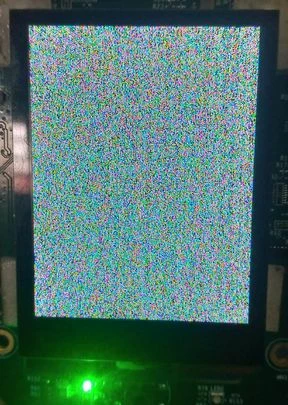
this is my code part:
int main(void)
{

	/* USER CODE BEGIN 1 */

	/* USER CODE END 1 */

	/* MCU Configuration--------------------------------------------------------*/

	/* Reset of all peripherals, Initializes the Flash interface and the Systick. */
	HAL_Init();

	/* USER CODE BEGIN Init */

	/* USER CODE END Init */

	/* Configure the system clock */
	SystemClock_Config();

	/* USER CODE BEGIN SysInit */

	/* USER CODE END SysInit */

	/* Initialize all configured peripherals */
	MX_GPIO_Init();
	MX_FSMC_Init();
	MX_CRC_Init();
	MX_FMPI2C1_Init();
	/* USER CODE BEGIN 2 */
	ST7789H2_Init();
	LCD_Fill(0xF800, 0, 0, 240, 240);

	/* USER CODE END 2 */

	/* Init scheduler */
	osKernelInitialize();

	/* USER CODE BEGIN RTOS_MUTEX */
	/* add mutexes, ... */
	/* USER CODE END RTOS_MUTEX */

	/* USER CODE BEGIN RTOS_SEMAPHORES */
	/* add semaphores, ... */
	/* USER CODE END RTOS_SEMAPHORES */

	/* USER CODE BEGIN RTOS_TIMERS */
	/* start timers, add new ones, ... */
	/* USER CODE END RTOS_TIMERS */

	/* USER CODE BEGIN RTOS_QUEUES */
	/* add queues, ... */
	/* USER CODE END RTOS_QUEUES */

	/* Create the thread(s) */
	/* creation of defaultTask */
	defaultTaskHandle = osThreadNew(StartDefaultTask, NULL, &defaultTask_attributes);

	/* USER CODE BEGIN RTOS_THREADS */
	/* add threads, ... */
	/* USER CODE END RTOS_THREADS */

	/* USER CODE BEGIN RTOS_EVENTS */
	/* add events, ... */
	/* USER CODE END RTOS_EVENTS */

	/* Start scheduler */
	osKernelStart();

	/* We should never get here as control is now taken by the scheduler */

	/* Infinite loop */
	/* USER CODE BEGIN WHILE */
	while (1)
	{
		/* USER CODE END WHILE */

		/* USER CODE BEGIN 3 */


	}
	/* USER CODE END 3 */
}

void LCD_Fill(uint16_t RGBCode, uint16_t Xpos, uint16_t Ypos, uint16_t width, uint16_t height)
{
	for (uint16_t i=0; i<height; i++)
	{
		ST7789H2_DrawHLine(RGBCode, Xpos, Ypos++, width);
	}
}
#include "main.h"
#include "LCD_Controller.h"


#define FMC_BANK1_REG ((uint16_t *) 0x60000000) // Register Address for A0
#define FMC_BANK1_DATA ((uint16_t *) 0x60000002) // Data Address for A0 -> A0<<1 -> 0010

void LCD_IO_WriteReg(uint8_t Reg)
{
	*FMC_BANK1_REG = Reg;
}

void LCD_IO_WriteData(uint16_t RegValue)
{

	*FMC_BANK1_DATA = RegValue;
}

void LCD_IO_WriteMultipleData(uint16_t *pData, uint32_t Size)
{
	for (uint32_t i=0; i<Size; i++)
	{
		LCD_IO_WriteData(pData[i]);
	}
}

uint16_t LCD_IO_ReadData(void)
{
	return *FMC_BANK1_DATA;
}


void LCD_IO_Delay(uint32_t delay)
{
	HAL_Delay(delay);
}
void LCD_IO_Init(void)
{
	HAL_GPIO_WritePin(MC_LCD_RESET_GPIO_Port, MC_LCD_RESET_Pin, GPIO_PIN_RESET);
	HAL_GPIO_WritePin(LCD_ENABLE_GPIO_Port, LCD_ENABLE_Pin, GPIO_PIN_RESET);
	LCD_IO_Delay(5);
//	HAL_GPIO_WritePin(BL_CONTROL_GPIO_Port, BL_CONTROL_Pin, GPIO_PIN_RESET);
//	LCD_IO_Delay(5);
	HAL_GPIO_WritePin(MC_LCD_RESET_GPIO_Port, MC_LCD_RESET_Pin, GPIO_PIN_SET);
	HAL_GPIO_WritePin(LCD_ENABLE_GPIO_Port, LCD_ENABLE_Pin, GPIO_PIN_SET);
//	HAL_GPIO_WritePin(BL_CONTROL_GPIO_Port, BL_CONTROL_Pin, GPIO_PIN_SET);

}
Can anyone help me?