

VSabn.1
Associate II
November 19, 2024
Question

STM32F746G Discovery: What is the difference between CU3 and CU4 suffix?

  • November 19, 2024
  • 6 replies
  • 2283 views

Hi,

I have a STM32F746G Discovery board on which I have developed an application. The application was running fine on STM32F746G Discovery CU3.


When I bought a new identical board and flashed the application, the display literally showed something  like this:
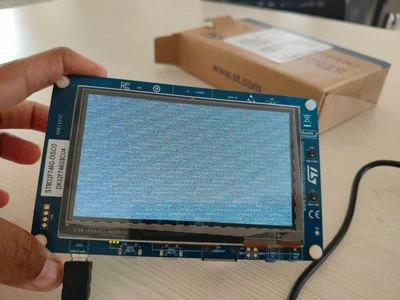
WhatsApp Image 2024-11-18 at 16.21.15.jpeg


 My old board is DK32F746G$U3, which is working fine, but the new one is DK32F746G$CU4, which shows Black screen. 
I have no clue what the display is used for CU4 as I could not find any information about it. 

How do I solve this? 

6 replies

Uwe Bonnes
Chief
November 19, 2024

Probably in the documentation to the board there is a schematics with a change log or there are several schematics for the different revisions. Carefully inspect these docs. Otherwise, Cube projects for those bard may als give you a hint..

Andrew Neil
Super User
November 19, 2024
A complex system that works is invariably found to have evolved from a simple system that worked.A complex system designed from scratch never works and cannot be patched up to make it work.
GaetanGodart
Technical Moderator
November 19, 2024

Hello @VSabn.1 ,


The post shared by Andrew Neil seems to be exactly what you are facing.
Can you try that and tell us if it worked for you.


CU3 and CU4 are revision. Basically, when we improve a board, we give it a new number to keep track of it.


I hope this helps!
If this comment or another one answers your question, I invite you to select it as "best answer".


Regards,

VSabn.1
VSabn.1Author
Associate II
November 19, 2024

Hello ,

Thank you for your reply.

  1. Copy the latest stm32746g_discovery_qspi.c/stm32746g_discovery_qspi.h files to Drivers-> BSP -> STM32F746G-Discovery (The version I had: Release v2.1.0 ).

From where I can get latest files of qspi.c and qspi.h

  1. Create a folder named w25q128j in Drivers-> BSP -> Components and copy the file w25q128j.h into the folder. (The version I had:: Release v1.0.0).

From where I can get latest w25q128j.h

  1. Define the USE_STM32746G_DISCO_REVC03 symbol in the preprocessor.

In which file I have to define this symbol?

As I am new user of STM I need help.

Thanks in advance.

Andrew Neil
Super User
November 19, 2024

Those points were in reply to this post by @Mohammad MORADI ESFAHANIASL - which says where to obtain the files:

https://community.st.com/t5/stm32-mcus-touchgfx-and-gui/stm32f746g-discovery-what-is-the-difference-between-cu2-and-cu4/m-p/717421/highlight/true#M39293

A complex system that works is invariably found to have evolved from a simple system that worked.A complex system designed from scratch never works and cannot be patched up to make it work.
VSabn.1
VSabn.1Author
Associate II
November 27, 2024

Hello,

I tried the steps suggested by  @Mohammad MORADI ESFAHANIASL , but facing the same issue.

waclawek.jan
Super User
December 7, 2024

How?

GaetanGodart
Technical Moderator
January 8, 2025

Hello,


If you are using a new board revision with an old project, the simplest way to fix it is to create a new project and to import your GUI in the new project.
If your project is complex and uses code outside the scope of TouchGFX, either you manually add that extra "external" code or you apply the patch file (git apply patchname.patch) attached in this message.


Regards,