
Associate III
September 15, 2024
Solved

STM32H745i with TouchGFX does not load code in STM32CubeIDE

  • September 15, 2024
  • 2 replies
  • 3368 views

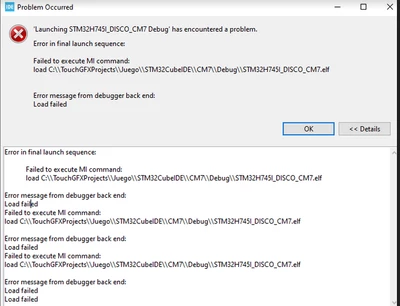
I have a STM32H745i that if I want to load the code by USB it works OK if the project is from STM32CubeIDE (1.16.0) but if the project is imported from TouchGFX it presents the following error when I want to load the code:
Maximiliano_0-1726438095850.png


I read a post from someone who had this error but I don't understand the “ExtMem_Boot” step so I just set up the external loader but it didn't work.


any idea what it could be?
Best answer by mƎALLEm

Hello,

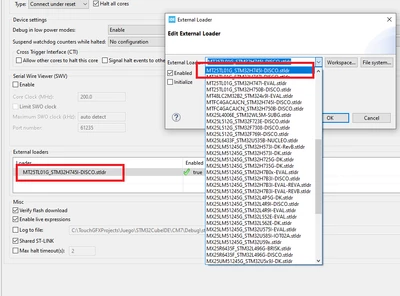
I reproduced the behavior and seems you didn't select the correct External Flashloader:

The correct one is: MT25TL01G_STM32H745I-DISCO.stldr

SofLit_0-1726582495096.png

I was able to upload the external QSPI after setting correct flash loader.

Hope it does answer your question.


2 replies

Tesla DeLorean
Guru
September 16, 2024

Nobody here knows what board you have.

The external loader needs to match your design, ie part, pins, size, etc

Tips, Buy me a coffee, or three.. PayPal VenmoUp vote any posts that you find helpful, it shows what's working..
Associate III
September 16, 2024

Hello @Tesla DeLorean  , did you indicate that the board was STM32H745i-Disco or do you mean some other data?

GaetanGodart
Technical Moderator
September 16, 2024

Hello @Maximiliano ,


It seems you have not mentioned the file to use as external loader.
This can be easily fixed.

  1. Open STM32CubeIDE
  2. Right click on your project
  3. Go to Debug as
  4. Click on Debug configurations...
    GaetanGodart_0-1726485382394.png
  5. Select your project again
  6. Open the Debugger window
  7. Under External loaders, click on Add
  8. Browse to find your stldr file (usually located in the gcc folder)
    GaetanGodart_1-1726485609785.png


This should fix your problem.

Can you tell me exactly what are the step you did to end up with this error message?
This should not happen when creating a project from TouchGFX Designer, I would like to investigate it.


If this comment or another one answered your question, I invite you to select it as "best answer".


Regards,

Associate III
September 16, 2024

Good morning Gaetan and thank you for your reply,


I had tried what you mentioned but it doesn't seem to work, I don't know if you meant that the file is inside the project folder. I selected the one that seemed right for my model from the options that the compiler gives me, it looks like this:

Maximiliano_0-1726486936903.png


but it throws the same error.


The steps followed were two.

1) first I tried exactly what the following video shows:

https://www.youtube.com/watch?v=Tkz9099a7a4


(in short it only compiles the project and opens it to be imported to stmcubeide and then load it without changes to the configuration.


2) when it didn't work I followed exactly the steps that worked for the previous project that I did with leds that didn't use touchGX but it didn't work either.

https://www.youtube.com/watch?v=jI1k6p-fduE

(following the steps as they were in the minutes (8:50 to 14:50))


3)I had read some of what you mentioned and tried to put external loader but for some reason it doesn't want to load the code either.

GaetanGodart
Technical Moderator
September 16, 2024

Ah that's annoying.

Can you share the log file?

You could try to connect the board to STM32CubeProgrammer and try to load from there.
If you do so, you need to plug your board, then click connect.
Then go to the External Bootloader section (EL) and search for your board (if you cannot find it, you need to copy your stldr file to C:\Program Files\STMicroelectronics\STM32Cube\STM32CubeProgrammer\bin\ExternalLoader asusming you installed your STM32CubeProgrammer there).
Then go to the load section and select your .hex or .elf file and click "Load".


Regards,