
Associate II
November 15, 2024
Solved

STM32H7S78-DK error RGB888

  • November 15, 2024
  • 1 reply
  • 3365 views

Hello everyone, I present my problem.


I am doing a simple project with Touch GFX on my Discovery STM32H7S78-DK. My main goal is to display images (the ones provided by touchGFX) in RGB888.
I created the project and moved to CubeMX to view the .ioc file and change the various fields the RGB format from 565 to 888. I changed both on the LTDC and pixel format tab and automatically in Middleware->TouchGFX the change was taken.

So far so good.

Filling in the automatically generated code, without any personal additions, and after regenerating the code with TouchGFX I get the following error:
undefined reference to `touchgfx::paint::rgb888::lineFromColor(unsigned char*, unsigned int, unsigned long, unsigned char)'
Which I fix by following the following link : https://support.touchgfx.com/4.20/docs/miscellaneous/known-issues.
Fixed this I compile the code, load the firmware on my dk but the screen appears black (Backlight On but totally black).

Debugging and hitting the pause button the program is stuck in HAL_GPU2D_ErrorCallback as shown in the figure below.
Unfortunately, the values of the registers cannot be accessed from Datasheet because private.


How can I do to see correctly on my Discovery in RGB888 format?
Best answer by GaetanGodart

Hello @Leo_Berna99 ,


If you select our TBS for the STM32H7S78-dk 24bpp, the framebuffer will be in 24bpp.
Selecting the pixel format to be ARGB8888 will not be enough, NeoChrom accelerator do the rendering in 32bpp but then we store the framebuffer in 24bpp such as:
main.c line 377 of the 24bpp TBS:


 GFXMMU_PackingTypeDef Packing;
 Packing.Buffer0Activation = ENABLE;
 Packing.Buffer0Mode = GFXMMU_PACKING_MSB_REMOVE; // every 3 bytes are served as 4 bytes in the virtual buffer. The most significant byte written to the virtual buffer is discarded
 Packing.Buffer1Activation = ENABLE;
 Packing.Buffer1Mode = GFXMMU_PACKING_MSB_REMOVE; // every 3 bytes are served as 4 bytes in the virtual buffer. The most significant byte written to the virtual buffer is discarded
 Packing.DefaultAlpha = 0xff;
 HAL_GFXMMU_ConfigPacking(&hgfxmmu, &Packing);


If you want, you could check the content of the framebuffer.
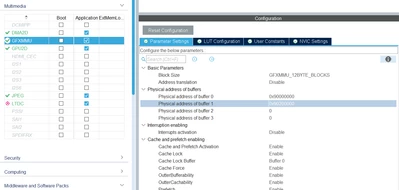
Their location are defined in STM32CubeMX under GFXMMU (among other places):

GaetanGodart_0-1732271939715.png


Yes, images in 32bpp get big quite fast.
The 24bpp TBS allows you to use 24bpp on the framebuffers to save RAM but it doesn't allow you to use 24bpp assets.
However, keep in mind that you can compress your assets.
TouchGFX offers various compression algorithms which have good performances for most images and it automatically select the best one for each specific image.


To access images stored in an SD card, I suggest you 3 links:

  1. TouchGFX documentation : caching-bitmaps 
  2. Youtube : Cache Bitmaps Stored on an SD Card 
  3. github : display images from SD card to LCD by LTDC 


I hope this helps! :smiling_face_with_smiling_eyes:
If this comment or a previous one answers your question, I invite you to select it as "best answer".


Regards,

1 reply

GaetanGodart
Technical Moderator
November 15, 2024

Hello @Leo_Berna99 ,


We have made a TBS (TouchGFX Board Setup) for the STM32H7S7-dk in 16bpp but also one in 24bpp :

GaetanGodart_0-1731662141567.png

Simple select the 24bpp and it should do what you want.


You can also create a project with both and look at the differences between them to see what we have changed to make it possible and compare that with the changes you have made yourself to see what was missing.


I hope this helps!
If this comment answers your question, I invite you to select it as "best answer".


Regards,

Associate II
November 15, 2024

Thank you for your immediate response.
However, I don't think the problem has been fixed with the new update, in fact I find the same errors again.
Meanwhile, opening the project on CubeMX I find the following error (error I find without having modified anything) see image "error" below.

error.png

Updated the code and simply doing the project build I find the error in image 2.

error2.png

Once I fixed the error in image 2 via tutorial on known problems the screen appears to me as in image 3.

image3.jpg

GaetanGodart
Technical Moderator
November 15, 2024

Hello @Leo_Berna99 ,


I suggest you to use the latest version of TouchGFX, STM32CubeIDE and STM32CubeMX.

The width cannot be between 0 and 0, I think the version of STM32CubeMX you are using is incompatible.


Have you tried to open TouchGFX Designer, create a new project, select the STM32H7S7-dk board in 24 bpp, flash and run from TouchGFX Designer?


Regards,