
Associate
January 12, 2026
Question

STM32N6570-DK How to use Camera(DCMIPP?)-Display with touchGFX GUI

  • January 12, 2026
  • 5 replies
  • 588 views

Hello ST Team,

I am working with the STM32N6570-DK board and trying to display the live camera feed on a TouchGFX application.

I cannot find any ready-to-use example that integrates DCMIPP (Camera) and TouchGFX.

Current Situation:

  1. TouchGFX Designer: I have created a UI with a transparent area in the center (Alpha = 0) to display the camera feed. (Please see the attached screenshot).

  2. Cube IDE Firmware:  I found the DCMIPP_ContinuousMode example and confirmed that it works fine independently. However, merging it into a TouchGFX project manually is quite difficult for me.
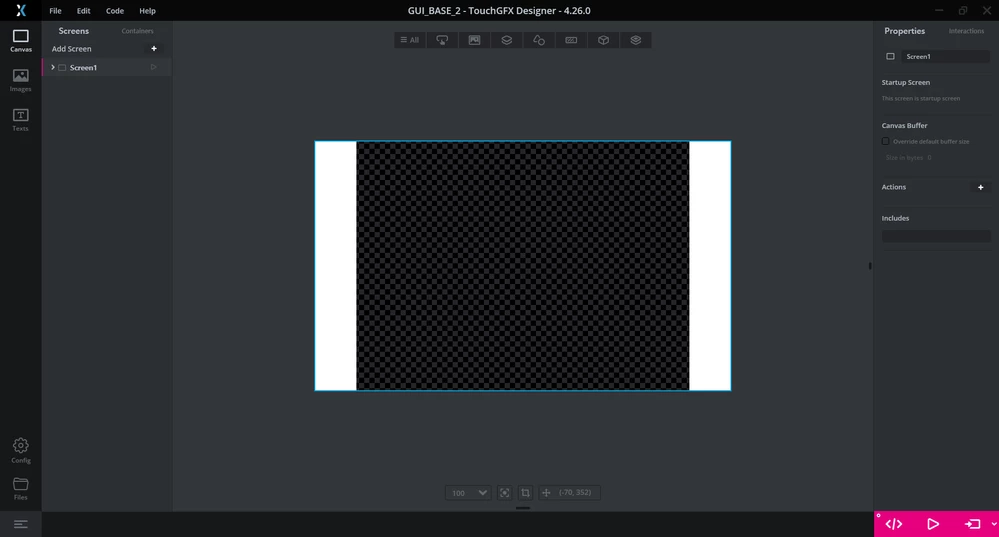
SCR_2026-01-12_164835.png

My Question:
Is there a simple, official example or Application Note demonstrating Camera Preview (maybe on Layer 0) + TouchGFX UI (maybe on Layer 1) for the STM32N6570-DK?

Since I am new to the STM32N6 series, a detailed, step-by-step explanation would be very helpful.

I would appreciate a quick guide or a GitHub link.
Thanks.

5 replies

Simon V.
ST Employee
January 12, 2026

Hello,

From my understanding, the video frame must be resync by the TouchGFx engine.

You can refer to the following documentation :

MJPEG Video | TouchGFX Documentation


I would start the trial with simple jpeg picture from the camera (DCMIPP+VENC) then configure Touchgfx to linked the image output buffer to the input widget cf Decoding Strategies chapter.


Regards,

Simon

To give better visibility on the answered topics, please click on Accept as Solution on the reply which solved your issue or answered your question.
JinukLeeAuthor
Associate
January 13, 2026

Hello Simon,

I carefully read the documentation you linked.

However, I could not find any information related to "Camera" or "Live Input" in that document.
It only explains how to play video files stored in memory.

Since I am a beginner, I don't understand how to convert the Camera stream (DCMIPP) into a JPEG/AVI format in real-time to use this widget.

Is there a simpler way to just show the camera feed without encoding/decoding it as MJPEG (like DCMIPP_ContinuousMode Example)?

Thanks.

JinukLeeAuthor
Associate
January 20, 2026

Truly impressive. The complexity of your products is evidently far beyond the reach of a junior engineer like me, working at a small company.

Back when I was a student learning the ropes, ST was the definition of trust. With your Eclipse-based IDE, various software tools, extensive examples, and documentation, I believed that ST chips could achieve whatever I intended them to.

But now? ST releases a product bundled with a camera module, yet has the audacity to not provide a single example that simultaneously streams the camera feed to the display while rendering a GUI. It’s shameless.

You people probably earn at least four times my salary starting from entry-level. I am genuinely curious: how can you justify not creating such an obviously needed example? Is it simply because it was "too annoying and complex" for you?

And another thing: why are so many of your basic examples incompatible with STM32CubeMX? If the DCMIPP_ContinuousMode example had been at least MX Compatible, I would have been trying something right now instead of writing this.

Let me be clear—I don’t have the skills to just "read the code and develop it perfectly" from scratch. If I did, I would have treated your examples as mere appetizers and just built it myself, without ever posting here.

Other manufacturers provide detailed manuals right from the unboxing of their DKs. Their development environments—IDE, debugging, execution—are built to run on VS Code, keeping up with modern trends. Has ST just become an old, exhausted company? It feels like the entire organization is just waiting for euthanasia while out on New Year’s holiday.

I don’t expect any helpful replies to this post, and you probably won't even read it. It certainly won’t help my work. 

Enjoy your holiday.

Osman SOYKURT
Technical Moderator
January 20, 2026

Hello @JinukLee ,

I understand that you’re frustrated and under pressure, and I’m sorry that our current examples and tools did not meet your expectations. However, I’d kindly ask you to keep the discussion respectful. We absolutely want to hear feedback, critical included. But personal attacks and assumptions about people’s work or motives don’t help anyone, including you.

STM32N6 is still a relatively new product (a bit more than a year since it was announced). And within this year, if you look closely in Designer, we have updated our TBS 5 times, and made also another example working with FreeRTOS, while still providing demo examples suitable for this product. That is to say, we have been very active updating our product, making it more mature, and also more user friendly with improving the debugging experience or making it compatible with a lot of different compilers.

That said, you’re right in the sense that its ecosystem is not yet as mature or straightforward as a long‑standing family like STM32F4. The complexity level is also not the same.

Regarding the specific N6+camera example you mentioned, we have made internally a project that runs on STM32N6 with the camera module shipped with the kit, which shows the camera stream in a TouchGFX application. Our intention is to make this available to everyone in TouchGFX Designer as a Board specific Demo (BSD). However, we encountered the same layer issue you mentioned and also another one with the dynamic bitmap bytes alignment.
Instead of publishing a version of this example with a temporary workaround that many users would find confusing or fragile, we are working on a proper official fix, and ensure it is maintainable and understandable, not just “barely works”. Rest assured that we will publish this as soon as possible.

Osman SOYKURTST Software Developer | TouchGFX
January 21, 2026

Hi,

Integrating DCMIPP with TouchGFX can be tricky since there isn’t an official ready-to-use example. A common approach is to use the DCMIPP example as a reference for capturing the camera frames and then push those frames into a DMA buffer that TouchGFX can access. In TouchGFX, you can create a custom Drawable or HAL function to render the camera buffer onto the transparent area. Make sure the pixel formats match between DCMIPP output and TouchGFX frame buffer to avoid display issues

Osman SOYKURT
Technical Moderator
February 24, 2026
Osman SOYKURTST Software Developer | TouchGFX