Solved
Text with wildcard not working, help!
This is one of those problems where I spent more hours than I care to explain.
I've got a text box configured with a wildcard:
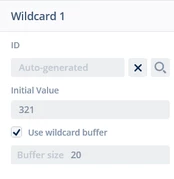
In Designer, I've got a typography set to Voltage, 20px:
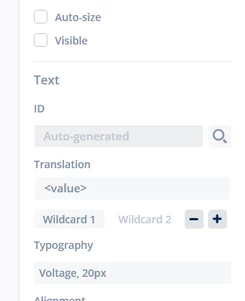
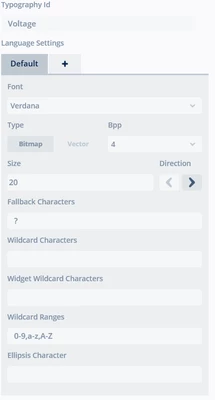
Here's the typographies:
Screen1ViewBase.cpp entry looks like this:
 textCellVoltage.setPosition(191, 0, 67, 24);
 textCellVoltage.setColor(touchgfx::Color::getColorFromRGB(255, 255, 255));
 textCellVoltage.setLinespacing(0);
 Unicode::snprintf(textCellVoltageBuffer, TEXTCELLVOLTAGE_SIZE, "%s", touchgfx::TypedText(T___SINGLEUSE_B9IA).getText());
 textCellVoltage.setWildcard(textCellVoltageBuffer);
 textCellVoltage.setTypedText(touchgfx::TypedText(T___SINGLEUSE_F28R));
 textCellVoltage.setVisible(false);
 ImplantData.add(textCellVoltage);
Screen1View.cpp looks like this:
void Screen1View::enableScreenElementsAfterInterrogation() {
	tab2.setAlpha(255);
	tab2.invalidate();

	textCellVoltage.invalidate();
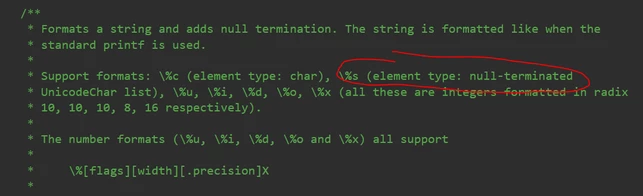
	Unicode::snprintf(textCellVoltageBuffer, 20, "%s", "123");
	textCellVoltage.setWildcard(textCellVoltageBuffer);
	textCellVoltage.resizeToCurrentTextWithAlignment();
//	textCellVoltage.resizeToCurrentText()
	textCellVoltage.setVisible(true);
	textCellVoltage.invalidate();
}
However, when enableScreenElementsAfterInterrogation is called, I see ?3?. I've tried using resizeToCurrentTextWithAlignment, but that gives the same result.
I must be doing something ridiculous, as this is slightly more difficult than printing "Hello world!".
Any help would be appreciated.