
Associate III
March 2, 2024
Solved

TGFX designer 23.1 still doesn't fix project folder structure in full on TrustZone projects.

  • March 2, 2024
  • 2 replies
  • 1951 views
  1. Create IOC file with CubeMX at "Root"
  2. Generate code from CubeMX for IAR
  3. Open "Root\TouchGFX\NGEN_NTZ.touchgfx" in TouchGFX designer and generate the code.
  4. It fails, as it tries to update project in "EWARM\Root" instead of "Root\EWARM", i.e. one level up comparing to what it is supposed to be.
  5. By manually creating extra directory "EWARM\Root" and placing there fake EWP project file, the problem gets fixed and Designer is able to finish code generation. However, then that file has to be manually edited to change correctly referenced but from incorrect location files and then be copied back to a proper location at "Root\EWARM".

Seems like there is still some problem with counting dots in file paths. However, 23.1 places all the rest of files at correct locations, unlike previous versions, which is definite progress!

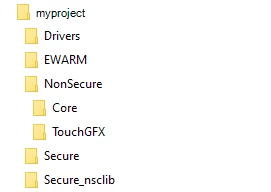
See the attached screenshot.


Thanks
 

This topic has been closed for replies.
Best answer by LouisB

Hello @bear2023R ,


The structure of your files seems different from what you are supposed to have, why is your TouchGFX folder is at the same level as EWARM? 

When I tried, I get this:

LouisB_0-1710425472082.png

Regards,

2 replies

ST Employee
March 5, 2024

Hello @bear2023R ,

I will report this issue and get back to you.

Regards,

bear2023RAuthor
Associate III
March 6, 2024

Thanks Louis

Hopefully we'll see a fix sometime soon, should be easy to fix. Meanwhile wrote and use small utility, that fixes incorrect relative paths in updated by TouchGFX Designer project file at wrong location.

Much more annoying situation that CubeMX doesn't allow to select TheadX as OS to use with TouchGFX - and only for TrustZone enabled project (see my other post from few days ago).

This also makes it necessary to do some unnecessary work of shuffling files around manually, in order to keep replacing incorrectly generated by both CuebMX and TouchGFX files for TrustZone project with those, correct ones, which were generated for non-TrustZone project.

Again, it seems like quite a simple fix required. As both generators work well for non-Trustzone project and it looks like just ThreadX option has to be enabled properly in drop-down list of OSs for TouchGFX in CubeMX... Or something like that.

A reasonably timed fix will be greatly appreciated!

Regards

LouisBBest answer
ST Employee
March 14, 2024

Hello @bear2023R ,


The structure of your files seems different from what you are supposed to have, why is your TouchGFX folder is at the same level as EWARM? 

When I tried, I get this:

LouisB_0-1710425472082.png

Regards,

bear2023RAuthor
Associate III
March 26, 2024

HI Louis

indeed, I have 2 TouchGFX folders: one as shown on your tree and one extra, - one level above. Probably my colleague moved it at wrong location when was copying from ThreadX-enabled project. Thanks for noting!

Best regards

ST Employee
April 2, 2024

Hello @bear2023R ,

You are welcomed, don't hesitate if you have another question.

Regards,