
Associate II
December 4, 2025
Question

Touch GFX and custom LCD

  • December 4, 2025
  • 8 replies
  • 1171 views

Hello all,

Trying to set up the custom display on the STM32H750B-DK dev board.

Interestingly, the display works via LTDC functions in Keil just fine... but I do not have much luck with the TouchGFX. For example, started with setting up the TBS in the Designer to avoid the complications of memory and other configurations (thanks to the ST support) and continuing in the CubeIDE where I have opened the .*.ioc file to update the MX configuration for the LTDC and TouchGFX... it compiles ok, I can opend the TouchGFX designer and "upload" the picture, for example, I can see the picture to be in the memory. See attached build memory analyzer.

However, when I run the application or debug, I cannot see the preview of the picture.

One of the ideas, as it is explained in the TouchGFX manual, namely Board bring up, would be to preview a simple framebuffer, not sure how easily that would be?

I am not sure how to tackle this problem, so any comments, ideas, or hints are more than welcome!


Best.
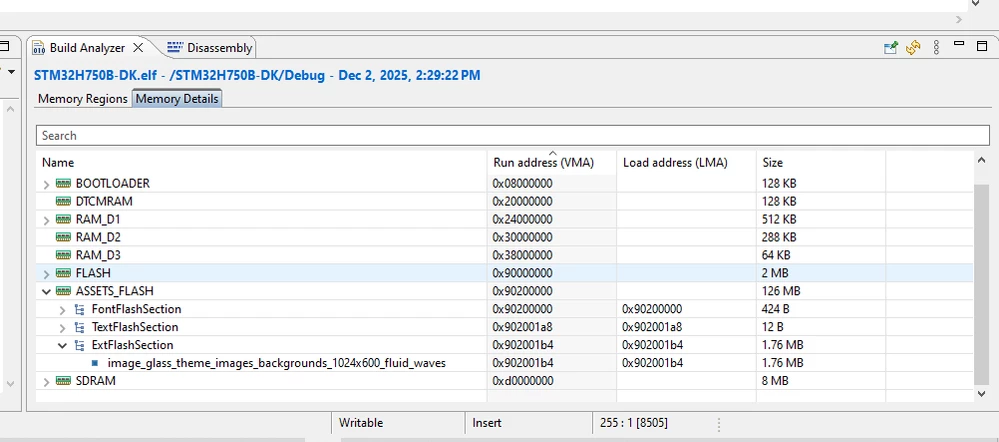
 

pic_in _memory.pnge memory 

8 replies

Associate II
December 4, 2025

Started with the "Board bring up" as given by the STM manuals, got stuck here https://support.touchgfx.com/docs/development/board-bring-up/how-to/03-display-internal

I am not sure why I cannot store a simple framebuffer in the available memory cells.

I have reduced the size of the framebuffer to save memory... for testing....

//creating the framebuffer
uint16_t framebuffer_1[1024*60]; //16 bpp framebuffer
//storing the framebuffer to a particular memory
uint16_t* framebuffer_1 = (uint16_t*)0x30000000; //16 bpp framebuffer memory location 


For example, I can see I have plenty of RAM, see the above picture about the available RAM...


In addition, when trying to debug, it goes rather well; however, I get the following "error."

debug_issue.png


Any ideas on how to tackle these issues and make progress would be more than welcome!


best.

Osman SOYKURT
Technical Moderator
December 8, 2025

Hello @total_and_STM32 ,

Your issue could be located in many places but we'll try to eliminate all the possibilities one by one.
First thing, just try to display a red box using the "Box" widget in touchgfx. Remove all the images and text/fonts from your application. You should at this point have no data inside internal/external flash (you can verify that in the map file). Let me know if you can see the red box on your screen or not.

Osman SOYKURTST Software Developer | TouchGFX
Associate II
December 8, 2025

Hello Osman, 

Thanks for the reply, 

Deleted the pict. , inside the Touch GFX,

I cannot see the box, I cannot even "run the project", actually, how should I check I can see the box?

For example, if the "gren PLAY" icon is pressed, namely the Run... I get an error, see below:

run_project.png


Not sure about the map file? Where can I find it? It is not seen next to the *.ld exc. files...

Checked the Build analyzer and I can see the following:

memory.png

It seems that there is 436B in it ?

I guess the pict. is not there anymore...

Best.


Osman SOYKURT
Technical Moderator
December 8, 2025

1. Yes, these are the fonts in external flash that comes with the default typographies in your TouchGFX Application. Just to make sure, you should put them in internal flash. For that, edit your linker script to have the font flash section and text flash section:

 FontFlashSection :
 {
 *(FontFlashSection FontFlashSection.*)
 *(.gnu.linkonce.r.*)
 . = ALIGN(0x4);
 } >FLASH

 TextFlashSection :
 {
 *(TextFlashSection TextFlashSection.*)
 *(.gnu.linkonce.r.*)
 . = ALIGN(0x4);
 } >FLASH

 
2. Could you try flashing using the STM32CubeProgrammer? (If needed, use the MT25TL01G_STM32H750B-DISCO)

3. The map file is located under the STM32CubeIDE/Debug/ folder (it ends with .map).

Osman SOYKURTST Software Developer | TouchGFX
Associate II
December 9, 2025

Re 1), corrected, compiles OK, and the "fonts" are in the internal flash...

font_int_flash.png

Re 2), of course, I guess I should have used the *.hex file? BTW, where can the compiled *.hex file be found?

Re 3) Thank you!


Best.


Osman SOYKURT
Technical Moderator
December 8, 2025

I would also recommend you try to debug your application step by step and see what function it goes into before it breaks.

Osman SOYKURTST Software Developer | TouchGFX
Associate II
December 9, 2025

Not sure what you mean by that, can you give me an example?

So far, this is the problem?

It does not even want to start the debugging process...

debug_issue_1.png

Associate II
December 9, 2025

Re: Downloading with the programmer:

Enabled the creation of the *.hex  accordibng to this info https://community.st.com/t5/stm32cubeide-mcus/how-does-one-generate-a-hex-file-from-stm32cubeide/td-p/287131, appears in the "Debug" folder,

making_hex.png


downloaded that file via the programmer, but nothing on the LCD, the LED on the top layer of the STM32H750b-dk is flashing (red, green)...


Associate II
December 9, 2025

It looks like the debugging and downloading were solved;

When debugging is used, I land on this:

debug_works.png

 When Resume or F8 is pressed, I get the following on my LCD, first it kind of flashes, like 1 second

display1.png


then it settles...

display2.png


Associate II
December 10, 2025

After debugging, more information is evident.

0) starting with the basic setup,

where the framebuffer is created, as it can be seen in the following picture, the RAM_D1 holds this buffer and its size is 300KB.

STARTING_FRAMEBUF.png

Indeed, the LTDC setup also follows these buffers' settings, see below for more... 


1) Not sure if the clocks are set for the display correctly,

the LCD manufacturer states that the pixel clock should be cca 50.7 MHz,  using the following LTDC parameters' settings :

  • HSync=20, HBP~140, HFP~140;
  • VSync=3,VBP~23, VFP~12,

LTDC_settings.png


which raises the pixel clock to ≈ 50.7 MHz.

I am looking at the MX and Clock configuration is to 50 MHz at the "To LTDC (MHz) ", see the picture below, is this OK?

LTDC-clock.png


2) When debugging, nothing much happens till I get to the MX_MDMA_Init(); MX_DMA2D_Init(); MX_FMC_Init();

For example, at these methods, the LCD starts showing some graphics, but more or less totally wrong, like the pictures above.


THE QUESTION:

Should I return back to the "CPU running" https://support.touchgfx.com/docs/development/board-bring-up/how-to/02-cpu-running, are my clocks OK?


Any comments, ideas, or help are more than welcome!


Best.


Osman SOYKURT
Technical Moderator
December 17, 2025

Hello @total_and_STM32 

Didn't you said your screen was working without TouchGFX at first place?


@total_and_STM32 wrote:

Interestingly, the display works via LTDC functions in Keil just fine


In our documentation, the "Board Bring up" is used to set a project without TouchGFX, and confirm that the peripherals are all working (screen, memory, physical buttons etc..). So if you were able to see a colored screen as described in this link, then you should probably not try to search the issue in the MX configuration.


Osman SOYKURTST Software Developer | TouchGFX
Osman SOYKURT
Technical Moderator
January 26, 2026

Hello @total_and_STM32 ,

Any progress with your project? Have you been able to see your framebuffer on your display with your TouchGFX application?

Osman SOYKURTST Software Developer | TouchGFX
Associate II
January 27, 2026
Hello Osman

Thank you for your email, the plan is to start by this week, I guess tomorrow will be more time!

Talk soon,
Miha