

CRich.4
Associate II
January 12, 2023
Question

TouchGFX 4.21.0 rendering problem

  • January 12, 2023
  • 8 replies
  • 4495 views

since i Updated to TouchGFX 4.21.0 (from 4.20.0) the LCD shows a visual artifact

it happens when rendering images in the L8_565 format (plain RBG_565 works) or text

i'm using a STM32 nucleo board with a STM32H7A3 processor

when i generated the code with CubeMX 6.6.1 and TouchGFX 4.20.0 it worked without artifacts

but after i updated to CubeMX 6.7.0 and TouchGFX 4.21.0 it started showing these artifacts:

example 1: this full screen image should have a solid yellow background, it is revealed using a wipe transition from black to the image. The wipe transition leaves black artifacts on the right edge (transition goes from left to right)
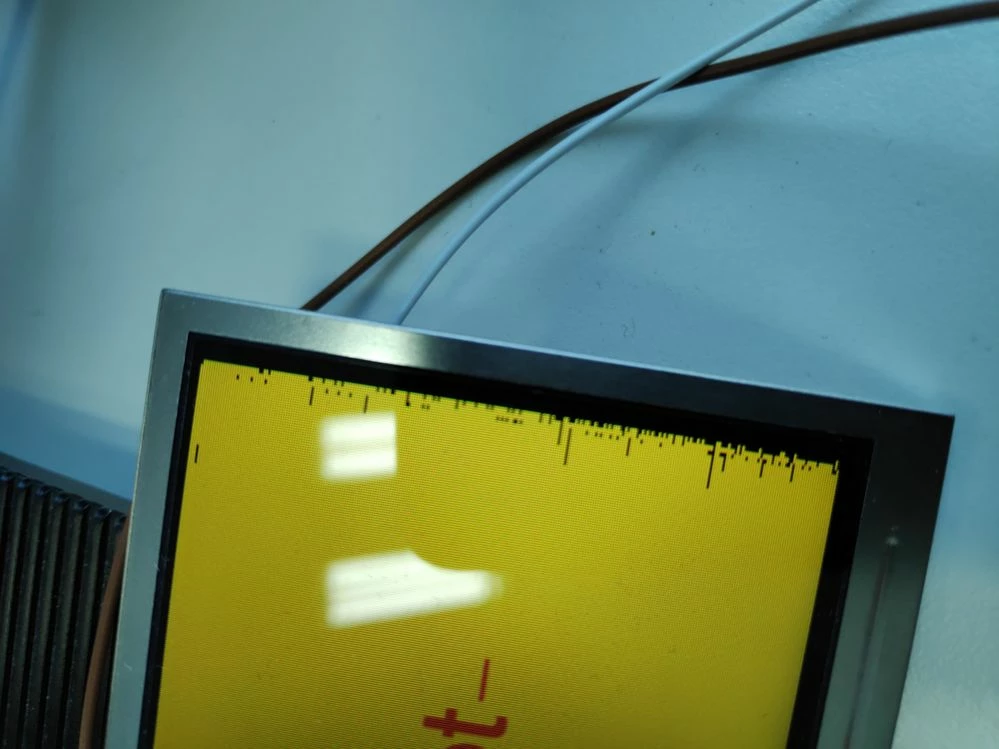
0693W00000Y85hHQAR.jpg 

Example 2: the text on the last menu tile is sometimes cut in half, it should say "Sprache"
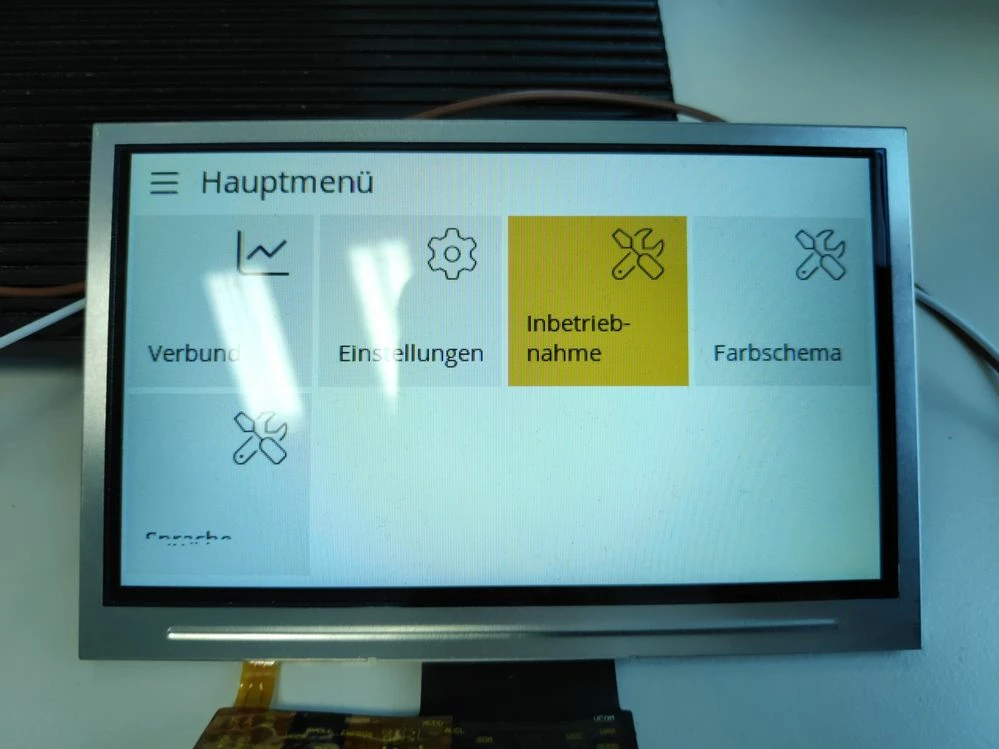
0693W00000Y85hvQAB.jpg 

-Clemens

This topic has been closed for replies.

8 replies

CRich.4
CRich.4Author
Associate II
January 12, 2023

addendum: the problem with the full-screen image only occurs when using the L8_RGB565 format and not with the plain RGB565 format

So i assume that the problem occurs, if a lookup table (CLUT) is used. Since afaik Text rendering also used the color lookup table functionality

Osman SOYKURT
Technical Moderator
January 13, 2023

Hello CRich.4,

And which compiler do you use? Have you tried different ones?

Also, does it happen only with this board or also with other ones (like a STM32H7B3-disco for example)? If you have no other board to test it with, please send me your project and I'll try to have a look at it.

/Osman

Osman SOYKURTST Software Developer | TouchGFX
CRich.4
CRich.4Author
Associate II
January 13, 2023

thanks for your reply

We are using the IAR EWARM compiler version 8.50.9

We have tested it with another prototype (also a Nucleo), which shows the same bug.

We have also reproduced this bug with a touchgfx example project. I have attached the project.

Photos of the example project:

sometimes the text is rendered correctly:

0693W00000Y8AxeQAF.jpgbut sometimes the text is cut off:

0693W00000Y8AsuQAF.jpg 

sadly we don't have another board to test it on

CRich.4
CRich.4Author
Associate II
January 25, 2023

the problem persists with Touchgfx 4.21.1

Osman SOYKURT
Technical Moderator
January 25, 2023

Hello CRich.4,

We haven't found yet a solution for your issue, unfortunately you'll still have it on 4.21.1 yes.

I'll get back to you when I'll have more info.

/Osman

Osman SOYKURTST Software Developer | TouchGFX
Osman SOYKURT
Technical Moderator
February 9, 2023

Hello CRich.4,

We still haven't been able to reproduce the issue on our side with the boards we have. I've tried for example with a STM32H7B3-disco board an no strange artifacts on screen during wipe transition, and texts looks good.

Actually, we don't know if the issue comes from updating from TouchGFX Designer 4.20 to 4.21 or is due to updating STM32CubeMX version from 6.6.1 to 6.7.0, or maybe the combination of this 2 updates.

What I can suggest you to do is to diff compare 2 versions of your project (before and after the update), maybe you've already done it.

Did you tried to put double framebuffer strategy or change the swipe transition to a slide transition ? That could be a workaround to your issue.

/Osman

Osman SOYKURTST Software Developer | TouchGFX
CRich.4
CRich.4Author
Associate II
April 21, 2023

CubeMX 6.7.0 with TouchGFX 4.20 did not show the artifact

The issue still persists with TouchGFX 4.21.3.

it only happens, for images if the L8 format is used, but it also affects text.

It only happens if DMA2D is active. I have also tried enabling the DMA2D interrupt, but the bug persists.

our current workaround is using the old TouchGFX version 4.20.

double framebuffer is not an option for us, because we don't have enough RAM for that.

CRich.4
CRich.4Author
Associate II
April 25, 2023

i did some further tests on a STM32H750B-DK board and that does NOT show the bug.

I have used CubeMX in both cases and have compared the settings of touchgfx and LTDC. I haven't found a difference apart from LTDC sync timing parameters and GPIO pins.

The Displays have the same dimensions, frame buffer/layer config is same, both use DMA2D, both use Azure RTOS (threadx)

on these boards the bug is visible:

  • Nucleo H7A3 (sample project I posted on 2023-01-13)
  • our own board based on an H7B0

while this board is unaffected:

  • STM32Ht50B-DK

I assume that there is some difference in how i have configured the projects that affects this bug.. Maybe the other tasks and interruption be the Threadx scheduler (systick) also affects the bug behavior.

the bug affects all touchgfx versions since 4.21.0. If i roll back to 4.20.0 the bug disappears.

CRich.4
CRich.4Author
Associate II
May 30, 2023

i have now reproduced the bug on the STM32H750B-DK and have attached the project

and i've noticed that the bug only occurs, if the CPU data cache is enabled.

So i think it's a data synchronization issue between the DMA2D and the CPU

I've also noticed that a call to SCB_CleanInvalidateDCache() was deleted from TouchGFXGeneratedHAL when updating from 4.20 to 4.21:


_legacyfs_online_stmicro_images_0693W00000bl8M2QAI.png 

this gives us two ways to avoid this issue:

  1. disable the DCache for the RAM
  2. re-add the call to invalidate the DCache (TouchGFXGeneratedHAL::InvalidateCache) in TouchGFXHAL::flushFrameBuffer()
Osman SOYKURT
Technical Moderator
June 13, 2023

Hello CRich.4,

If you don't need DCache that's fine to disable it, but having DCache shouldn't cause the issue I would expect.

And concerning the SCB_CleanInvalidateDCache funtion, there's no reason to call SCB_CleanInvalidateDCache() function in flushFrameBuffer(), we changed that because it was a mistake in first place. The SCB_CleanInvalidateDCache() function is useful only if we do software and hardware rendering, and it should be called only when we need to synchronize the data from the cache and RAM. We have on our support website an article talking about this subject, maybe you'll be interested to have a look at it.

/Osman

Osman SOYKURTST Software Developer | TouchGFX
CRich.4
CRich.4Author
Associate II
June 13, 2023

thanks for linking the article

the statemachine described there seems to be not working correctly.

The call to invalidate the cache in flushFrameBuffer might have masked that problem in earlier versions (4.20 and earlier).

In the TouchGFX versions since 4.21 the UI shows the artifacts mentioned above, if DCache is enabled.

our current workaround is to use the MPU to set the RAM to non-cacheable

EDIT: i think the problem occurs, because the DCache is set to write-back by default, but should be configured as write-through since the LTDC is always directly reading from RAM and might miss updated data that the CPU rendered into the DCache.

NGune.1
Associate III
November 20, 2023

Hi,

I have the same rendering problem with STM32H743ZIT6 and TouchGFX v4.22.1. I had the same problem with 4.21.4, as well. I am using a 480x272 display in RGB565 configuration. It doesn't matter if it is a plaint text or it is a label on a button, issue exists. In addition, the problem appears in different locations on the screen sporadically.  

Disabling DCache solves the rendering issue but brings other problems with LWIP. So, it may be, I think, a workaround for the ones who don't need LWIP.


 IMG20231120202848m.jpgIMG20231120202914m.jpg


CRich.4
CRich.4Author
Associate II
March 18, 2024

hi @NGune.1 

You could try the following workaround:

1. put the frame buffer into a separate memory region

2. define a matching region in the MPU that disables the DCache for only that region

This will let you keep the DCache for other data (like the data used by LWIP) and still avoid rendering issues