

Roger.ch
Associate III
February 17, 2023
Solved

TouchGFX 4.21.1; Unicode; Wildecard; Simulator works, Target fails.

  • February 17, 2023
  • 3 replies
  • 1767 views

I am trying to pass text into the wildcard of a text: 

---

// Container definition

DatenpunktFeldWert datenpunktFeldWertSchweissZeitSoll;

---

datenpunktFeldWertSchweissZeitSoll.setWertStr((touchgfx::Unicode::UnicodeChar*)L"23.4 s");

---

  /*

   * Wildcard Buffers

   */

  static const uint16_t WERT_SIZE = 15;

touchgfx::Unicode::UnicodeChar WertBuffer[WERT_SIZE];

---

void DatenpunktFeldWert::setWertStr(touchgfx::Unicode::UnicodeChar* wertStr)

{

  touchgfx::Unicode::snprintf(WertBuffer, WERT_SIZE, "%s", wertStr);

  Wert.invalidate();

}

---

In Simulator this works perfectly: 
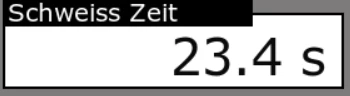
0693W00000aH6HLQA0.png 

However, only the 1st character is always shown on the display of the target. 
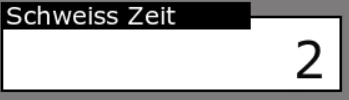
0693W00000aH6JvQAK.pngWhat am I doing wrong?

This topic has been closed for replies.
Best answer by LouisB

Hello all,


Update :
An easier way is to use Unicode::strncpy instead to print string:


touchgfx::Unicode::strncpy(textAreaBuffer, "string", TEXTAREA_SIZE);
textArea.resizeToCurrentText(); // optional, will resize the box to fit the text if it's too small
textArea.invalidate();


Regards,

3 replies

Yoann KLEIN
ST Employee
February 17, 2023

Hello @Roger.ch​,

That is a behavior we are aware of.

To explain quickly there is some end of line code between every character composing your string. TouchGFX framework code reads your string, sees this special code, and then thinks that your string is over and only composed of this single character. We are discussing this problem internally and we'll try to improve the code to avoid those issues.

But for the moment you have 2 solutions:

You can either display your string as several char (with a for-loop for example), or you can use a float variable if you wanna display numbers in a wildcard, like :

touchgfx::Unicode::snprintf(WertBuffer, WERT_SIZE, "%f", wertStr);
Wert.invalidate();

I'd recommend the second option because it is easier to implement and more readable.

/Yoann

Visitor II
April 23, 2024

We're encountering the same issue where the simulator output appears correct, but only the first character is printed on the target.

We would greatly appreciate it if this problem could be addressed soon.

Roger.ch
Roger.chAuthor
Associate III
February 17, 2023

Hello Yoann

Thank you very much for your quick and competent help. 

Best regards, 

Roger

LouisBBest answer
ST Employee
April 29, 2024

Hello all,


Update :
An easier way is to use Unicode::strncpy instead to print string:


touchgfx::Unicode::strncpy(textAreaBuffer, "string", TEXTAREA_SIZE);
textArea.resizeToCurrentText(); // optional, will resize the box to fit the text if it's too small
textArea.invalidate();


Regards,