Associate II
January 16, 2024
Solved

touchgfx crashes when custom keyboard and custom widget meet

  • January 16, 2024
  • 2 replies
  • 1145 views

Hello,

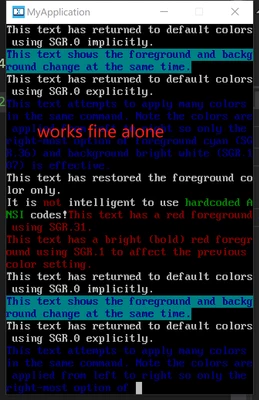
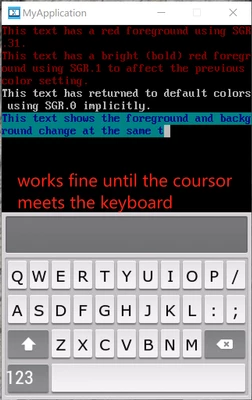
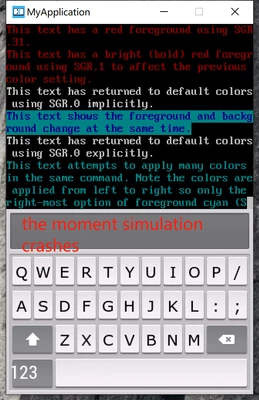
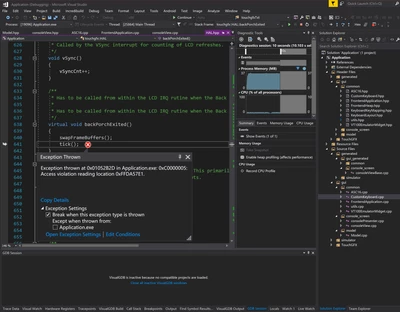
I'm working on a vt100 terminal emulator,  so I created a custom widget which decodes input stream and then display it on a TFT-LCD by LTDC. It works fine alone,  after a custom keyboad added on the top, the simulation will crash when the custom widget try to draw the part under the keyboard, and visual studio throws an exception as shown in the screenshot.

what cause this result and how can I avoid it?

your help will be appraciated.
wonderFine_0-1705426668636.png

2.png

1.png

3.png

This topic has been closed for replies.
Best answer by Mohammad MORADI ESFAHANIASL

Hello @wonderFine ,

That's a pretty cool project you are working on :D

To be honest, it is very difficult to detect what is causing the issue, but a possible solution to hide the symptom would be to try auto scrolling the text to avoid cursor colliding with the keyboard. 

Have you created the keyboard yourself? 

2 replies

ST Employee
January 26, 2024

Hello @wonderFine ,

That's a pretty cool project you are working on :D

To be honest, it is very difficult to detect what is causing the issue, but a possible solution to hide the symptom would be to try auto scrolling the text to avoid cursor colliding with the keyboard. 

Have you created the keyboard yourself? 

Associate II
January 27, 2024

Hi, @Mohammad MORADI ESFAHANIASL 

Thanks for your time.

The keyboard widget is ported from the Keyboard Example in touchGFX Designer.

It's strange that no error emerges when the cousor colliding with standard widgets (which provided by touchGFX Designer) :thinking_face:. Scrolling the text can avoid the symptom indeed. Thanks again.