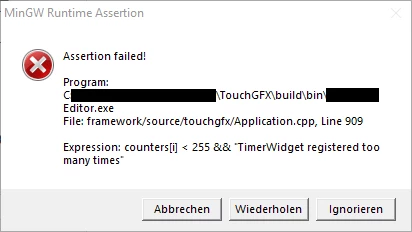
With great help from @GaetanGodart we sorted this (almost) out. I'm still not sure if this assertion is a bug (more likely) or a feature (timebomb?) inside TouchGFX Simulator framework code, but I can use the ScrollList as planned without getting the assertion. I will explain what parts of my code caused this assertion and how I changed it. Maybe this helps other users, when seeing the same assertion while running the Simulator application.
Contrary to what I first thought, the MoveAnimators did not cause the problem.
I have code that updates the content of all my ScrollList's items every second, because the information shown on the items could have changed (yes I know...:face_with_rolling_eyes:). My function to trigger the item-update-callback for each item of the ScrollList looked like this:
void MyView::updateList(uint16_t size)
{
scrollList.setNumberOfItems(0); //workaround update bug
scrollList.setNumberOfItems(size);
for (int i = 0; i < scrollListListItems.getNumberOfDrawables(); i++) {
scrollList.itemChanged(i);
}
scrollList.invalidate();
}
When calling setNumberOfItems(0) while the ScrollList is not scrolled up to the top item, the "TimerWidget" counter gets incremented and after reaching a count of 255 I get the assertion. I'll explain next why I had the seemingly pointless call to setNumberOfItems(0) before setting the real size.
While developing on the target I had issues with some Items of the ScrollList did not update their content while scrolling through the list (mostly the last ones). I thought it's a bug of TouchGFX and played around with the ScrollList API and found out that setting the size to 0 at first fixed my problem. Now I understand why it helped and what I did wrong until now:
A ScrollList has a fixed number or DrawableListItems (typically number of visible list elements on screen + 2). In my for-loop I iterate over this count and thought itemChanged(i) would tell every DrawableListItem to trigger the item-update-callback. But I mixed the two indices the ScrollList is working with: One is the index of the DrawableListItems and the other one is the index to your list (counting up to whatever "numberofItems" your told the ScrollList to have. And itemChanged(i) expects an index to the later one.
Mixing those caused some of my items to never update. By resizing the ScrollList having it resized to 0 and back to whatever size it has, internally causes a call to the item-update-callback for each item on screen.
Now my update code looks like this:
scrollList.setNumberOfItems(size);
for (int i = 0; i < scrollList.getNumberOfItems(); i++) {
scrollList.itemChanged(i);
}
scrollList.invalidate();
The only disadvantage is when your list is long (like 1000 or so), you iterate over all of your items and TouchGFX filters out the elements currently shown on the screen calling the update-callback for those items.
To only iterate over the currently visible items I would need to know which elements are currently visible (the scroll offset). But unfortunately, the ScrollLists (inherited from ScrollBase) method getOffset() is declared as protected.
It's the same reason that prevents me from creating a scroll bar around the ScrollList - we don't have access to the scrolled position. Hopefully that changes with the next TouchGFX release. :)