Hello Anuj
I think you must implement handleDragEvent-function to all screens for handle the draggings and then trigger slide transition from screen to another when needed.
You can easily get all transition functions generated to FrontendApplicationBase.cpp by just adding empty interactions to some of your screens like
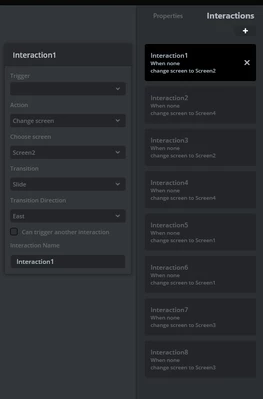
Remember to add all necessary transitions. Then you can trigger a transition from view by calling function like:
application().gotoScreen2ScreenSlideTransitionEast();
Here is example of simple horizontal swipe detection. view.cpp:
#include <gui/screen1_screen/Screen1View.hpp>
#include <touchgfx/Utils.hpp>
Screen1View::Screen1View()
{

}

void Screen1View::setupScreen()
{
 Screen1ViewBase::setupScreen();
 clearSwipeCounter=0;
 swipeXcounter=0;
 swipeYcounter=0;
 skipDragCounter=SKIP_DRAG_AFTER_SHOW_TIME;
}

void Screen1View::tearDownScreen()
{
 Screen1ViewBase::tearDownScreen();
}
void Screen1View::handleTickEvent()
{
	if(skipDragCounter!=0)skipDragCounter--;
	if(clearSwipeCounter!=0)
	{
		clearSwipeCounter--;
		if(clearSwipeCounter==0)
		{
			swipeXcounter=0;
			swipeYcounter=0;
#ifdef DEBUGMSG
			touchgfx_printf("SWIPE TIMEOUT scr1 \n");
#endif

		}
	}

}

void Screen1View::handleDragEvent(const DragEvent & event)
{
	if(skipDragCounter==0)
	{

		swipeXcounter+=event.getDeltaX();
		swipeYcounter+=event.getDeltaY();
	#ifdef DEBUGMSG
		touchgfx_printf("handleDragEvent dx: %d dy: %d xc: %d yc: %d \n",event.getDeltaX(),event.getDeltaY(),
				swipeXcounter,swipeYcounter);
	#endif
		if(abs(swipeXcounter)>SWIPE_X_MIN_TRAVEL&&
			abs(swipeYcounter)<SWIPE_Y_MAX_TRAVEL)
		{
			if(swipeXcounter>0)
			{
	#ifdef DEBUGMSG
				touchgfx_printf("SWIPE RIGHT \n");
	#endif
				application().gotoScreen4ScreenSlideTransitionWest();
			}
			else
			{
	#ifdef DEBUGMSG
				touchgfx_printf("SWIPE LEFT \n");
	#endif
				application().gotoScreen2ScreenSlideTransitionEast();

			}
			clearSwipeCounter=0;
			swipeXcounter=0;
			swipeYcounter=0;
		}
		else
		{
			clearSwipeCounter=SWIPE_TIMEOUT;
		}
	}
	else skipDragCounter=SKIP_DRAG_AFTER_SHOW_TIME;
}
view.hpp:
#ifndef SCREEN1VIEW_HPP
#define SCREEN1VIEW_HPP

#include <gui_generated/screen1_screen/Screen1ViewBase.hpp>
#include <gui/screen1_screen/Screen1Presenter.hpp>

class Screen1View : public Screen1ViewBase
{
public:

 Screen1View();
 virtual ~Screen1View() {}
 virtual void setupScreen();
 virtual void tearDownScreen();
 void handleDragEvent(const DragEvent & event);
 void handleTickEvent();
protected:
 uint16_t clearSwipeCounter=0;
 uint16_t skipDragCounter=0;
 int16_t swipeXcounter=0;
 int16_t	swipeYcounter=0;
};

#endif // SCREEN1VIEW_HPP
some definitions in model.hpp
#ifndef MODEL_HPP
#define MODEL_HPP

#define SWIPE_X_MIN_TRAVEL	150
#define SWIPE_Y_MAX_TRAVEL	60
#define SWIPE_TIMEOUT	4 		// timeout which kills the ongoin counting (ticks)
#define SKIP_DRAG_AFTER_SHOW_TIME	4 	// how long dragging must not persist after screen
										// change

#define DEBUGMSG
This example handles only horizontal swipes, but it is not big deal to add vertical direction also.
Hopefully this helps.
Br JTP