
Associate
May 16, 2024
Solved

TouchGFX TextArea characters are often shown partially erased on the display

  • May 16, 2024
  • 6 replies
  • 6709 views

Hi all

I am currently developing a product that uses a TFT display.  The product uses the following:

STM32F469ZITx
TouchGFX v4.23.2
TFT Module 320 x 240, LTDC RGB565 (16 bits), ST7272
Very often, when displaying text in a TextArea, some of the initial characters look as though they have been erased, as shown below:
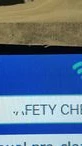
TextArea erased characters.jpg

The first word should read 'SAFETY'

Sometimes, this reads correctly, eg by cycling through my screens and back to this one.

All of the other items on the screens such as images, buttons, icons etc display with no problems at all.  It's just the TextAreas that are affected. The font used is Verdana, as supplied in TouchGFX.

Any help with this would be most welcome.

Best answer by JTP1

BTW what is this white object behind SAFETY text, it looks so unsharp and soft edge. Just think can it affect to the text also. The other object below looks very sharp.

Is there some common factor between working and non-working texts... or are all texts glicthed randomly ?.  Just some thoughts...

Br JTP


6 replies

ST Employee
May 16, 2024

Hello @johnhague ,

Are you using the available TouchGFX Board Setup for your project or have you started a completely new project?
Are you storing your TextFlashSection inside external flash or internal one?

Best regards,

johnhagueAuthor
Associate
May 16, 2024

Hi Mohammad

Thanks for replying to my post.

I only joined this project recently, so I have inherited the main code base.  However, it is a custom board, so I would assume that it was started as a completely new project. I will check when the person involved at the very start returns to the office on Monday.

As to your second question, we are only using internal flash at this moment,

Best regards,

John

ST Employee
May 16, 2024

Okay, I see. Just wanted to make sure that it is a custom board.

Based on the point that you made about the text correctly rendered after cycling through other screen, I would suggest adding a button which on the click invalidates the corrupted TextArea. It is not a solution, it is for testing purpose to observe the behavior of what is happening.

Please try that and update us with your findings.

Kind regards,

johnhagueAuthor
Associate
May 20, 2024

Hi Mohammad

Do you have any thoughts on the results of the tests that I carried out?

Best regards,

John

Graduate II
May 20, 2024

Hello John

Can you show how you set for example this 'Safety...' text ? I mean is it wildcard buffer text or use text resources ?

Sometimes it seem to help if the text area is invalidated also before manipulating the text content especially when use some move or resizing- commands.

Br JTP


johnhagueAuthor
Associate
May 21, 2024

Hello JTP

Thanks for the response.

The 'Safety...' text is just a Text Area that has been defined in TouchGFX Designer and is fixed in nature.

Regarding your second comment, I do not manipulate this text whilst running the code.  It is set and displayed in the screen's View Base file, as:

InfoLabelSafetyChecks.setTypedText(touchgfx::TypedText(T_SAFETYCHECKSHEADING));

Best regards,

John

Graduate II
May 22, 2024

Hello

I see. Maybe just add some extra invalidate-calls to setupScreen function as a temporary fix (if it works then).

Br JTP

johnhagueAuthor
Associate
May 23, 2024

Hello JTP1

I have just tried again, with 4 calls to the text area's invalidate() method in the setupscreen and unfortunately I do still see the same occasional problem.

Best regards,

John

Lead II
May 22, 2024

Do you use cache? In that case you need to clear the cleaninvalidate the cache.

"Kudo posts if you have the same problem and kudo replies if the solution works.Click ""Accept as Solution"" if a reply solved your problem. If no solution was posted please answer with your own."
johnhagueAuthor
Associate
May 23, 2024

Hello

Thanks for your input.  I do not use cache (yet) in my application, so this is not a solution, unfortunately.

Best regards,

John

Lead II
May 23, 2024

Do you see the same problem in the simulator?

"Kudo posts if you have the same problem and kudo replies if the solution works.Click ""Accept as Solution"" if a reply solved your problem. If no solution was posted please answer with your own."
johnhagueAuthor
Associate
May 23, 2024

Hello

I don't recall seeing it in the simulator.  However, I cannot get my code to build for the simulator atm...it builds in the IDE, but not TouchGFX Designer.  That's another problem though....

JTP1Best answer
Graduate II
May 23, 2024

BTW what is this white object behind SAFETY text, it looks so unsharp and soft edge. Just think can it affect to the text also. The other object below looks very sharp.

Is there some common factor between working and non-working texts... or are all texts glicthed randomly ?.  Just some thoughts...

Br JTP


johnhagueAuthor
Associate
May 24, 2024

Hello

The white object behind is an image taken from our marketing slides and is just a plain white background.  I will look to change this to a fiiled box, or another 'TouchGFX 'stock' object.  Thanks for the observation, as this box is used on other screens where this problem occurs.

Also, in response to your second question.  The texts do appear randomly, but all share an imported .png background. 

I will investigate further and come back with my findings.

Best regards,

John