
Solved
TouchGFX TextArea Widget Re-orders the Text
There was a post about this before, but the issue appeared to be happening for that individual only in a custom container, for me it has appeared on multiple screens.
In the example below, I've typed "1. Toggle Pump On/Off' and the text appears in the designer as "Toggle Pump On/Off .1", moving the 1. to the end and changing it's order.
- I'm running TouchGFX Designer 4.24.0
- This is static text, no wild cards. There is only a single specified language (English).
- Whether the Text ID is auto-generated or not has no impact.
- If you inspect the text.xml file generated to hold the text, it appears as entered, not as rendered.
- If I build this in Visual Studio targeting the simulator the text is re-arranged as it appears when rendered in the designer.
See the screen cap below.
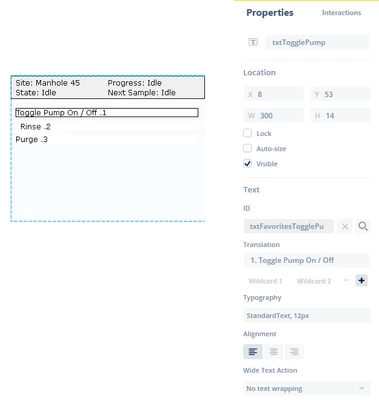
I have observed several circumstances under which this happens/does not happen:
- Removing the "." after the 1 has no effect. (Text still re-arranged)
- Adding additional leading numbers has no effect, nor does leading spaces.
- Adding a leading letter (e.g., "x1. Toggle Pump On/Off") resolves the issue. (Text is no longer re-arranged).
- If the text contains only numbers (including a decimal) text is not re-arranged.
It appears to be an issue that can arise when the text starts with a number
- If I parenthesize text (e.g., "Volume (ml)") the parenthesized text is moved to the beginning of the string: "(ml) Volume". The same behavior is seen with square brackets [ ] or curly brackets { }. So for example text like the following "{1} Toggle Pump On/Off {2}" is re-arranged as "{2} Toggle Pump On/Off {1}".