Associate II
August 29, 2024
Solved

TouchGFX v 4.24 Custom board integration

  • August 29, 2024
  • 1 reply
  • 2190 views

Hello,

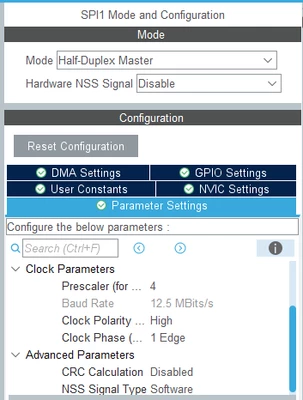
I am working on project with:

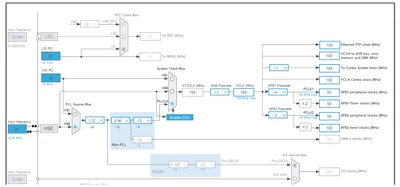
First, I tried test function in driver above with my board and working just fine displaying colors, fonts, and images. then I want to run my board with 100MHz clock and using CRC (because it's necessary for TouchGFX).

Second, I tried change the configuration, using 100MHz Clock and CRC, my board displaying test function just fine

Third, I Added TouchGFX through CubeMX without Changing any configuration, before adjusting the driver I want to check is the previous LCD driver working. so I make blank function of:


void touchgfxDisplayDriverTransmitBlock(uint8_t* pixels, uint16_t x, uint16_t y, uint16_t w, uint16_t h);
uint32_t touchgfxDisplayDriverTransmitActive(void);


I can build the program without error, after that I commented out TouchGFX's Include, Init, and process function. 

I can build the code and download to flash memory successfully, but my display not showing anything, just black screen with backlight. (same goes if I'm not commented out TouchGFX's function)

I have tried execute the program with single-step in debug mode, and I don't get stuck ini any loop, when reach the test function, my board displaying the function just fine. but if I reset the board and run the program, the display going black with backlight again. (same goes if I'm not commented out TouchGFX's function)

Does anyone know what happened? I have tried lower my SPI clock from 100MHz, 50MHz and 20 MHz, but my display still not showing anything. 

Thank you in advance!

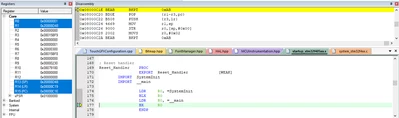
edit: I juts found out that my code stuck in Reset_Handler sometime, after resetting debugger or cancel execute progress, my program get out from the loop and get to memory shown in the disassembly window. I still not understand what happened here, please help me!
ButterDeco_0-1725011002014.png


ButterDeco_0-1724906559944.png

ButterDeco_2-1724906629468.png


Best answer by ButterDeco

Hello @Mohammad MORADI ESFAHANIASL @MM..1 

Thank you for your feedback to my question. after reading ARM documentation, I found out Keil uVision do not support Semi hosting, and my problem is typical semi hosting problem. so I follow some instruction to disable semi hosting in my keil project, hope it'll not bring any problem in the future :grinning_face_with_sweat:. I attached the link to solve my problem below. 

I thought TouchGFX developer have anticipated semi hosting problem in Keil uVision when making TGFX available in MDK-ARM project, maybe you can add more information about this kind of problem in your documentation later, Thank you for your hard work! 


Description about semi hosting problem:

https://developer.arm.com/documentation/ka002219/latest


How to disable Semi Hosting:

https://mklimenko.github.io/english/2018/11/02/disable-semihosting/

1 reply

ST Employee
August 30, 2024

Hello @ButterDeco,

So, if I understood the situation correctly, when you use the debugger and go through the code step by step, everything works fine. But if you don't use the debugger, the display does not show anything and only the backlight is turned on. 
Have you tried starting the debugger but not going through the code step by step, instead letting the code run and checking how the code progresses? In other words, I am curious to know if the board runs into any hardfaults or endless loops that prevents the screen from displaying data. 

Associate II
August 30, 2024

Hello @Mohammad MORADI ESFAHANIASL 

Thank you so much for answering my question, I have tried run the code in debugger, and I have to click "run" for several times like 3-6 times so the code will reach the while loop, and my code always got stuck here:

Reset_Handler PROC
 EXPORT Reset_Handler [WEAK]
 IMPORT SystemInit
 IMPORT __main

 LDR R0, =SystemInit
 BLX R0
 LDR R0, =__main
 BX R0
 ENDP

at BX R0, then I have to stop executing progress or reset debugger, then after that the code will get to register with function: BEAB BKPT 0xAB 

If I run program several time (click the 'run' button several time), it'll change some registers then get to the while loop and execute my driver program normally. but after resetting the board or unplug-plug the power the display just show backlight 

ButterDeco_0-1725011883988.png

here my project that I have try, the step 3_2 is project with TouchGFX transfer data function (function can send the data just fine but, it get stuck like my other project) then the step5_6 is project that described above. It'll help me a lot if you can help me find a way to fix this I think there is something wrong with the Touch GFX configuration or maybe system clock configuration. 

https://drive.google.com/drive/folders/1Jr9puXh-eOziJBhFkR_hxR9Ugy4SERJy?usp=sharing


MM..1
Chief III
August 31, 2024

Reset_handler is normal place for enabled IRQ without code handler. Too error handlers in IT with while {} ...

Check your code if every enabled interrupt have handler code...