
Solved
TouchGFX Wildcard Issues displaying floating point data?
Hi all. I'm trying to display local floating point variable data via a button click in text area fields on my TouchGFX project screen.
I seem to be having an issue. It appears that the fields are being populated with the format specifier that preceeds the variable in my code. Here is my button function:
void main_screenView::s_type_bobbin_btn_click()
{
 // Test constant, floating-point variables for bobbin dimensions
 const float bobbin_length = 12.51;
 const float bobbin_width = 7.36;
 const float bobbin_height = 3.88;

 // Convert the float values to strings and store them in the buffers
 Unicode::snprintf(bobbin_length_data_areaBuffer, sizeof(bobbin_length_data_areaBuffer), "%.2f", bobbin_length);
 bobbin_length_data_area.invalidate();

 Unicode::snprintf(bobbin_width_data_areaBuffer, sizeof(bobbin_width_data_areaBuffer), "%.2f", bobbin_width);
 bobbin_width_data_area.invalidate();

 Unicode::snprintf(bobbin_height_data_areaBuffer, sizeof(bobbin_height_data_areaBuffer), "%.2f", bobbin_height);
 bobbin_height_data_area.invalidate();
}
Here is the result of the button click (using the asterisk as a fallback character):
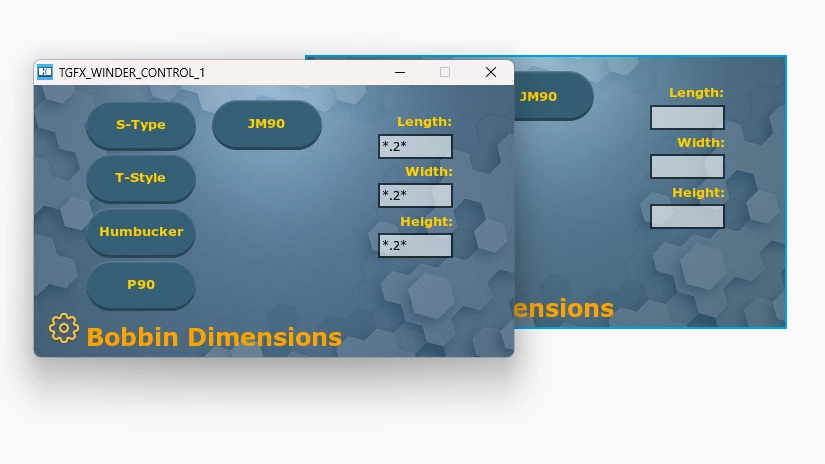
I have tried multiple ways to try to correct this behaviour without success. If anyone can shine a light on my errors/issues, I would be exteremely appreciative. Thanks