Associate
July 30, 2025
Question

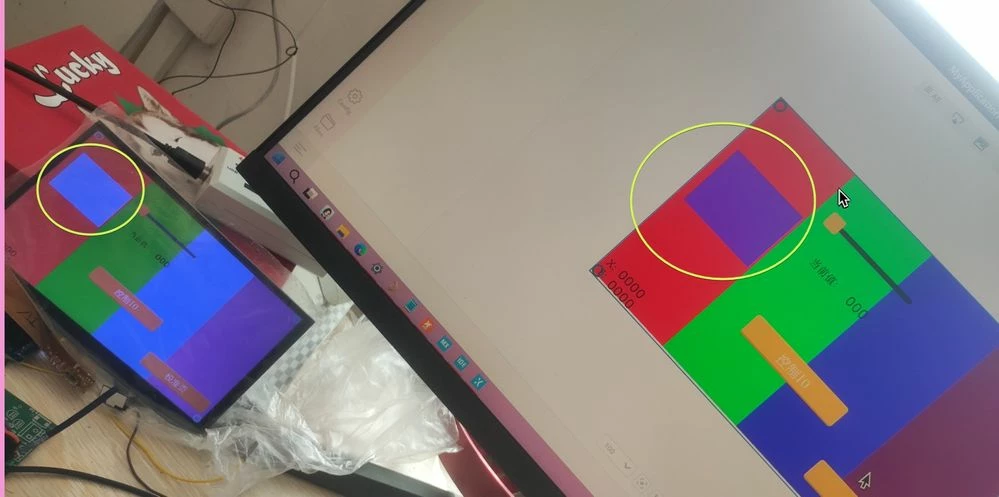
touchgfx4.25.0 show color wrong
  • July 30, 2025
  • 12 replies
  • 1054 views

Honeyview_eQckB7gk7X.jpg

It should be purple, but it shows up as blue. background is svg picture is normal.

 

12 replies

youxueAuthor
Associate
August 1, 2025

rgb565 ,rgb888 im try.result can't.

Osman SOYKURT
Technical Moderator
August 5, 2025

Hello @youxue ,

To me it doesn't look like a "TouchGFX" issue but more a display (configuration?) issue. What display do you use? Do you have backlight ON? Could you check your display driver and adjust gamma settings?

Osman SOYKURTST Software Developer | TouchGFX
youxueAuthor
Associate
August 8, 2025

backlight  is on.i use stm32cubemx  Generated project. All other colors are quite normal, but it turns out that purple doesn't work.

Osman SOYKURT
Technical Moderator
August 11, 2025

Ok, and what about this? 


@Osman SOYKURT wrote:

Could you check your display driver and adjust gamma settings?


Often, it is not only one color but all colors that are affected by the issue. However, sometimes the effects are less perceptible. Applying an extra layer, such as a box widget in the foreground with a specific color and alpha value, can also be an easy workaround. This approach slightly modifies the color to match your expectations, but it will still not provide the same visual appearance as on the simulator.

Osman SOYKURTST Software Developer | TouchGFX
youxueAuthor
Associate
August 29, 2025

There is no setting for the Alpha channel in the project。Other colors do have anomalies.

Osman SOYKURT
Technical Moderator
September 15, 2025

Hello @youxue ,

Did you find a solution for your issue? You said in your latest message other colors do have anomalies as well, so maybe the screen itself is problematic?

Osman SOYKURTST Software Developer | TouchGFX
youxueAuthor
Associate
September 16, 2025

Thank you for all your replies, and special thanks to the official technical staff for their responses. I have tested with other screens, but the result was the same. It is presumably caused by an incorrect parameter in the generated code.

Osman SOYKURT
Technical Moderator
September 18, 2025

Hello @youxue,

If you send me the different colors code that you have on your screen, I can try to replicate a similar application and see if I got the same result as you on our stm32 boards (if it's a wrong generated code, I should be able to see it).

Osman SOYKURTST Software Developer | TouchGFX
youxueAuthor
Associate
September 18, 2025

thank you very much! 


Osman SOYKURT
Technical Moderator
September 22, 2025

Hello @youxue ,

The colors look good on my side with our discovery boards (tried on STM32U5G9J-DK2 and STM32F469I-DK).
However, when purple is placed over red, I occasionally experience an optical illusion where it appears blue instead of purple.

Osman SOYKURTST Software Developer | TouchGFX
youxueAuthor
Associate
September 28, 2025

In that case, can I assume that there is an issue with the code generated by the STM32CubeMX or TouchGFX tool?

MM..1
Chief III
September 28, 2025

Maybe better as say generated is fail, place some info in your question. Primary how object is rectangle image, box , svg, ...? MX never generate LCD control init usw.