
Associate II
May 9, 2025
Solved

Unwanted artifacts in screen object
  • May 9, 2025
  • 1 reply
  • 866 views

LCD_noise1.jpg

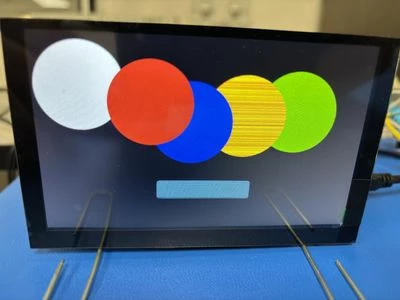
I'm seeing "noise" in some objects drawn on the screen.  See pic... the yellow circle ("shape") should be solid yellow, but instead includes red-orange horizontal lines.  If the circles are rearranged the yellow circle can look correct, but the blue circle may have the lines instead - only lighter blue, not red-orange.  Also, the button can include some horizontal lines when showing the "pressed" version.  These lines can flicker a bit too.. possibly turning on and off very quickly.  


What is causing this and what can be done to fix it? 


There was some improvement when setting the Alpha to 255 (from 127) but problem still exists.

Screen is running at RGB565 - don't have enough RAM to run at RGB888.  STM32H7a3.  No RTOS.  Interface is LTDC with DMA2D enabled (but I did try disabling DMA2D).  Single layer... what else do you need to know??  Thanks!!

Best answer by SJR1

New PCB's are here and no noise problems!  It must have been a poor connection.

1 reply

ST Employee
May 13, 2025

Can you try to create an interaction on the screen like the one in the screenshot?

It will force re-rendering the entire screen in every frame.

Does it flicker? Is it still only the yellow circle? Any other artefacts?

If you have any free GPIO accessible, you can name them VSYNC_FREQ, RENDER_TIME and FRAME_RATE to get some debug output, which might be interesting. Performance Measurement | TouchGFX Documentation

invalidate.png

SJR1Author
Associate II
May 14, 2025

Thanks for the reply!

I tried the interaction to invalidate() but there was no change.  Tried invalidate() whole screen and only the circle.  Invalidating the whole screen actually added some new flickering.

Thanks for the suggestion about the debug GPIO.  I wasn't aware of that these signals were available.  May be helpful.

What I did find was that I couldn't reproduce the noise on the yellow circle with any rearrangements of all the circles, nor on the buttons, however the noise on the blue circle remains in all arrangements.  The blue noise did seem to be effected by physically pressing on the 40 pin FFC LCD connector so the remaining noise may be a hardware issue.

Luckily the actual application doesn't require several circles of different colors to be splashed across the screen so the issue may be resolved.  Better hardware/connections may clear up the remaining noise.

ST Employee
May 20, 2025

It does sound like a hadware issue.

I would suggest making sure that the LTDC VSYNC frequency is 60 Hz, for example using the TouchGFX performance pins, and that the pixel clock is within the spec of the controller you are using. Apart from that hardware does seem to be the issue if it is affected by physical touch.